Media asset management software (MAM) is the system a video team uses to ingest footage, generate proxies, connect editors to the media and find any clip again years later; the best media asset management software in 2026 includes iconik, CatDV, Axle.ai, Evolphin X and EditShare FLOW, with Frame.io, MediaSilo, MediaValet and Brault covering review, distribution and finished-video search. This guide compares nine tools on deployment, editing integrations, proxies, free tiers and prices verified on each vendor's site on 2026-10-29.
Most teams that search for a MAM are really asking a narrower question: where do our videos live, and how do we find, review and deliver them without a machine room and an annual contract? Brault is a creative file management platform where creative and marketing teams store, search, review and deliver video next to photos, design files and documents, from $0. It is not a broadcast MAM, and the sections below say plainly when iconik or CatDV is the better fit. For the wider category, start with what a DAM is or browse the Digital Asset Management hub.
TL;DR
- Hybrid cloud MAM for footage on a NAS and in the cloud: iconik, usage-based Starter from $9 a month per Browse User, Professional and Enterprise by quote.
- Editors cutting from shared storage on site: CatDV (quote), Axle AI MAM (from $2,995) or EditShare FLOW (quote), all with Premiere Pro and Avid integrations.
- MAM and DAM in one platform, any deployment: Evolphin X, by quote, with panels for Premiere Pro, After Effects, Avid, Final Cut Pro and Resolve.
- Review and secure screeners rather than a full MAM: Frame.io ($15 per member a month) and MediaSilo (from $15 per user a month, 5-seat minimum).
- Video search, review and delivery without running a MAM: Brault, free plan, Pro $12 a month billed annually for 2 TB, Growth $70 for 5 TB and 4 users.
How do the best media asset management tools compare in 2026?
The nine tools side by side, grouped by what they were built for. Deployment and integrations follow each vendor's own product page; a dash means the vendor does not list it.
| # | Tool | Best for | Deployment | Editor integrations | Proxies and transcoding | Free tier | Price from |
|---|---|---|---|---|---|---|---|
| 1 |  iconik iconik |
Hybrid cloud MAM | Cloud and hybrid, on-prem indexing | Adobe Creative Cloud panel, Final Cut Pro | Yes; Edge Transcoder add-on | Collaborator seat $0; free trial | $9 per Browse User a month, usage-based |
| 2 |  Frame.io Frame.io |
Review in Premiere Pro, Camera to Cloud | Cloud | Premiere Pro, Final Cut Pro | Cloud playback, transcription | 2 members, 2 GB | $15 per member a month |
| 3 |  CatDV CatDV |
Enterprise media catalog on site | On-prem or cloud | Avid and Premiere Pro workflows | Worker nodes automate transcoding | - | Quote |
| 4 |  Axle.ai Axle.ai |
AI search on your own storage | On-prem, private or hosted cloud | Premiere Pro, Avid, DaVinci Resolve | Yes, proxies on every upload | - | $20 per TB a month (Cloud); MAM from $2,995 |
| 5 |  Evolphin Evolphin |
MAM plus DAM in one platform | Cloud, on-prem or hybrid | Premiere Pro, After Effects, Avid, Final Cut Pro, Resolve | Yes, proxies and channel transcodes | Trial offered | Quote |
| 6 |  EditShare FLOW EditShare FLOW |
Broadcast ingest and editorial | On-prem, cloud, hybrid | Premiere Pro, Avid, DaVinci Resolve | Yes, proxies at ingest, up to 8K | - | Quote |
| 7 |  MediaSilo MediaSilo |
Secure review and screeners | Cloud | Adobe Creative Cloud, DaVinci Resolve | Cloud playback | 14-day trial, 3 seats, 50 GB | $15 per user a month, 5-seat minimum |
| 8 | MMediaValet | Finished video in an enterprise DAM | Cloud (Microsoft Azure) | Adobe Creative Cloud | Transcoding, AI transcription | - | Quote |
| 9 |  Brault Brault |
Video search, review and delivery without a MAM | Cloud | - (no editor panel) | Every video transcoded for browser preview | 2 GB, review and AI search | $4 a month billed annually; Pro $12 for 2 TB |
Prices and plan facts verified on each vendor's own site on 2026-10-29: iconik.io/pricing, frame.io/pricing, axle.ai, evolphin.com, editshare.com, mediasilo.com/pricing, mediavalet.com, quantum.com (CatDV) and brault.app/pricing. All prices in US dollars before tax. Frame.io and MediaSilo prices are month to month; Frame.io takes 13% off on annual billing.
Read the table from the left. The first six columns decide whether a tool can work with your footage at all, and only then does the price matter. Five of the nine sell by quote or by usage, so the "price from" figure is a floor, not a budget. The tools that publish per-seat or per-plan prices (Frame.io, MediaSilo, Brault) are the cloud ones that never touch an edit bay.
MAM or DAM: which one does your team need?
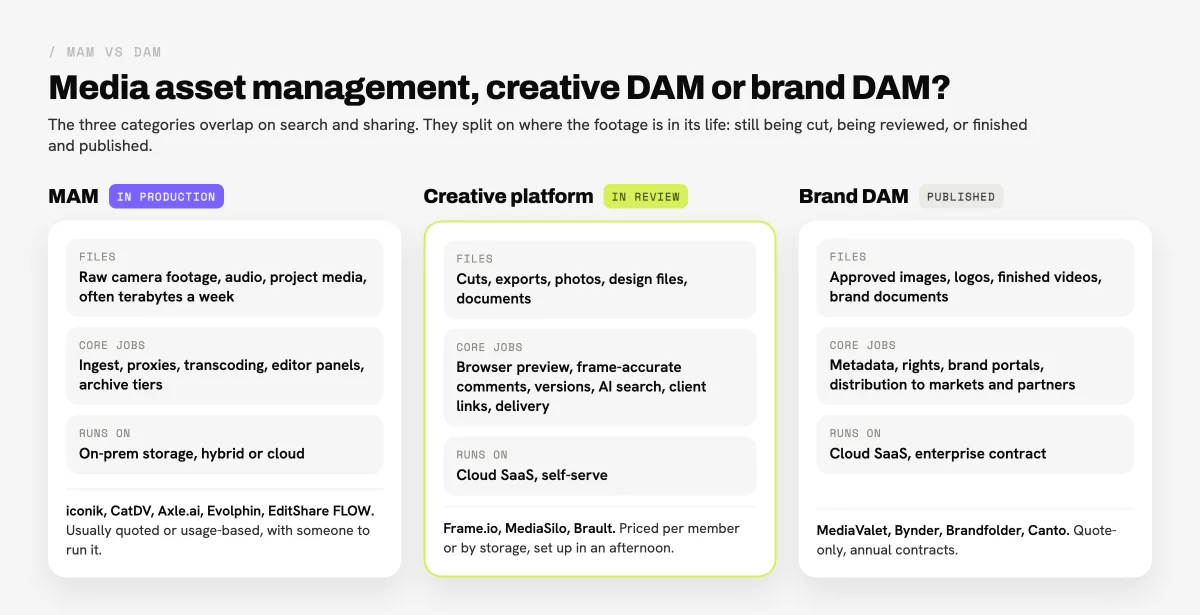
A team needs a MAM when editors work from the same footage at the same time, the media sits on shared storage or a NAS, and the work depends on proxies, timecode and an editor panel; a team needs a DAM when the assets are finished and the job is to find, approve and distribute them. AWS's definition of media asset management centers MAM on storing, organizing and retrieving rich media such as video and audio, and the production tools around it are what separate a MAM from a DAM in practice.
Three practical tests settle it faster than any feature list:
- Does anyone cut from this footage while it is stored here? If editors open the media from the system inside Premiere Pro, Resolve or Avid, you need a MAM with a panel or plugin and proxies. If the system only receives exports and cuts for review, a cloud platform is enough.
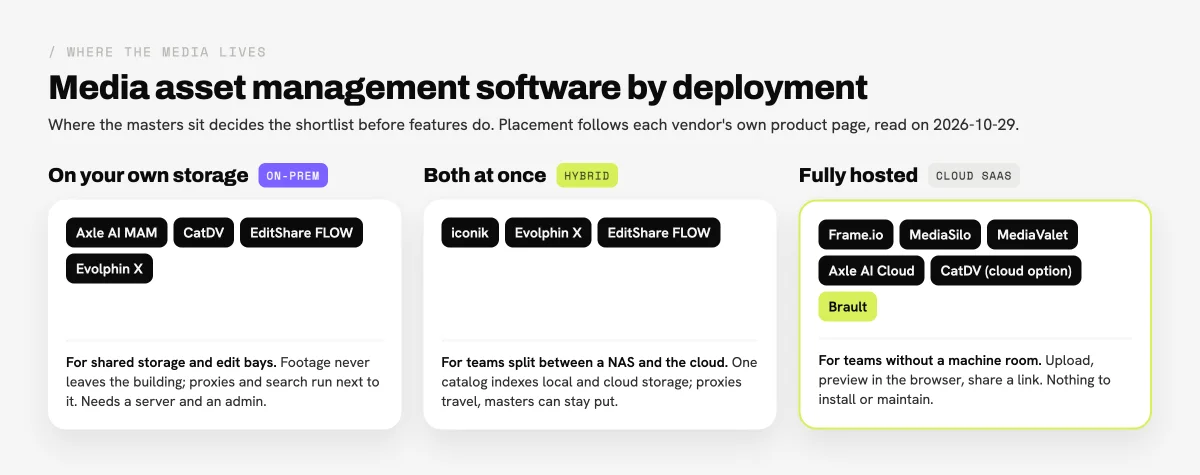
- Where do the masters live? Footage on on-premise shared storage, LTO or a NAS needs a tool that indexes it there (CatDV, Axle AI MAM, EditShare FLOW, iconik's on-prem indexing). Footage that already lives in the cloud does not.
- Who touches the files? A post team of editors, assistants and producers is a MAM audience. Marketing, social and brand teams that mostly search, approve and share are a DAM or creative platform audience.
Brand DAMs such as Bynder, Brandfolder and Canto sit at the finished end. They handle video, but their center of gravity is brand governance, and they sell by quote: Vendr buyers report median contracts of about $43,200 a year for Bynder and $24,999 for Brandfolder (February 2026). Creative platforms such as Air.inc, Playbook and Brault sit in between, with self-serve prices and visual libraries; Brault adds frame-accurate video review and built-in transfer on every plan, Free included. Generic cloud drives such as Google Drive and Dropbox store video and play it back, but they search by filename and do not index what is said or shown in a clip. Our best digital asset management software roundup covers the DAM side in depth.
What should you look for in media asset management software?
The right media asset management software for a video team comes down to six capabilities, in this order:
- Deployment. On-premise, hybrid or cloud. This is the one decision you cannot change later without a migration.
- Editor integration. A panel or plugin inside Premiere Pro, DaVinci Resolve, Avid Media Composer or Final Cut Pro lets editors search and pull media into the timeline. Review-only tools export markers at best.
- Proxies and transcoding. Light proxy files make heavy footage searchable and editable remotely; transcoding turns one master into deliverables.
- Search inside the media. Transcription, face, object, logo and text recognition make a clip findable by what happens in it, not by its filename.
- Review and approval. Frame-accurate comments, versions and client links, built in or through a second tool.
- Pricing model. Per user, per terabyte, usage credits or a quote with implementation. Ask for the price at today's archive size and at twice that size.
Teams that only need the review step can skip most of this list; our video review software comparison covers eleven review tools on their own. Dropbox Replay is left out here for the same reason: it adds frame-accurate review to files in Dropbox but does not catalog, proxy or archive media.
Which are the best media asset management software tools in 2026?
Nine tools, ranked from full production MAMs to cloud platforms that cover part of the workflow. The rank follows how much of a production pipeline each tool runs, not which one is better: a cloud platform ranked lower can be the right answer for a team that never edits from shared storage.
1iconik: best for hybrid cloud media management
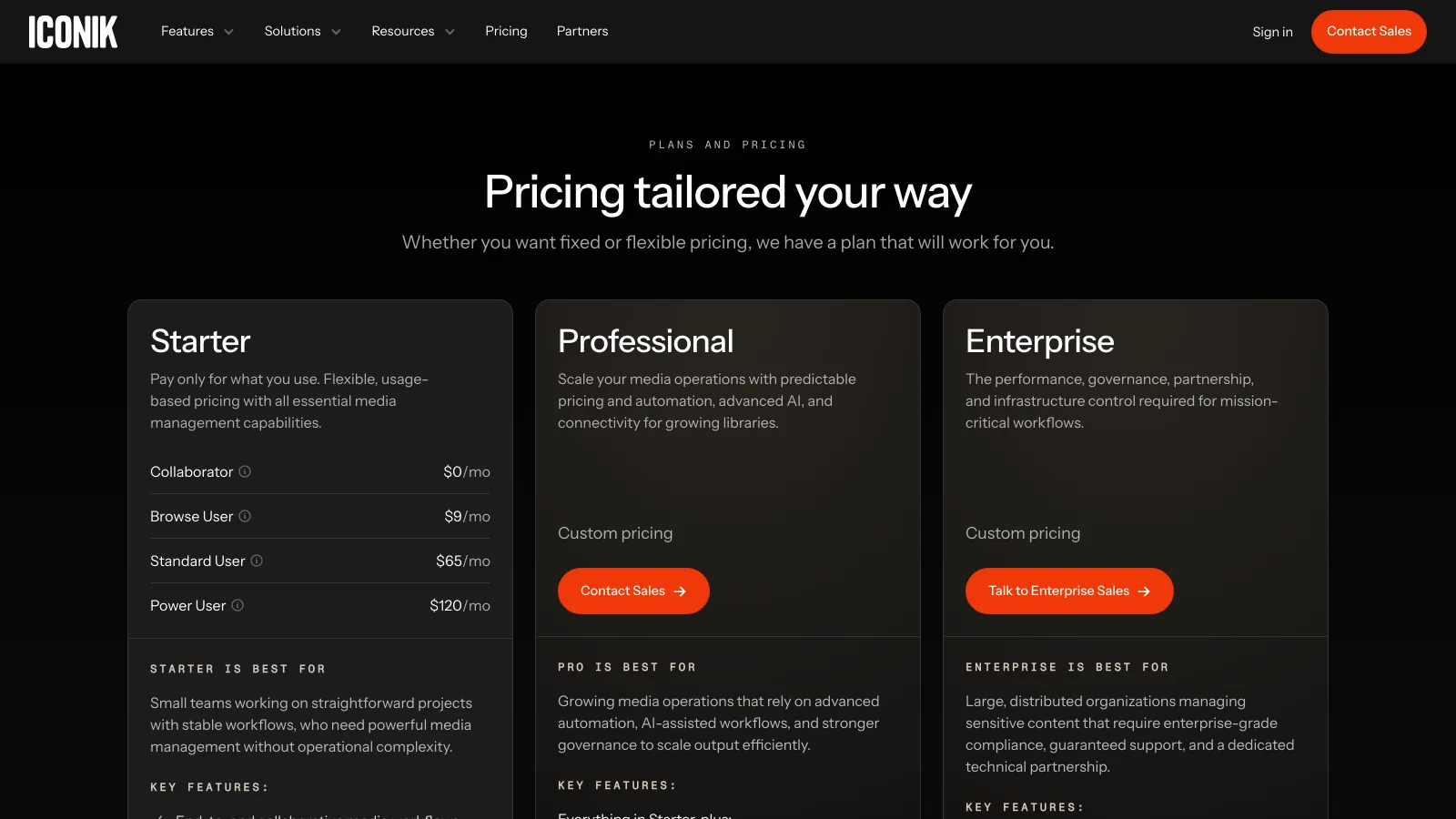
iconik is a cloud-native media asset management system that indexes media wherever it sits, on local servers and in any number of cloud storage buckets, from one interface. Hybrid cloud management and on-premise indexing (ISG) are listed on every tier, along with the iconik panel for Adobe Creative Cloud, a Final Cut Pro integration and comments that land as time-based markers in Premiere Pro. iconik's pricing is usage-based on Starter: Collaborator users are $0 a month, Browse Users $9, Standard Users $65 and Power Users $120, with credits that pay for storage, AI and services as you use them. Professional and Enterprise are quoted and add proxy storage, bring-your-own proxy storage and the Edge Transcoder add-on.
- Best forVideo teams with footage split between on-premise storage and the cloud
- PricingStarter usage-based: Collaborator $0, Browse $9, Standard $65, Power $120 per user a month plus credits; Professional and Enterprise by quote (verified 2026-10-29)
- Free planFree trial on Starter; Collaborator seats at $0
- Watch outCredits for storage and AI make the monthly bill depend on usage; advanced transcoding is an add-on
iconik is the closest thing in this list to a MAM a small post team can start on a card. It is a different fit for marketing teams that never touch a NAS: the per-user prices for Standard and Power seats are built for people who manage media all day.
2Frame.io: best for review inside Premiere Pro and Camera to Cloud
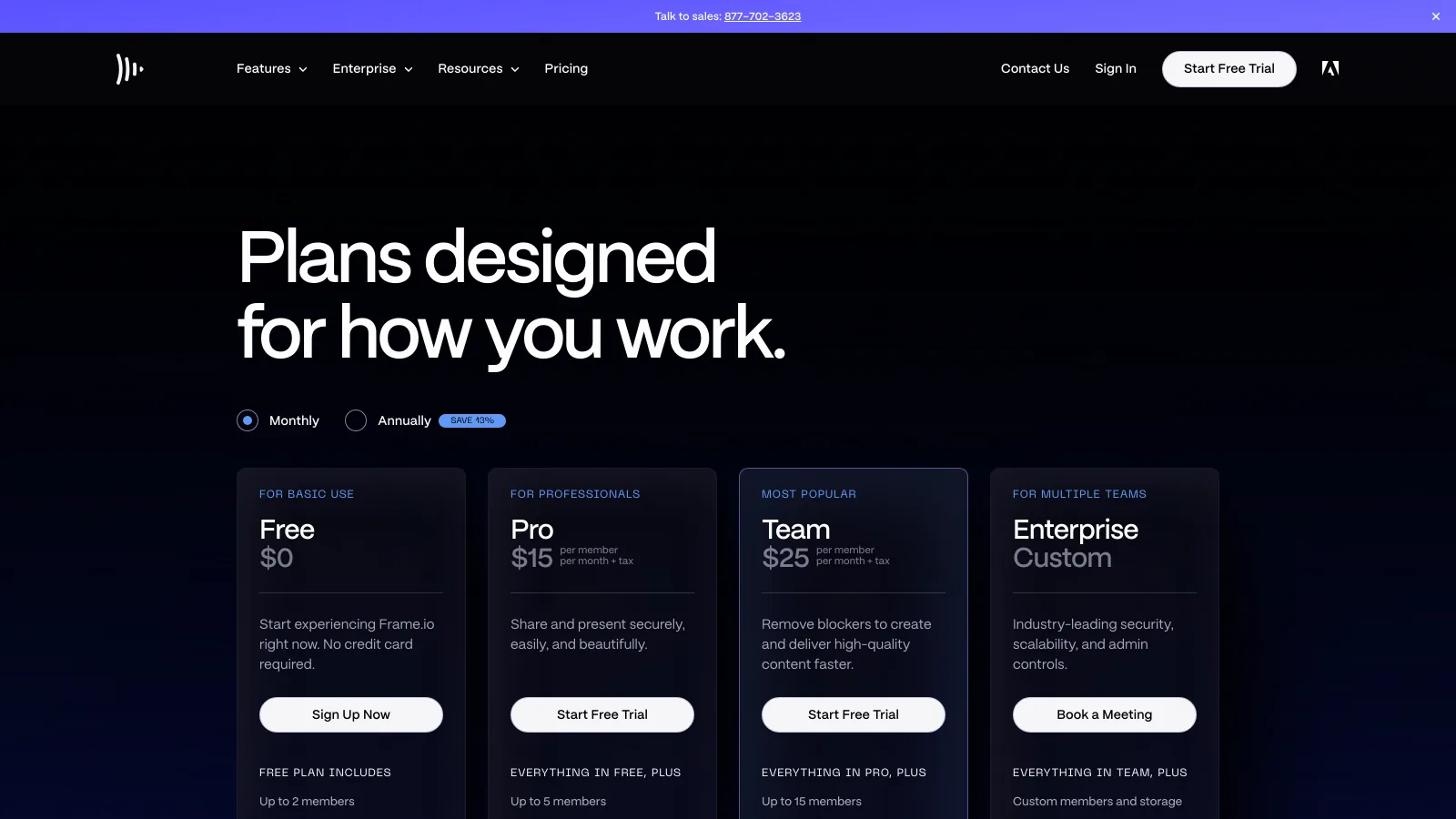
Frame.io is Adobe's cloud review and collaboration platform, and it covers the part of a MAM workflow closest to the edit: Camera to Cloud uploads takes from set as soon as the director calls cut, transcription and captions are included, and Frame.io integrates with Premiere Pro and Final Cut Pro. Frame.io's pricing has a Free plan for 2 members, 2 projects and 2 GB with Camera to Cloud; Pro at $15 per member a month for up to 5 members with 2 TB plus 2 TB per additional member; Team at $25 per member a month for up to 15 members with 3 TB plus 2 TB per additional member; and Enterprise on quote. Annual billing takes 13% off.
- Best forAdobe editors and productions that shoot with Camera to Cloud
- PricingFree; Pro $15 and Team $25 per member a month, 13% off annually; Enterprise custom (verified 2026-10-29)
- Free plan2 members, 2 projects, 2 GB, Camera to Cloud included
- Watch outPriced per member; does not index on-premise shared storage or manage archive tiers
Frame.io is often bought next to a MAM rather than instead of one. For the full breakdown, see our Frame.io review and Frame.io vs Brault.
3CatDV: best for enterprise media catalogs on your own storage
CatDV, from Quantum, is an asset management and workflow orchestration platform for organizations with large volumes of digital media, and Quantum describes it as covering MAM, DAM and production asset management (PAM). It runs on premise (All-In-One, Client and Server, On-Site) or in the cloud, works across traditional and object storage tiers, and its worker nodes automate tasks from ingest to transcoding. AI enrichment comes through integrations: speech-to-text, translation and tagging of people, places, things and sentiment. Quantum publishes reference material for Avid editors and for remote Premiere Pro editing with StorNext and CatDV. Pricing is not published; Quantum's CatDV page routes buyers to sales.
- Best forBroadcasters, sports and archives cataloging large libraries on their own storage
- PricingBy quote (checked 2026-10-29)
- Free planNone listed
- Watch outA deployment project with servers and an administrator, not a self-serve sign-up
CatDV is a different fit for any team without IT support for a server. Its strength is control: the catalog, the workers and the storage tiers all stay under your roof.
4Axle.ai: best for AI search on footage you already store
Axle.ai sells AI-powered media asset management in two forms. Axle AI MAM runs 100% on premise on your existing storage, generates proxies while keeping your folder structure, and sends selects into Premiere Pro, Avid Media Composer and DaVinci Resolve; it starts at $2,995 (the site does not state the term). Axle AI Cloud costs $20 per TB a month and gives every upload an H.264 proxy, an automatic multi-language transcript and browser-based review and approval. Search covers faces you can train, scenes, objects, logos, text and spoken words. The axle.ai homepage lists Axle AI Tags, the tagging engine and API, from $200 a month.
- Best forVideo teams that want AI search over footage on their own storage without a cloud migration
- PricingAxle AI Cloud $20 per TB a month; Axle AI MAM from $2,995; Axle AI Tags from $200 a month (verified 2026-10-29)
- Free planNone listed
- Watch outWhether the $2,995 MAM price is one-time or recurring is not published; confirm users and server needs with sales
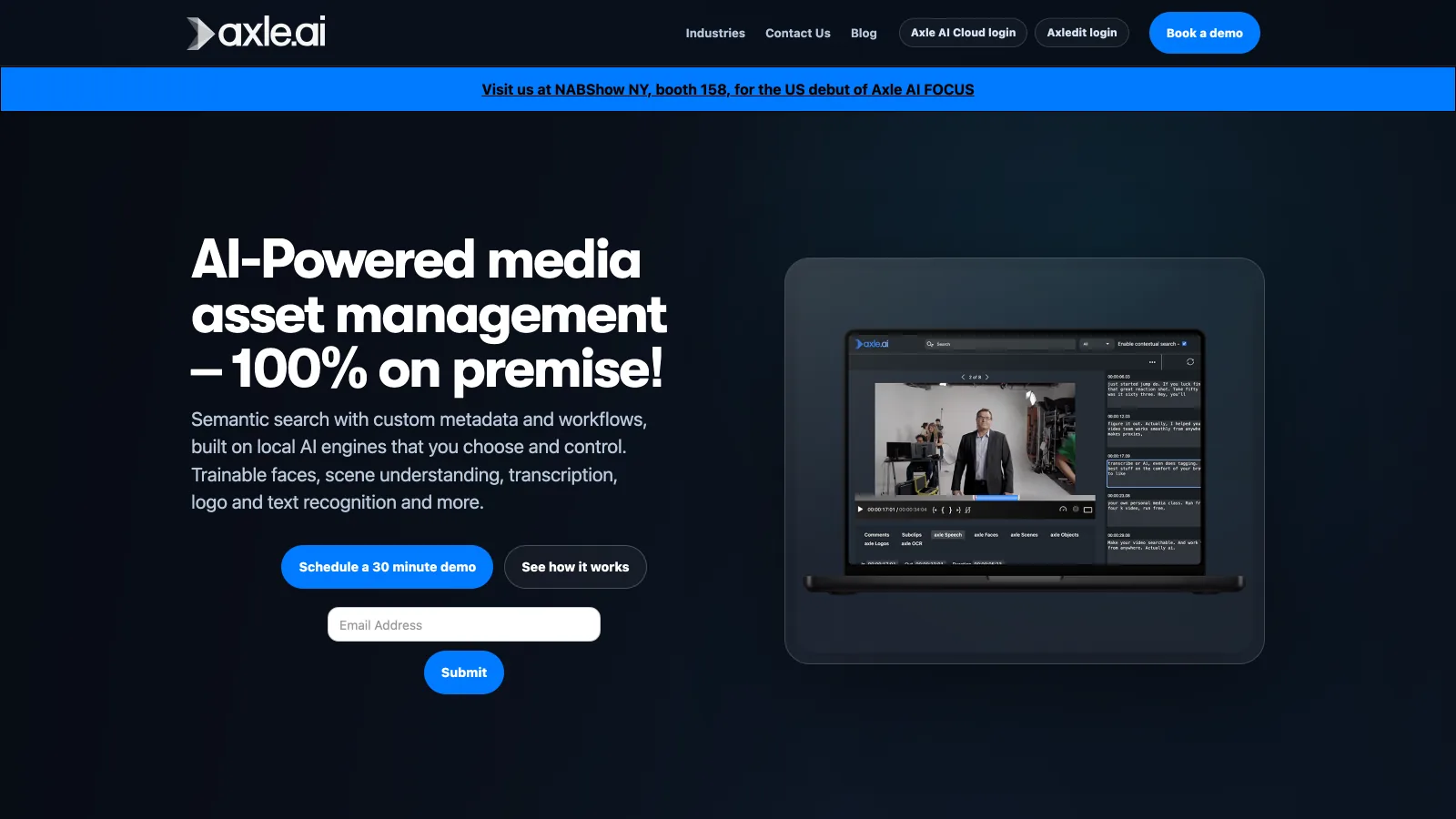
Axle.ai has the most transparent entry price of the production MAMs here. Per-terabyte pricing on Axle AI Cloud also makes it easy to model: a 10 TB library is $200 a month.
5Evolphin X: best for MAM and DAM in one platform
Evolphin X is a media asset management platform that also covers DAM work, with natural-language search, automatic tagging of faces, objects, brands, text, speech, locations, scenes and chapters, AI summaries and timecoded transcripts. It deploys as a fully managed single-tenant cloud, on premise or hybrid, on storage you bring: Amazon S3, Azure, Google Cloud, Wasabi, Box or a NAS. Editors work from a panel in Premiere Pro, and Evolphin lists integrations with After Effects, Avid Media Composer, Final Cut Pro and DaVinci Resolve. Instant proxies support active production, and automated conversion turns one master into channel-ready formats for YouTube, Instagram, TikTok and LinkedIn. Pricing is modular and quoted; a trial sign-up is offered.
- Best forIn-house studios that produce video and also manage brand assets
- PricingBy quote, priced by the modules you buy (checked 2026-10-29)
- Free planTrial sign-up offered; terms not published
- Watch outNo public price list, so budgeting starts with a demo
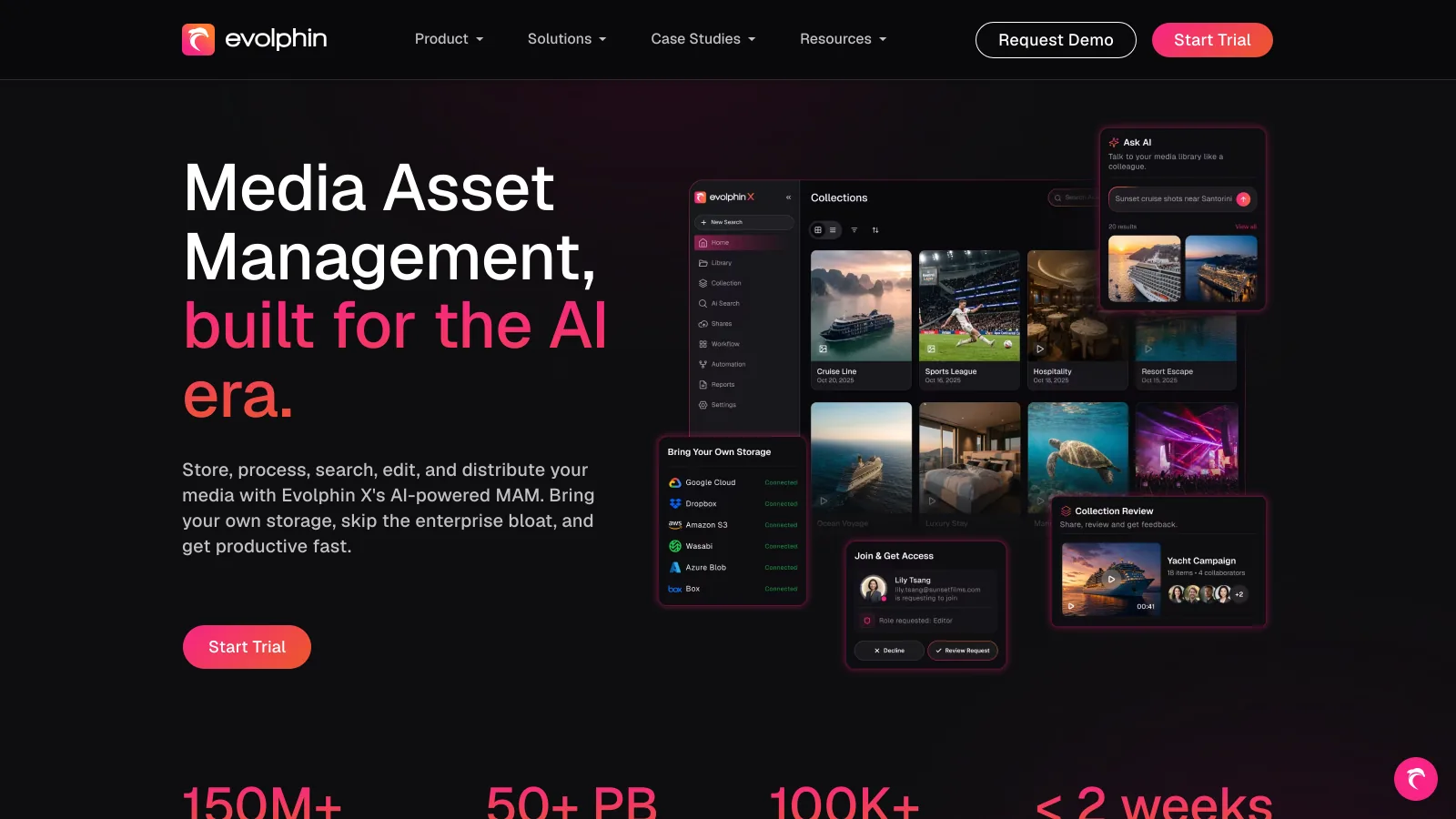
Evolphin X suits teams that would otherwise buy a MAM and a DAM separately. It is a different fit for small teams that need neither editor panels nor a deployment choice.
6EditShare FLOW: best for broadcast ingest and editorial
EditShare FLOW is production and video asset management software built around ingest, editorial and delivery. During live ingest FLOW creates proxies for immediate viewing, logging and editing, and Capture + Ingest transcodes footage with high-end codecs up to 8K. Plugins for Premiere Pro, Avid Media Composer and DaVinci Resolve let editors browse and bring assets into the timeline, on premise or in the cloud, and media managers can push libraries to the cloud and LTO. AI integrations add transcription, object and shot detection, facial recognition and keywords. FLOW is sold through a demo and a recommended product suite; EditShare notes that FLOW Core comes with unlimited licenses.
- Best forBroadcast and post facilities running live ingest, shared storage and multiple editing suites
- PricingBy quote; FLOW Core includes unlimited licenses (checked 2026-10-29)
- Free planNone listed
- Watch outDesigned around EditShare's wider production stack; a facility purchase, not a team subscription
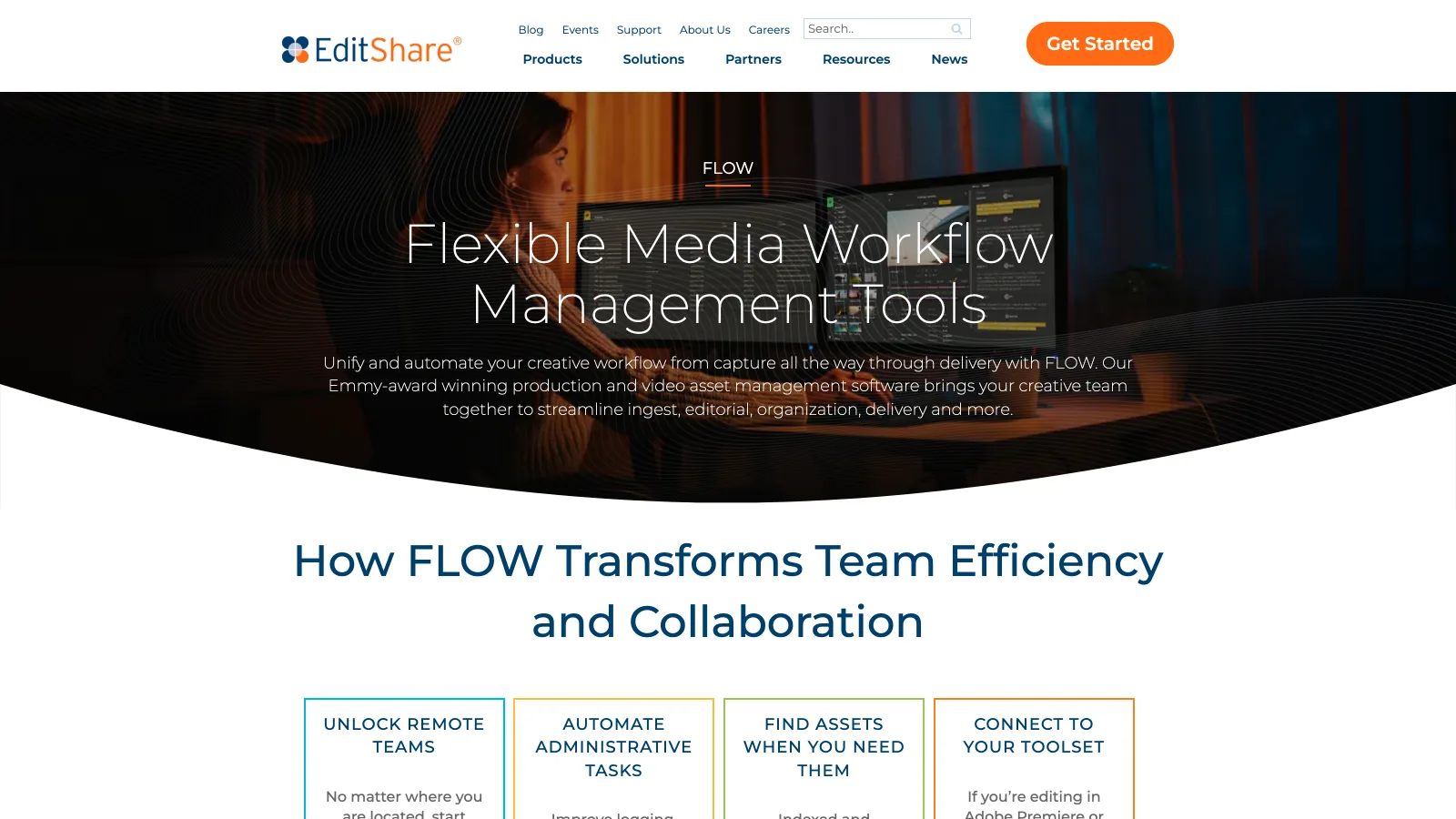
FLOW is the most broadcast-oriented tool in this guide. Studios that do not run live ingest or shared edit storage usually find iconik or a cloud platform simpler.
7MediaSilo: best for secure review and pre-release screeners
MediaSilo, by EditShare, is a cloud platform for sharing, reviewing and presenting video, with unlimited reviewers, log-in-free playback, side-by-side cut comparison, annotations and engagement insights. Pro adds visual and forensic watermarking, SSO for one domain, a no-code presentation and website builder and an API. MediaSilo's pricing lists a 14-day free trial for up to 3 seats and 50 GB; Team from $15 per user a month with a minimum of 5 seats, up to 10, and 2 TB; Pro from $25 per user a month for 10 to 30 seats and 4 TB; an Unlimited AI add-on at $12 per user a month; and Enterprise with bring-your-own S3. Every paid plan includes integrations with Adobe Creative Cloud and DaVinci Resolve.
- Best forStudios and distributors sending cuts and screeners that must be watermarked and tracked
- PricingTeam from $15 and Pro from $25 per user a month; 5-seat minimum on Team; Enterprise on request (verified 2026-10-29)
- Free plan14-day trial, up to 3 seats and 50 GB
- Watch outThe 5-seat minimum puts Team at $75 a month or more; forensic watermarking starts on Pro
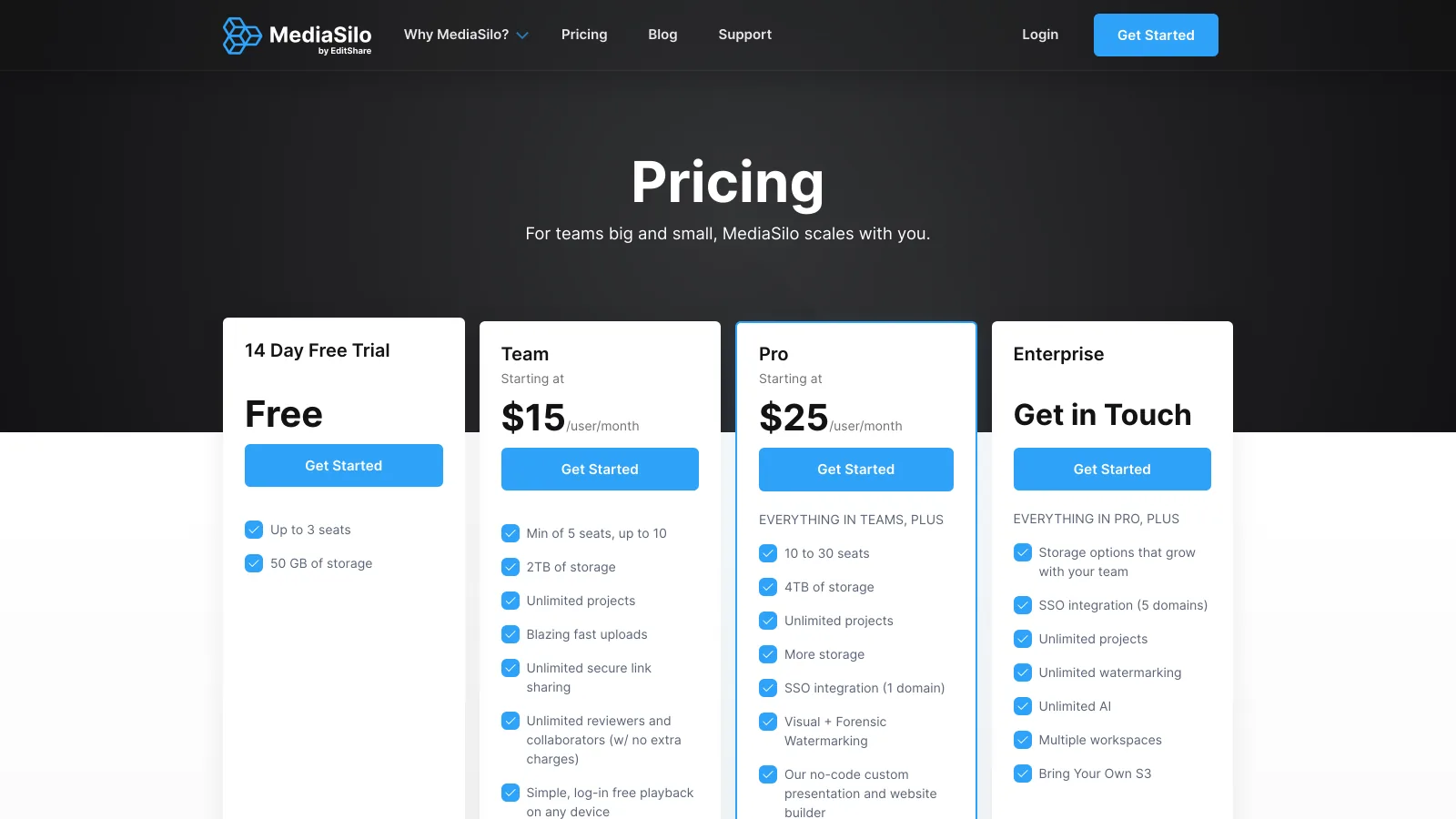
MediaSilo is a distribution and review layer, not a catalog for raw footage. It pairs naturally with EditShare FLOW on the production side.
8MediaValet: best for finished video inside an enterprise DAM
MediaValet is an enterprise digital asset management platform built on Microsoft Azure with a dedicated offer for media and entertainment. Its Audio Video Intelligence (AVI) transcribes video automatically, recognizes people, objects, text, spoken words, topics and locations, and lets users locate the exact clip or frame they need. MediaValet lists support for over 400 video and audio file types, assets up to 8K, transcoding for delivery and an Adobe Creative Cloud integration. Pricing is custom: MediaValet quotes after a conversation, avoids pre-built tiers, and notes that video-heavy storage affects cost.
- Best forMedia, education and enterprise teams managing finished video next to every other brand asset
- PricingCustom quote, no published tiers (checked 2026-10-29)
- Free planNone listed
- Watch outA DAM, not a production MAM: no proxy editing or editor panels are listed
MediaValet is the right reference when someone in your company says "MAM" but means a searchable archive of finished video. For the price side of enterprise DAMs, see how much digital asset management costs.
9Brault: best for video search, review and delivery without a MAM
Brault is a creative file management platform, not a broadcast MAM, and it fits creative and marketing teams that need MAM-like control over video without a deployment. Every video uploaded to Brault is transcoded for browser playback whatever its codec, up to 40 GB per file, and hovering a video in a gallery scrubs through its frames with the timestamp visible. Brault AI Search finds a clip by what is said in it (speech-to-text) and what is shown in it, across 50+ formats on every plan. Review is built in: frame-accurate timestamped comments and drawings on video and images, versions with their own threads, and review links that clients open without an account. Approved files go out through Brault Transfer (BTransfer), up to 250 GB per transfer on Growth, on a branded page. Brault Pro costs $12 a month billed annually ($15 month to month) for 2 TB and up to 3 users at $8 each; Growth costs $70 ($85) for 5 TB with 4 users included and $4 per extra user; extra storage is $9 per TB a month.
- Best forCreative, marketing and agency teams that store, search, review and deliver video next to photos and design files
- PricingFree $0 (2 GB); Lite $4 (200 GB); Pro $12 (2 TB, up to 3 users); Growth $70 (5 TB, 4 users) a month billed annually; $5, $15 and $85 month to month (verified 2026-10-29 on brault.app/pricing)
- Free plan2 GB with video preview, AI search, frame-accurate review and 5 branded transfers a month up to 2 GB
- Watch outNo editor panel for Premiere Pro, Resolve or Avid, no proxy editing workflow, no on-premise or hybrid storage
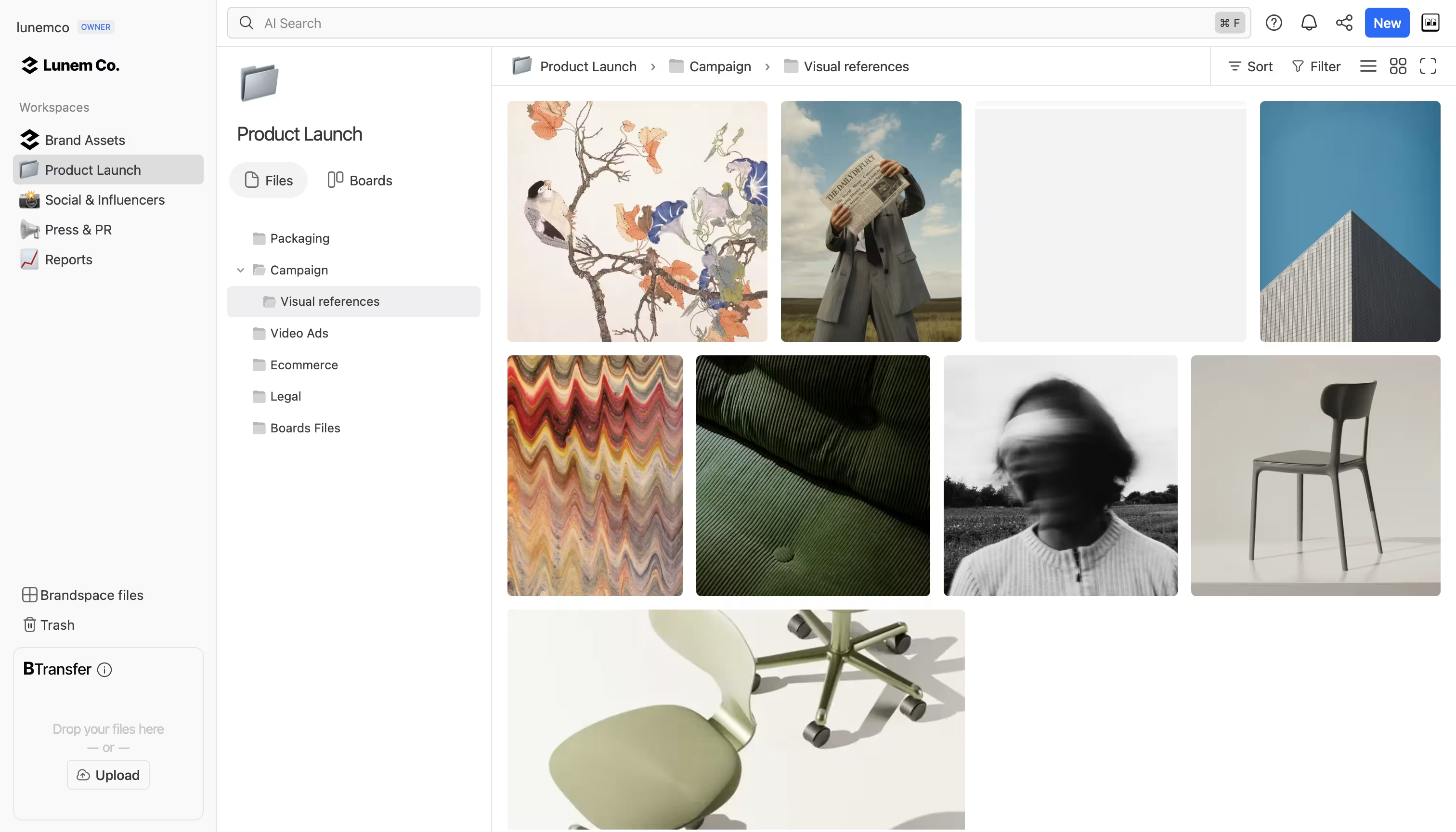
Before Brault, Pablo and I co-founded creative and advertising agencies, and our video problem was never ingest: it was finding last year's spot, getting a client's notes on the right frame and sending the master without a second subscription. That is the gap Brault covers. Brault Desktop for Mac syncs libraries into the Finder, and the public API (from the Lite plan) automates uploads and reviews from your own tools, but neither turns Brault into a production MAM. For the storage side of a video workflow, see our best cloud storage for video editing guide.
Which media asset management software is right for your team?
The right media asset management software follows from the constraint you cannot change, and most teams land in one of four groups:
Editors cut from shared storage on site
CatDV, Axle AI MAM or EditShare FLOW. All three index on-premise media, generate proxies and connect to Premiere Pro and Avid; FLOW adds live ingest for broadcast.
Footage split between a NAS and the cloud
iconik for a usage-based start, Evolphin X when the same platform should also run the brand library. Both keep one catalog across local and cloud storage.
Review, approval and screeners
Frame.io for Premiere Pro and Camera to Cloud, MediaSilo for watermarked, tracked screeners. Both are usually bought next to a MAM.
Video next to every other creative file, no deployment
Brault: browser preview of every video, AI search inside clips, frame-accurate review and branded delivery, from $0 and $12 a month billed annually on Pro for 2 TB.
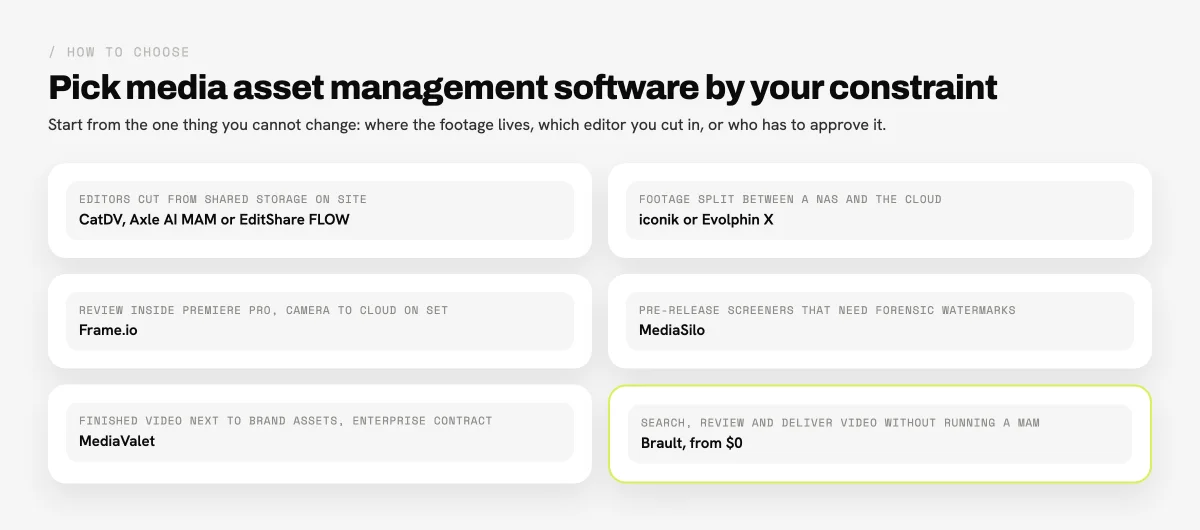
Finished video inside a governed brand library points to MediaValet or another enterprise DAM. Price that path with a quote at today's archive size and at double it, because video storage drives most DAM and MAM contracts.
When is a real MAM a better fit than Brault?
A dedicated MAM such as iconik, CatDV or EditShare FLOW is the better fit than Brault whenever editors work from the media inside their editing software. Brault has no panel for Premiere Pro, DaVinci Resolve or Avid Media Composer, so an editor exports from the timeline and uploads, rather than searching and pulling clips into it. Brault does not generate editing proxies or relink to camera originals, so remote editors cannot cut a project from Brault the way they cut from an iconik or Evolphin proxy. And Brault runs only in the cloud: it does not index a NAS, on-premise shared storage or LTO, which is exactly what CatDV, Axle AI MAM and EditShare FLOW are built for.
Brault is the better fit when the video work starts after the edit. A marketing team with a few terabytes of campaign films, social cuts and interviews; an agency that reviews cuts with clients and delivers masters; a brand team that wants any clip findable by what someone says in it. For those teams a MAM adds servers, panels and a quote they will not use, while Brault adds the search, review and delivery they need on a plan that starts at $0.
Frequently asked questions
What is media asset management software?
Media asset management (MAM) software stores, indexes and moves video and audio through production: it ingests camera footage, generates proxies and transcodes, connects to editing software such as Premiere Pro, DaVinci Resolve and Avid Media Composer, and archives finished masters. Examples in 2026 are iconik, CatDV (Quantum), Axle.ai, Evolphin X and EditShare FLOW. Creative platforms such as Frame.io and Brault cover the review and sharing part of that workflow in the cloud.
What is the difference between MAM and DAM?
A MAM (media asset management system) manages video and audio while it is still being produced: raw footage, proxies, transcoding, editor panels and archive tiers, often on local or hybrid storage. A DAM (digital asset management system) manages finished assets for distribution: approved images, logos, finished videos and brand documents, with metadata, rights and brand portals. iconik and CatDV are MAMs; Bynder and MediaValet are DAMs; Brault is a creative file management platform that previews, searches, reviews and delivers video next to every other creative format, without editor panels or on-premise storage.
What is the best media asset management software in 2026?
It depends on where your footage lives. iconik is the strongest hybrid cloud MAM (Starter is usage-based, from $9 a month per Browse User and $65 per Standard User). CatDV, Axle AI MAM (from $2,995) and EditShare FLOW fit editors working from shared storage on site. Evolphin X covers MAM and DAM with cloud, on-premise or hybrid deployment. Frame.io ($15 per member a month) leads for review inside Premiere Pro, and Brault (free plan, Pro $12 a month billed annually for 2 TB) fits teams that want video search, review and delivery without running a MAM. Prices verified 2026-10-29.
How much does media asset management software cost?
Media asset management software in 2026 ranges from free tiers to quoted enterprise contracts. Published prices verified on 2026-10-29: iconik Starter charges $0 to $120 a month per user type plus usage credits; Axle AI Cloud costs $20 per TB a month and Axle AI MAM starts at $2,995; Frame.io is $15 or $25 per member a month; MediaSilo starts at $15 per user a month with a 5-seat minimum. CatDV, Evolphin X, EditShare FLOW and MediaValet sell by quote. Brault costs $0, $4, $12 or $70 a month billed annually ($5, $15 and $85 month to month).
What is the best video asset management software for small teams?
Small teams that review and deliver video rather than edit from shared storage rarely need a full MAM. Frame.io (free for 2 members and 2 GB, Pro $15 per member a month) fits Adobe editors. Brault fits small creative and marketing teams that store video next to photos and design files: every video is transcoded for browser playback (up to 40 GB per file), searchable by what is said and shown in it, reviewable with frame-accurate comments and deliverable with Brault Transfer, from $0 and $12 a month billed annually on Pro for 2 TB. Axle AI Cloud at $20 per TB a month is the low-cost entry point for a hosted MAM.
Is there free media asset management software?
A few tools in this guide have a free tier or a free seat type: iconik Starter includes Collaborator users at $0 a month (other users are paid), Frame.io Free gives 2 members, 2 projects and 2 GB with Camera to Cloud, and Brault Free gives 2 GB with video preview, AI search, frame-accurate review and 5 branded transfers a month up to 2 GB. MediaSilo offers a 14-day free trial for up to 3 seats and 50 GB. CatDV, Evolphin X, EditShare FLOW and MediaValet do not publish a free plan.
Is Frame.io a media asset management system?
Frame.io is a cloud review and collaboration platform owned by Adobe, and it covers part of a MAM workflow: Camera to Cloud ingest from set, transcription, integrations with Premiere Pro and Final Cut Pro, and storage of 2 TB to 3 TB on its paid plans. It does not index on-premise shared storage or manage archive tiers the way iconik, CatDV or EditShare FLOW do, so post-production houses often run Frame.io for review next to a MAM.
Can Brault replace a MAM?
Brault replaces a MAM only for teams whose video work is review, search and delivery rather than editing from shared storage. Brault transcodes every video for browser preview, searches inside video with speech-to-text and AI analysis, adds frame-accurate comments and drawings, keeps versions and delivers files with Brault Transfer up to 250 GB. It has no editor panel for Premiere Pro, Resolve or Avid, no proxy editing workflow and no on-premise or hybrid storage, so post-production and broadcast teams are a better fit for iconik, CatDV or EditShare FLOW.
Key takeaways
- Media asset management software manages video and audio in production (ingest, proxies, transcoding, editor panels, archive); a DAM manages finished assets for distribution.
- Deployment decides the shortlist: CatDV, Axle AI MAM and EditShare FLOW for on-premise storage, iconik and Evolphin X for hybrid, Frame.io, MediaSilo, MediaValet and Brault in the cloud.
- Five of the nine publish prices: iconik Starter ($0 to $120 per user type a month plus credits), Axle.ai ($20 per TB a month in the cloud, MAM from $2,995), Frame.io ($15 and $25 per member), MediaSilo (from $15 per user, 5-seat minimum) and Brault ($0 to $70 a month billed annually); CatDV, Evolphin X, EditShare FLOW and MediaValet sell by quote.
- Frame.io and MediaSilo cover review and screeners and are often bought next to a MAM, not instead of one.
- Brault fits teams that need video search, frame-accurate review and branded delivery without a MAM deployment, from $0 and $12 a month billed annually on Pro for 2 TB; teams that edit from shared storage are a better fit for iconik, CatDV or EditShare FLOW.