Dropbox and Brault both keep a creative team's files in the cloud, and they are built around different jobs. Dropbox is a cloud file system: a folder that syncs to every machine, version history, shared folders with permissions, Dropbox Transfer for sending copies out, and Replay, a paid add-on, for review. Brault is a creative file management platform: libraries that store the same files and add AI search by what is in them, frame-accurate review and approval, Boards, white-label links and Brault Transfer, billed by storage on a public price from $0 to $70 a month billed annually.
This comparison walks the six things a buyer asks, sync and storage, search, review, branded delivery, transfer, and security, then price, and says where each product has the edge. Dropbox's plans are the US list verified on 2026-09-14, the same figures as WeTransfer vs Dropbox; Replay's price is from Frame.io vs Dropbox Replay. The wider field is in best Dropbox alternatives for creative teams.
TL;DR
- Sync and storage: Dropbox wins. Every file type on every device, and Advanced gives 15 TB; Brault syncs on the Mac through the Finder and tops out at 5 TB on Growth.
- Search: Brault wins. AI search reads 50+ formats, RAW, PSD and AI included; Dropbox searches names and document text.
- Review: Brault wins. Frame-accurate comments, versions and approvals on every plan; Dropbox sells Replay at $10 per user a month.
- Branded delivery and transfer: Brault wins. Logo, colors and domain on every link from Free, transfers to 250 GB; Dropbox brands from Standard and caps transfers at 50 GB on Plus.
- Price: Brault Pro $28 for a studio of three against Dropbox Standard $45; Growth $94 for ten people with 5 TB against $150.
How do Dropbox and Brault compare at a glance?
| Criteria |  Dropbox Dropbox |
 Brault Brault |
|---|---|---|
| What it is | Cloud file system: sync, shared folders, version history, Transfer, Replay add-on | Creative file management platform: libraries, AI search, review, Boards, white-label links, Brault Transfer |
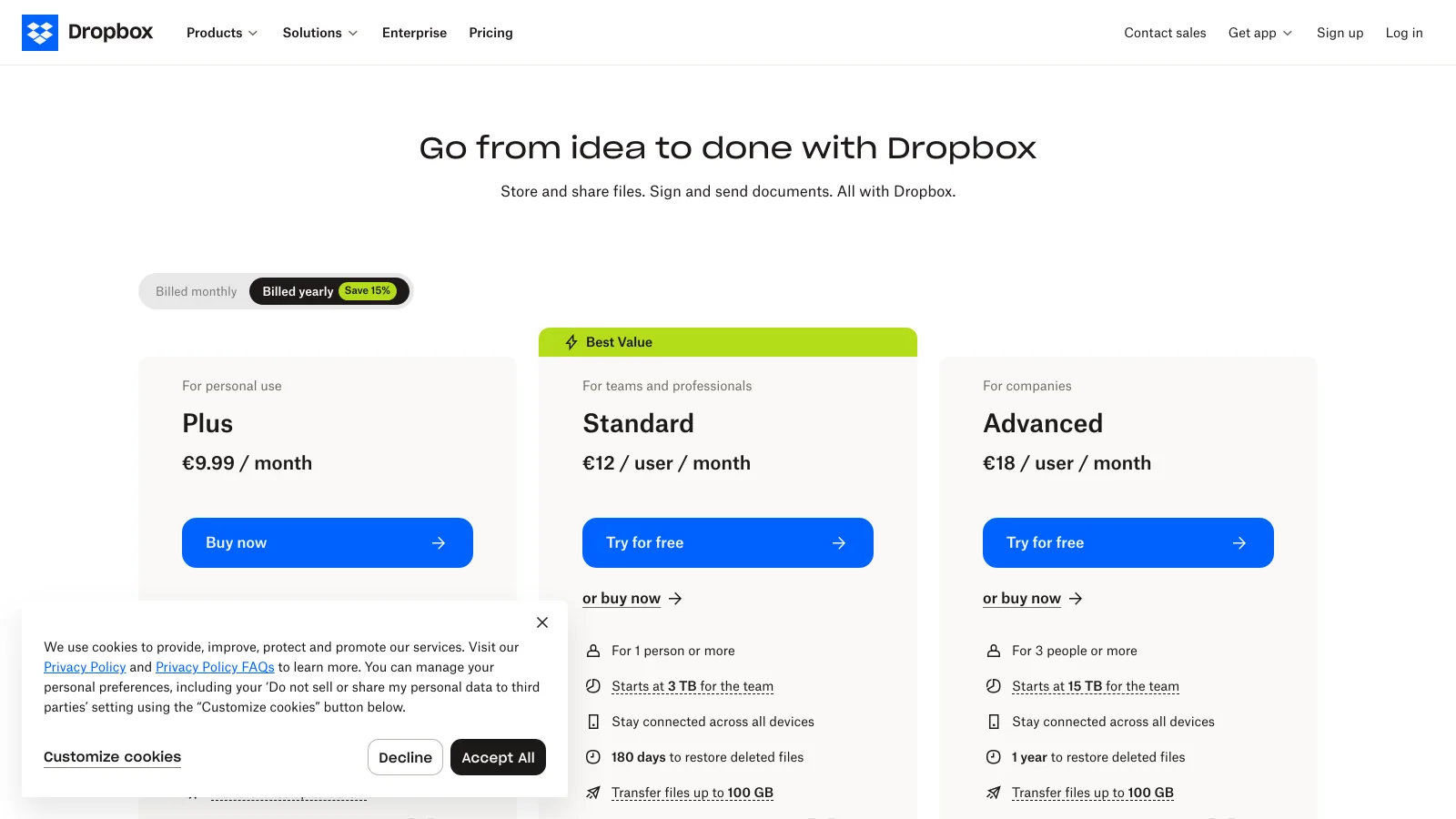
| Pricing | Basic free; Plus $9.99 a month; Standard $15 and Advanced $24 per user a month, 3 users minimum; Business Plus and Enterprise on quote | Free; Lite $4; Pro $12; Growth $70 a month billed annually ($5, $15, $85 monthly); Enterprise on quote |
| Free plan | 2 GB, 2 GB transfers, 7-day link expiry | 2 GB, 5 branded transfers a month up to 2 GB, AI search, Boards, review |
| Storage | 2 TB (Plus); 3 TB (Standard, team); 15 TB (Advanced, team) | 200 GB (Lite); 2 TB (Pro); 5 TB (Growth), in libraries with permissions |
| Desktop sync | Windows, Mac, Linux, mobile; every file type | Brault for Mac (Finder, on-demand sync); Brault for iPhone; web |
| Search | File names and document text | AI search by content across 50+ formats including RAW, PSD, AI, video and audio |
| Review and approval | Replay add-on, $10 per user a month billed annually, on a paid plan | Frame-accurate comments, drawings, versions, approvals on every plan |
| Branded links | Standard and above (logos, backgrounds, passwords) | Every plan including Free; custom domain on paid plans |
| Transfer cap | 2 GB (Basic); 50 GB (Plus); 100 GB (Standard, Advanced); 250 GB (Business Plus, Enterprise) | 2 GB (Free); 50 GB (Lite); 100 GB (Pro); 250 GB (Growth) |
| Version history | 30 days (Plus); 180 days (Standard); 1 year (Advanced) | Versions kept with their own comment threads; no time limit on the plan |
| Security | Encryption in transit and at rest; end-to-end on Advanced; ransomware detection; SSO on Advanced | Private AI on Brault's own servers; granular access control; password from Lite, expiry from Pro; SSO on Enterprise |
| Users | 1 (Basic, Plus); 3 minimum on Standard and Advanced | 1 on Free and Lite; up to 3 on Pro ($8 each); 4 included on Growth ($4 each) |
Dropbox plans from dropbox.com/plans and help.dropbox.com, US list, verified 2026-09-14; Replay from dropbox.com/replay verified 2026-09-11; Brault plans from brault.app/pricing verified 2026-09-30. Prices in US dollars, annual billing where the vendor offers it.
Which one should you choose?
Choose Dropbox if
- You need every file type synced to Windows, Linux and mobile, not only creative files on a Mac.
- Your library is past 5 TB and you want it in one plan: Advanced starts at 15 TB.
- Your company already runs on Dropbox for documents and adding Replay for review is cheaper than a second tool.
Choose Brault if
- You find files by what is in them, not by remembering a name: RAW, PSD, AI, video and audio included.
- Clients approve your work and should see your logo and domain on the link from the first send, not from a $15-per-user plan.
- You pay for Dropbox plus a review tool plus a transfer tool, and want one bill that follows the library, not the headcount.
Which one is better for sync and storage?
EdgeDropbox
Dropbox's whole product is this layer, and it is still the best general-purpose version of it: a folder on Windows, Mac, Linux and phones that holds any file type, selective and on-demand sync, shared folders with permissions, and version history of 30 days on Plus, 180 on Standard and a year on Advanced. Storage scales past creative needs: 2 TB on Plus, a 3 TB pool on Standard, 15 TB on Advanced.
Brault covers the part of this a creative team uses. Libraries hold the files with permissions per library, folder and file; Brault for Mac mounts them in the Finder with on-demand sync, so a 40 GB project downloads when opened and can be kept offline or freed; versions are kept with their comments and never expire on the plan. What Brault does not do is sync arbitrary folders from a Windows machine or a phone, and its storage stops at 5 TB on Growth. For the file-system job on its own, Dropbox has the edge.
Which one is better for finding files?
EdgeBrault
Dropbox search reads file names, folder names and the text inside documents, with AI-assisted search on business plans that summarizes and answers questions over documents. For a creative library the unit is the image, the cut and the design source, and those have no text: a RAW frame is "IMG_4821.CR3" until someone renames it. Brault's AI search reads the content of 50+ formats, RAW, PSD, AI, video, audio and PDF among them, so "the shot of the red bicycle in the rain" returns the frame without a name, a tag or a folder. Similar-file search finds the other takes. Previews exist for the same formats, including PSD and AI files that Dropbox shows as icons. This is the gap the two products are furthest apart on.
Which one is better for review and approval?
EdgeBrault
Dropbox reviews through Replay: frame-accurate comments and drawings on video, images, audio, PSD and PDF, version compare and sign-off, sold as an add-on at $10 per user a month billed annually on top of a paid Dropbox plan. It is a capable review layer, priced as a second product. Brault reviews inside the library on every plan, Free included: timestamped comments and drawings on video and images, versions with their own threads, mentions, approvals, and client review links on a branded page with optional password and expiry, so the approved version is the one the transfer sends. A studio of three that adds Replay pays $30 a month more than its Dropbox plan; on Brault the loop is in the $28.
Which one is better for branded delivery?
EdgeBrault
On Dropbox a shared link and a transfer carry Dropbox's brand on Basic and Plus; logos, backgrounds and passwords on transfers arrive with Standard at $15 per user with three users minimum, so the smallest branded Dropbox is $45 a month. On Brault the branded download page, share links, public boards and the app carry your logo and colors on every plan including Free, and paid plans add a custom domain, so a client of a freelancer sees the freelancer from the first send. For anyone whose deliveries are part of the brand, this is the deciding feature and it costs $0.
Which one is better for sending large files?
EdgeBrault
Dropbox Transfer sends copies out of the folder with a ceiling that follows the plan: 2 GB on Basic, 50 GB on Plus, 100 GB on Standard and Advanced, 250 GB on Business Plus and Enterprise. Links expire after 7 days with no password on Basic and Plus; Standard and above allow a custom expiry, passwords and branding. Brault Transfer sends from the library or the Mac menu bar: 2 GB on Free, 50 GB on Lite, 100 GB on Pro (20 a month, unlimited up to 50 GB), 250 GB on Growth, always from a branded page without an account for the recipient, with password from Lite and expiry windows from Pro. At the same price point Brault's ceiling is higher and the page is yours: a Plus subscriber at $9.99 sends 50 GB under Dropbox's brand, a Pro subscriber at $12 sends 100 GB under their own. The two match only at the top, 250 GB each.
Which one is safer for client work?
EdgeDropbox
Dropbox encrypts in transit and at rest, adds end-to-end encryption for team folders, ransomware detection and SSO on Advanced, and carries the compliance catalogue a procurement team expects. Brault encrypts in transit and at rest, runs its AI on its own servers so no file leaves for a third-party model, applies access control per library, link and board, and adds password on links from Lite, expiry from Pro and SSO on Enterprise. Both cover a client delivery; for a company that needs end-to-end encryption on a self-serve plan and the audit paperwork today, Dropbox Advanced has the edge.
Which one is cheaper?
EdgeBrault
Dropbox bills the person: Plus $9.99 a month for one, Standard $15 and Advanced $24 per user a month with three users minimum, so the team plans start at $45 and $72. Brault bills storage: Lite $4 a month billed annually for 200 GB, Pro $12 for 2 TB with up to 3 users at $8 each, Growth $70 for 5 TB with 4 users included and $4 per extra, all $5, $15 and $85 month to month. The comparison by team looks like this.
| Team | Dropbox |
Brault |
|---|---|---|
| Freelancer, 200 GB, branded delivery | Standard at 3 users, $45 a month (branding needs Standard) | Lite, $4 a month (200 GB, branded page, 20 transfers up to 50 GB) |
| Freelance photographer, 2 TB | Plus, $9.99 a month | Pro, $12 a month (2 TB, AI search, review, transfers to 100 GB) |
| Studio of 3, 2 TB, review | Standard $45 plus Replay $30, $75 a month | Pro, $28 a month (3 users, review included) |
| Agency of 10, 5 TB | Standard, $150 a month (3 TB pool, more on request) | Growth, $94 a month (4 users + 6 × $4) |
| Company of 10, 15 TB, end-to-end encryption | Advanced, $240 a month | Not in one plan (5 TB on Growth; Enterprise on quote) |
Dropbox verified 2026-09-14 (Replay 2026-09-11), Brault verified 2026-09-30; monthly figures on annual billing where offered. Dropbox Standard and Advanced bill three users minimum.
Brault is the lower bill at every creative team size because the plan includes the review and the branded transfers Dropbox sells separately or reserves for team tiers, and because seats cost $4 to $8 rather than $15 to $24. Dropbox wins the two cases outside that shape: one person who only needs 2 TB of plain storage, where Plus at $9.99 undercuts Pro by $2, and a company past 5 TB that needs end-to-end encryption on a self-serve plan.
Three things to check before you compare the two numbers
- What the seat buys. Dropbox's $15 buys sync and 1 TB of a shared pool per user; Brault's $8 or $4 buys a login to a library sized by the plan. Count the people who upload and approve, not the clients who download.
- The add-ons. If the team reviews video, add Replay at $10 per user to the Dropbox column. If it brands links, the Dropbox column starts at Standard.
- The desktop. If someone needs whole-disk sync on Windows, keep a Dropbox or Google Drive seat for that person and size Brault for the creative library.
Where does Brault fit, and where does Dropbox?
Dropbox is the right answer for the general-purpose file system: every file type, every device, storage past 5 TB, and the compliance catalogue on Advanced. Brault is the right answer for the creative library on top of it, or instead of it: the files a studio, agency or in-house team searches by content, gets approved and delivers under its own brand, in one plan sized by storage, with the library in the Finder on the Mac.
- Best forStudios, agencies and in-house creative teams that search, review and deliver files out of one library
- Pricing$0 / $4 / $12 / $70 a month billed annually, $6 to $14 per TB; transfers up to 2 / 50 / 100 / 250 GB per plan (verified 2026-09-30 on brault.app/pricing)
- Free planYes; 2 GB, 5 branded transfers a month up to 2 GB, AI search, Boards and review, no card
- Watch outFinder sync on the Mac app only; 5 TB is the self-serve ceiling; 1 user on Free and Lite
What Brault does and does not replace
Brault replaces the Dropbox library for creative files, the Replay add-on and the transfer tool next to it, with AI search across 50+ formats, review and approval on every plan, a branded download page from Free and transfers up to 250 GB. It does not replace whole-disk sync on Windows and Linux or storage past 5 TB on a self-serve plan. The category comparison is on Brault vs traditional DAM, and the sending-only pair on WeTransfer vs Dropbox.
Frequently asked questions
Dropbox vs Brault: which is better for a creative studio of three?
Brault, unless the studio needs every file type synced to every machine. Dropbox Standard costs $45 a month for three users with 3 TB, searches by file name, brands links on this plan and sells review as the Replay add-on at $10 per user. Brault Pro costs $28 a month ($12 plus two users at $8) for 2 TB with AI search across 50+ formats, frame-accurate review and approval, Boards, a branded download page from Free and transfers up to 100 GB, with the library mounted in the Finder through Brault for Mac (Dropbox verified 2026-09-14, Brault 2026-09-30).
Is Brault cheaper than Dropbox?
For a team, yes, on published prices. Dropbox Plus is $9.99 a month for one person and 2 TB; Brault Pro is $12 for 2 TB and up to three users, or Lite $4 for 200 GB. Dropbox Standard bills $15 per user with a three-user minimum, so 3 people pay $45 and 10 pay $150; Brault Pro is $28 for 3 and Growth $94 for 10 with 5 TB. Dropbox Advanced is $24 per user for 15 TB, the one tier where Dropbox offers more storage than Brault Growth (verified 2026-09-14 and 2026-09-30).
Does Brault sync files to the desktop like Dropbox?
On the Mac, yes: Brault for Mac mounts every library in the Finder with on-demand sync, so files download when opened and can be kept offline or freed at will, and transfer links are created from the menu bar. Brault does not sync arbitrary folders from every device the way Dropbox does on Windows, Linux and mobile; Brault for iPhone browses, previews, comments and uploads from the camera roll. Teams that need whole-disk sync on Windows keep a drive for that and use Brault for the creative library.
Can Brault send files as large as Dropbox Transfer?
Larger on most plans. Dropbox Transfer sends 2 GB on Basic, 50 GB on Plus, 100 GB on Standard and Advanced and 250 GB on Business Plus and Enterprise, with a 7-day expiry and no password on Basic and Plus. Brault Transfer sends 2 GB on Free, 50 GB on Lite, 100 GB on Pro (20 a month, unlimited up to 50 GB) and 250 GB on Growth, from a branded download page on every plan, with password from Lite and expiry windows from Pro (verified 2026-09-14 and 2026-09-30).
Does Dropbox have review and approval like Brault?
As an add-on. Dropbox Replay puts frame-accurate comments, version compare and sign-off on video, images, audio, PSD and PDF, at $10 per user a month billed annually on top of a paid Dropbox plan. Brault includes frame-accurate comments, drawings, versions, mentions and approvals on video and images in every plan, Free included, with client review links on a branded page.
Key takeaways
- Dropbox and Brault overlap on keeping the files; Dropbox is built around the file system, Brault around what a creative team does with the files after that.
- Dropbox has the edge on sync and storage (every file type, every device, 15 TB on Advanced) and on security paperwork (end-to-end encryption and SSO on Advanced).
- Brault has the edge on search, review, branded delivery and transfer: content search across 50+ formats, approval on every plan, your brand on every link from Free, 100 GB transfers at $12 where Dropbox sends 50 GB at $9.99.
- On price, a studio of three pays $28 on Brault Pro against $45 on Dropbox Standard ($75 with Replay); an agency of ten pays $94 on Growth against $150.
- Pick Dropbox for the general-purpose drive; pick Brault for the creative library, and keep a small drive for documents if the team needs whole-disk sync on Windows.
Want the library in the Finder and the branded download page in the same plan? Try Brault free.