WeTransfer and Dropbox both get a large file to another person, but they are built for opposite moments. WeTransfer is a sending tool: you upload, you share a link, and the recipient downloads it before it expires. Dropbox is a storage platform: the files stay, sync across devices, and Dropbox Transfer sends copies out when you need to. That difference settles most of the choice before any limit or price does, so this comparison starts with what happens to the file after it is sent.
WeTransfer's plans are Free, Starter, Ultimate, Teams and Enterprise; Dropbox's are Basic, Plus, Standard, Advanced and Enterprise, with Transfer included on every one. Prices below were verified on 2026-09-14 on wetransfer.com/pricing and dropbox.com/plans; the limits come from each company's own help pages. Dropbox against its enterprise rival is in Box vs Dropbox, with Box's plans priced one by one in Box pricing. The wider field is in best WeTransfer alternatives in 2026, and the step-by-step for any channel is in how to send large video files.
How do WeTransfer and Dropbox compare at a glance?
WeTransfer leads on the single delivery; Dropbox leads on everything that happens before and after it.
| Criteria |  WeTransfer WeTransfer |
 Dropbox Dropbox |
|---|---|---|
| What it is | A transfer service: upload, link, download, expire | Cloud storage with sync, sharing and a Transfer feature |
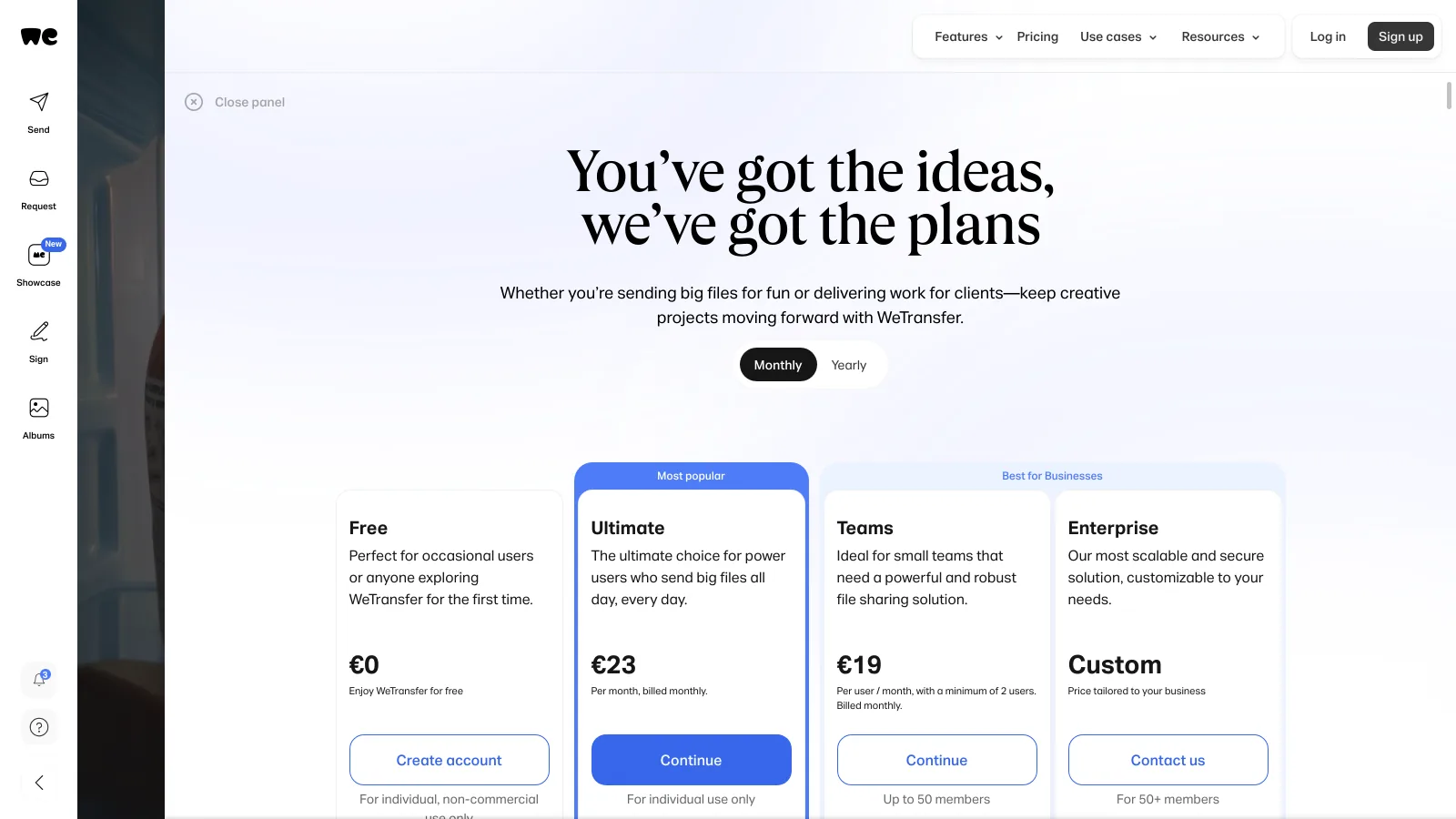
| Free plan | 10 transfers or 3 GB per rolling 30 days, 3 GB per transfer, expires in 3 days | 2 GB of storage, Transfer up to 2 GB, links expire in 7 days |
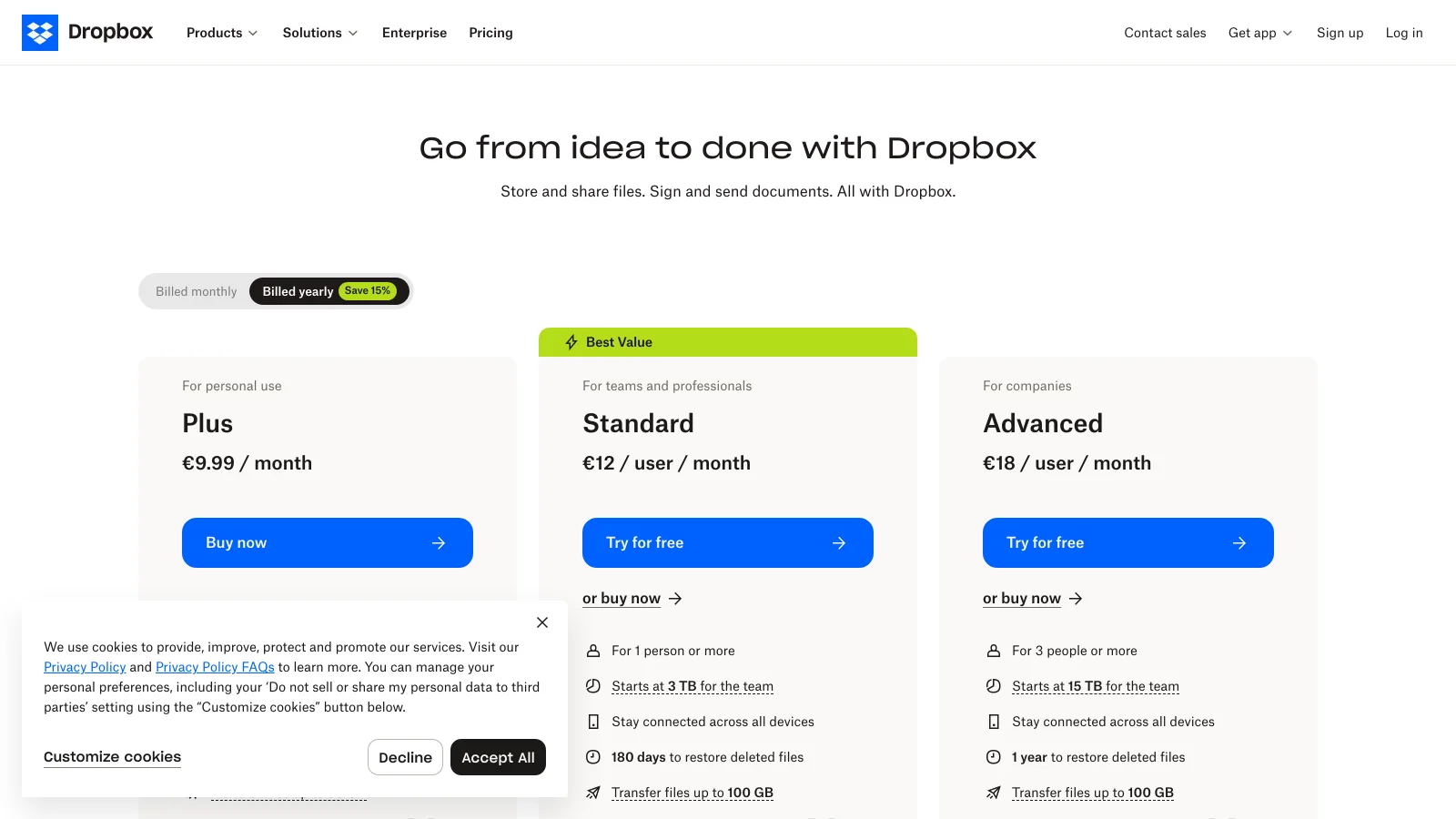
| Largest transfer | 1 TB per transfer on Ultimate and Teams | 50 GB on Plus, 100 GB on Standard and Advanced, 250 GB on Business Plus and Enterprise |
| Expiry | Custom or none on Ultimate and Teams, recoverable | 7 days on Basic and Plus; 30-day default, adjustable, on Standard and above |
| Password and branding | Ultimate and Teams | Standard and above (passwords, logos, backgrounds) |
| Storage | 2 TB on Free, Starter and Ultimate; 5 TB on Teams, extendable to 30 TB | 2 GB Basic, 2 TB Plus, 3 TB per team on Standard, 15 TB on Advanced |
| Recipient | No account, ads on free downloads | No account for Transfer links; account needed to edit or sync shared folders |
| Price | $0; Ultimate $23 a month; Teams $19 per user (2 minimum) | $0; Plus $9.99 a month; Standard $15 per user; Advanced $24 per user (3 minimum) |
US list prices, verified 2026-09-14: dropbox.com/plans and dropbox.com/buy (Plus $9.99 a month, Standard $15 and Advanced $24 per user per month, as indexed from the US), wetransfer.com/pricing (Ultimate $23 a month billed monthly, $19 billed yearly; Teams $19 per user), wetransfer.com/help-center/subscriptions/plan-limits (updated 2026-05-30) and help.dropbox.com/share/dropbox-transfer.
Which one should you choose?
The question to answer first is whether the file needs to live somewhere after it is delivered.
Choose WeTransfer if
- You deliver finished work a few times a month and the file does not need to stay online afterwards
- Your recipients are clients who should not need an account or an app
- You send very large packages: Ultimate takes 1 TB in one transfer
Choose Dropbox if
- Your files already live in Dropbox and delivery is a step, not the product
- You work with a team that syncs folders across machines
- You want one bill for storage and sending: Plus is $9.99 a month with 2 TB and 50 GB transfers
Which one is better for sending one large file?
EdgeWeTransfer
WeTransfer is the shorter path from a file on disk to a link in an email: no folder to choose, no sync to wait for, no account for the person on the other end. The free plan takes 3 GB per transfer, and Ultimate takes up to 1 TB per transfer with unlimited transfers, which is more than any Dropbox plan below Business Plus allows in one send.
Dropbox Transfer does the same job from inside Dropbox, with a per-transfer ceiling that follows the plan: 2 GB on Basic, 50 GB on Plus, 100 GB on Standard and Advanced, 250 GB on Business Plus and Enterprise. For a 40 GB video delivery, a Plus subscriber is fine; for a 120 GB RAW batch, the sender needs a business plan or a different tool.
Which one is better for storing and organizing files?
EdgeDropbox
Dropbox is a file system in the cloud: folders, version history, desktop sync, shared folders with permissions, and a search over everything you keep. Plus gives one person 2 TB; Standard starts a team at 3 TB and Advanced at 15 TB. A file you deliver with Transfer stays in that library afterwards.
WeTransfer stores too, but as a record of what was sent: Free, Starter and Ultimate keep up to 2 TB of transfers, Teams up to 5 TB, extendable to 30 TB on request. There is no sync client for a working folder and no version history on a file; the storage exists so a transfer can be found and re-sent, not so a project can be organized in it.
Which one gives you more control over expiry and access?
EdgeWeTransfer
On WeTransfer the controls arrive with the first paid tier that matters: Ultimate adds password protection, a custom expiry or no expiry at all, recovery of expired transfers and branded download pages, all for one person at $23 a month. Free transfers expire after 3 days and are gone.
On Dropbox the same controls sit on the team plans. Transfer links on Basic and Plus expire after 7 days with no password; Standard and above allow a custom expiry (30 days by default), passwords, logos and backgrounds. A solo Plus subscriber gets the 50 GB ceiling but not the password, which is the detail freelancers most often discover after the link is out.
Which one is easier for the recipient?
EdgeWeTransfer
A WeTransfer link opens a page with one button. No account, no app, and on paid plans no ads; on free transfers the download page carries advertising. A Dropbox Transfer link behaves the same way, but a Dropbox shared folder does not: to edit, comment or sync, the recipient needs a Dropbox account, and an added folder counts against their own storage, which is why a 200 GB client folder can be refused on a 2 GB Basic account.
Which one is cheaper for a solo creator?
EdgeDropbox
Dropbox Plus is $9.99 a month for 2 TB of storage and 50 GB transfers; WeTransfer Ultimate is $23 a month billed monthly for unlimited 1 TB transfers and 2 TB of transfer storage. If the deliveries fit in 50 GB and you want the files to stay, Plus is the smaller bill and covers both jobs. If you send bigger packages or need passwords and a branded page without a team plan, Ultimate is the one that does it, at more than twice the price.
Which one has the more useful free plan?
EdgeWeTransfer
WeTransfer Free sends 3 GB per transfer, up to 10 transfers or 3 GB in total per rolling 30 days, for individual non-commercial use, with a 3-day expiry and ads. Dropbox Basic gives 2 GB of storage in total and a 2 GB Transfer ceiling. For an occasional large send, WeTransfer's free tier does more; for keeping anything, neither free plan is enough, and the WeTransfer cap of 3 GB a month means a second delivery in the same month is already paid.
How much do WeTransfer and Dropbox cost side by side?
Per year, on the plan that covers a working creative: passwords, a large transfer ceiling and somewhere to keep the files. Brault sits alongside as the reference for a platform that includes the transfer in the storage plan.
| Need | WeTransfer |
Dropbox |
 Brault Brault |
|---|---|---|---|
| Solo, deliveries up to 50 GB, files kept | Ultimate $276 (no working storage) | Plus $120 (2 TB, no password) | Pro $144 (2 TB, 50 GB transfers, branded page) |
| Solo, deliveries above 50 GB with a password | Ultimate $276 (1 TB per transfer) | Standard $180 (100 GB, 1 seat) | Pro $144 (20 transfers a month up to 100 GB) |
| Team of 5, storage and delivery | Teams $1,140 (5 TB) | Standard $900 (3 TB) | Growth $888 (5 TB, 250 GB transfers) |
Per year at US list prices, verified 2026-09-14. WeTransfer Ultimate $23 a month billed monthly; Teams $19 per user per month. Dropbox Plus $9.99 a month; Standard $15 per user per month. Brault Pro $12 a month with 1 user included and up to 3 at $8 each; Growth $70 a month with 4 users included and $4 per extra user; billed annually.
What the headline price leaves out
- The free WeTransfer cap is monthly, not per transfer. 10 transfers or 3 GB in any rolling 30 days: one 3 GB delivery uses the whole allowance.
- Dropbox passwords start at Standard. Plus sends 50 GB but cannot lock the link; the first password costs a per-user team plan.
- Two bills for one workflow. WeTransfer sends and Dropbox stores; a freelancer who needs both is paying for two subscriptions that do not know about each other.
Where does Brault fit?
Brault is a different fit from both: the library and the delivery are the same product, so a file is stored, searchable and sent from one place, on a plan priced by storage.
- Best forCreatives who deliver from the same library they work in and want a branded download page
- Pricing$0 Free, $4 Lite, $12 Pro (2 TB), $70 Growth (5 TB, 4 users), billed annually
- Free planYes: 5 transfers a month of up to 2 GB, branded page, no ads
- Watch outNo desktop sync of a working folder like Dropbox; Pro tops out at 3 users
One subscription, both jobs
Brault Transfer is included on every plan: 5 transfers a month of up to 2 GB on Free, 20 of up to 50 GB on Lite, unlimited 50 GB transfers plus 20 of up to 100 GB on Pro, and unlimited transfers of up to 250 GB on Growth. Each one lands on a page with your logo, a password if you want one, and an expiry you set, and the files stay in the library with AI search across 50+ formats. A freelancer on WeTransfer Ultimate plus a storage plan is paying roughly $400 a year for two tools; Brault Pro is $144. WeTransfer keeps the edge on the 1 TB single transfer, and Dropbox on desktop sync; the head-to-heads are on [Brault vs WeTransfer](/blog/file-transfer-and-sharing/wetransfer-vs-brault) and [Brault vs Dropbox](/blog/creative-asset-management/dropbox-vs-brault).
Frequently asked questions
Is WeTransfer or Dropbox better for sending large files?
For a one-off delivery, WeTransfer: the free plan sends up to 3 GB per transfer with no account for the recipient, and Ultimate sends up to 1 TB per transfer with password protection and a custom expiry. Dropbox Transfer sends 2 GB on the free Basic plan, 50 GB on Plus and 100 GB on Standard and Advanced, and its files stay in your Dropbox afterwards. For repeated deliveries from a library you already keep, Dropbox is the more convenient of the two; for files up to 250 GB with a branded download page and no per-transfer fee, Brault Transfer is a third option, included on every Brault plan.
How much do WeTransfer and Dropbox cost in 2026?
WeTransfer lists Free at $0, Ultimate at $23 a month billed monthly and Teams at $19 per user per month with a minimum of two users, verified on wetransfer.com/pricing on 2026-09-14 (US list; $19 a month for Ultimate when billed yearly). Dropbox lists Basic at $0 with 2 GB, Plus at $9.99 a month with 2 TB, Standard at $15 per user per month with 3 TB for the team, and Advanced at $24 per user per month with 15 TB, verified on dropbox.com/plans on 2026-09-14.
Do WeTransfer files expire?
Yes. Free WeTransfer transfers expire after up to 3 days and cannot be recovered; the free plan also caps you at 10 transfers or 3 GB in any rolling 30-day window. Ultimate and Teams let you set a custom expiry, keep transfers active indefinitely, and recover expired ones. Dropbox Transfer links expire after 7 days on Basic and Plus and default to 30 days, adjustable, on Standard and above; the files themselves stay in your Dropbox until you delete them.
Does the recipient need an account on WeTransfer or Dropbox?
No on either. A WeTransfer link opens a download page with no sign-up, and free downloads carry ads. A Dropbox Transfer link also downloads without an account. The difference appears with a regular Dropbox shared folder, where editing or syncing needs a Dropbox account and counts against the recipient's own storage.
What is a cheaper alternative to WeTransfer and Dropbox for a freelancer?
Brault includes Brault Transfer on every plan, Free included: 5 transfers a month of up to 2 GB at $0, 20 a month of up to 50 GB on Lite at $4 a month, unlimited 50 GB transfers plus 20 of up to 100 GB on Pro at $12 a month with 2 TB of storage, and unlimited transfers of up to 250 GB on Growth at $70 a month with 5 TB, billed annually. Every transfer lands on a branded download page, and the files stay searchable in the library, so a freelancer replaces WeTransfer Ultimate ($23 a month) and a storage plan with one subscription.
Key takeaways
- WeTransfer sends; Dropbox stores and can send. Decide by what the file needs to do after delivery.
- WeTransfer wins the single delivery: 3 GB free, 1 TB per transfer on Ultimate, no account for the recipient, passwords and custom expiry from $23 a month.
- Dropbox wins the library and the price for a solo user who keeps files: Plus is $9.99 a month for 2 TB and 50 GB transfers, but passwords on Transfer links start at Standard.
- Both free plans are small: 10 transfers or 3 GB a month on WeTransfer, 2 GB of storage and 2 GB transfers on Dropbox.
- Brault includes the transfer in the storage plan, with branded pages and transfers up to 250 GB, from $0 to $70 a month billed annually, so the two jobs need one bill.