 WeTransfer
WeTransfer is a file transfer service: you upload files up to 3 GB on the free plan, WeTransfer produces a download link, and the recipient downloads it from a page in the browser without an account. Paid plans (Starter, Ultimate and Teams) raise the caps, remove the expiry and add a branded page. This review covers what WeTransfer does well in 2026, where the free and paid plans stop, and which kind of creative it still fits after a year in which the plans, the terms and the feature set all changed.
Prices below are the US list, verified on 2026-09-17 on wetransfer.com/pricing; the plan-by-plan detail is in the WeTransfer pricing guide, the ranked field in best WeTransfer alternatives, and the head-to-head with the other default in WeTransfer vs Dropbox.
TL;DR
- WeTransfer is still the fastest way to turn a file into a link: no folder, no sync, no account for the recipient.
- Free is small and personal: 10 transfers or 3 GB in any 30 days, 3-day expiry, ads on the download page, individual non-commercial use only.
- Ultimate ($23 a month, $19 billed yearly) removes the size and expiry limits and adds branding, passwords and recovery of expired transfers.
- In 2025 WeTransfer changed owners, rewrote and then softened its terms, and removed Reviews and Portals.
- It is a different fit for anyone who needs the files to stay somewhere after they are sent.
What is WeTransfer and how does it work?
WeTransfer is a Dutch file transfer service founded in Amsterdam in 2009 and owned by the Italian company Bending Spoons since July 2024. The product is one flow: drop files, add an email address or choose a link, send. The recipient gets a page with a download button and needs no account. That flow has not changed in 17 years, and it is the reason "send it over WeTransfer" is still a sentence people say.
Around that flow sit the plan features: a personal WeTransfer page where clients can send you files (Ultimate), password protection (every plan, with a free account), custom expiry dates and recovery of expired transfers (Ultimate and Teams), download tracking, and since 2025 a paid-download option where the recipient pays before the file unlocks. Storage is a transfer archive of 2 TB per account on every plan, which is where sent and received transfers live until they expire or you delete them.
Where is WeTransfer strong and where does it fall short?
WeTransfer is strongest as a delivery mechanism and least convincing as the place where the work lives.
Where WeTransfer is strong
- The shortest path from a file on disk to a link in an email; no learning curve
- Recipients never need an account, an app or a login
- Ultimate sends packages up to 1 TB with no expiry, a password and your branding
- File requests: clients send you files through your own WeTransfer page
Where it falls short
- Free is 10 transfers or 3 GB a month with a 3-day expiry, ads, and non-commercial use only
- Storage is an archive of what was sent, not a library: no folders to work in, no search by content, no versions
- Reviews and Portals were discontinued in December 2025; feedback needs another tool
- Branding starts at Ultimate, $23 a month, for one person
What does WeTransfer include on each plan?
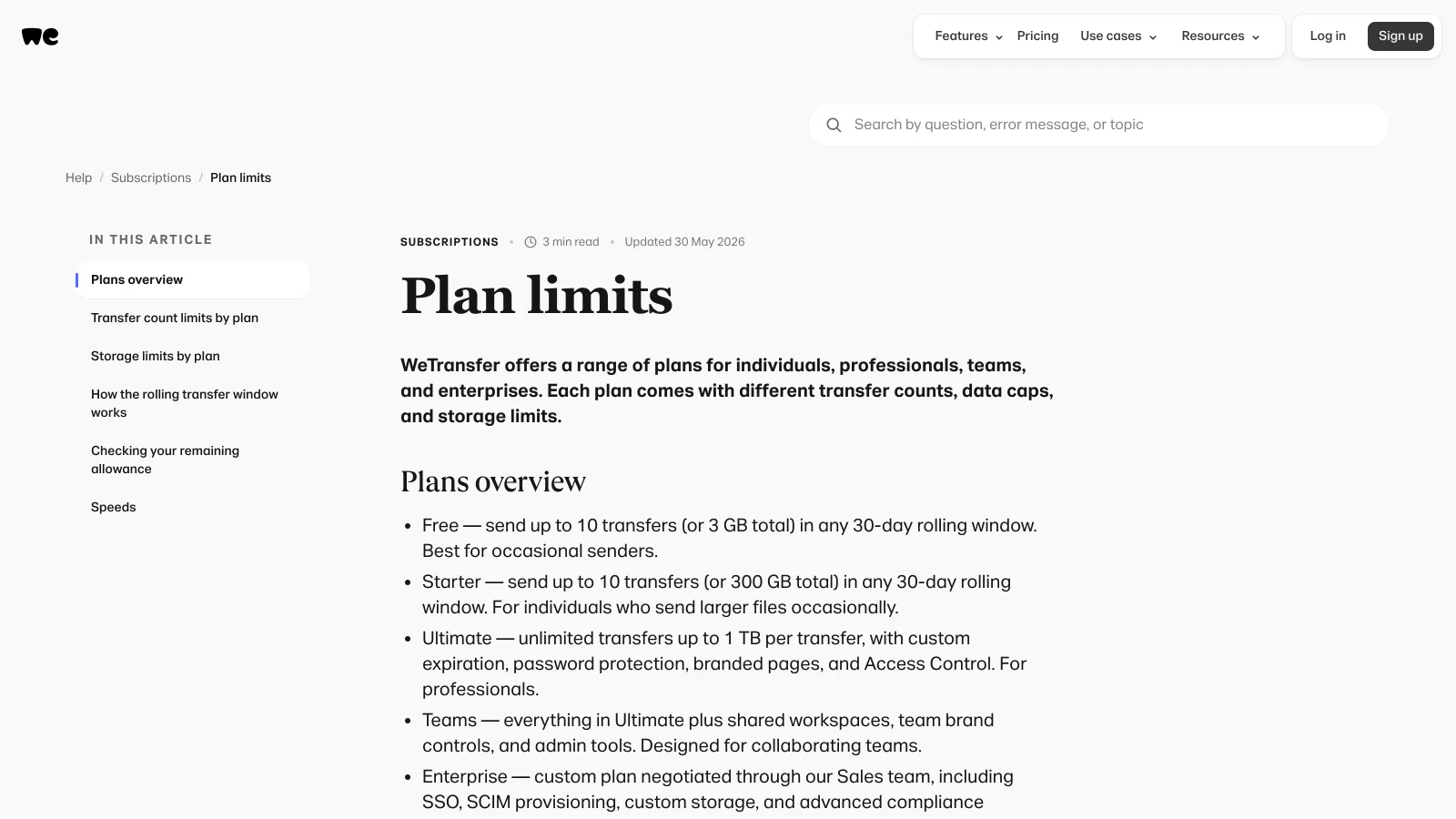
WeTransfer's 2026 lineup is Free, Starter, Ultimate, Teams and Enterprise. The caps come from the plan limits page of WeTransfer's help center (updated 2026-05-30) and the pricing page.
| Area | What WeTransfer includes | Limits and notes |
|---|---|---|
| Sending | Email or link transfers, download tracking, file requests via a personal page (Ultimate) | Free: 10 transfers or 3 GB per rolling 30 days. Starter: 10 transfers or 300 GB. Ultimate and Teams: unlimited, up to 1 TB per transfer |
| Expiry | 3 days on Free and Starter (help center); custom or none on Ultimate and Teams | The pricing page prints "up to 7 days" for Free and Starter; the help center (2026-05-29) says 3. Expired free transfers cannot be recovered |
| Security | Password protection on every plan, encryption in transit and at rest, two-factor authentication, malware scanning on paid plans | A free account is required to set a password; no end-to-end encryption |
| Branding | Custom WeTransfer page, personalized emails, custom wallpapers | Ultimate and above; Free and Starter downloads show advertising |
| Storage | 2 TB per account of sent and received transfers | Same on every plan; Teams 5 TB, extendable to 30 TB on request. Not a working folder |
| Team | Shared branding, shared transfer overview, centralized billing | Teams: $19 per user per month, minimum 2, up to 50 members; Enterprise for 50+ with SSO |
Verified 2026-09-17 on wetransfer.com/pricing and the WeTransfer help center (plan limits updated 2026-05-30, transfer availability 2026-05-29).
Can WeTransfer be trusted?
WeTransfer is a legitimate service with password protection on every plan and encryption in transit and at rest, and the honest answer to the trust question is that 2025 gave creatives three reasons to read the terms before uploading client work.
The first was ownership. Bending Spoons, the Italian company that also owns Evernote and Meetup, acquired WeTransfer in July 2024 and announced deep staff cuts that September. The second was the July 2025 terms update, which stated that uploaded content could be used to improve machine-learning models. Photographers, illustrators and editors reacted within hours; WeTransfer removed the machine-learning language and said it does not use files to train AI. The third was the December 2025 removal of Reviews and Portals, the two features that had turned WeTransfer into a light client-collaboration tool.
None of that makes the transfer itself unsafe. WeTransfer does not offer end-to-end encryption, so the company can technically access files in storage, which is true of Dropbox and Google Drive as well. A 2019 incident in which some download links were emailed to the wrong recipients is the one documented delivery error. The practical rules are the same as for any transfer service: set a password on anything confidential, set an expiry, and keep your own copy, because a free transfer that has expired is gone.
Billing is the other recurring complaint: the Trustpilot profile, at 3.4 out of 5 on 1,127 reviews as shown in Google results on 2026-09-17, is dominated by subscription renewals people did not expect. WeTransfer subscriptions renew automatically and are cancelled from Account Settings; the yearly Ultimate plan is $228 charged at once.
Who should choose WeTransfer?
WeTransfer fits people who send finished work a few times a month, whose recipients are clients who should never see a login screen, and who do not need the files to live anywhere after delivery.
Occasional senders
A few deliveries a month under 3 GB each, to people who just need a download button. The free plan was built for exactly this, as long as the use is personal.
Editors delivering very large packages
Ultimate takes up to 1 TB in one transfer with no expiry and a password, more than Dropbox Transfer allows below a business plan.
Small teams with one sending brand
Teams puts every member behind one branded page with a shared overview and one invoice, from two seats at $19 each.
What does a year of WeTransfer cost?
A year of WeTransfer Ultimate is $276 billed monthly or $228 billed yearly, for one person, transfers only. The WeTransfer pricing guide lists every plan in both billing periods and prices three real workflows against a platform that includes storage. The short version: a freelancer paying for WeTransfer Ultimate and a separate 2 TB storage plan spends roughly $350 to $400 a year on two tools that do not know about each other, and Brault Pro covers both jobs for $144 a year.
Which WeTransfer alternatives are worth a look?
Three tools are a different fit for the three reasons people look around: a library that also sends, a transfer tool with branding at a lower price, and one platform for storage, feedback and delivery.

- Best forPeople whose files already live in Dropbox and who send from there
- PricingPlus $9.99 a month for 2 TB with 50 GB transfers; Standard $15 per user (verified 2026-09-14)
- Free planBasic: 2 GB of storage, 2 GB transfers
- Watch outTransfer passwords and branding start on the team plans

- Best forCreatives who want a branded transfer page for less than Ultimate
- PricingPro $10 a month, $6 billed yearly, $4.80 on a two-year term, unlimited size and branding (US list excl. VAT, verified 2026-09-21)
- Free planAny size with priority up to 2 GB, 7-day expiry, no account
- Watch outTransfer only; no library, no search, no feedback

- Best forCreatives who want to store, get feedback and deliver from one library
- Pricing$12 a month on Pro (2 TB, unlimited 50 GB transfers), $70 on Growth (5 TB, 250 GB, 4 users), billed annually
- Free planYes: 5 transfers a month of up to 2 GB, branded page, no ads
- Watch outNo 1 TB single transfer; Pro tops out at 3 users
Brault Transfer is included on every Brault plan, and each transfer lands on a page with your logo, an optional password and an expiry you set, while the file stays in a library with AI search across 50+ formats and comments pinned to the image or the frame, which is the part WeTransfer removed with Reviews. For the full ranking, read best WeTransfer alternatives in 2026; for the free caps in detail, the WeTransfer free limit guide.
Frequently asked questions
Can WeTransfer be trusted?
WeTransfer is a legitimate Dutch service founded in 2009 and owned by Bending Spoons since July 2024, with password protection on every plan and encryption in transit and at rest, but no end-to-end encryption. Two events shaped trust in 2025: a July terms-of-service update that mentioned using uploaded content to improve machine-learning models, removed after public pressure, and the December shutdown of the Reviews and Portals features. For client work, use a password, set an expiry, and keep a copy of anything you send, because free transfers cannot be recovered after they expire.
What is WeTransfer used for?
WeTransfer is used to send files that are too large for email: a photographer delivering a wedding gallery, an editor sharing a 20 GB cut, a designer handing over a packaged layout. You upload, WeTransfer emails a download link or gives you one to paste, and the recipient downloads from a page in the browser with no account. Paid plans add a branded page, a password, a custom expiry and recovery of expired transfers.
Is WeTransfer worth paying for?
WeTransfer Ultimate at $23 a month ($19 billed yearly, verified 2026-09-17) is worth it for someone who sends large packages several times a week, wants a branded download page and needs transfers that never expire, and who has no use for storage beyond the 2 TB transfer archive. For a freelancer who also pays for cloud storage, the same $228 to $276 a year buys a platform that stores and sends from one library; Brault Pro is $144 a year for 2 TB with unlimited 50 GB transfers and a branded page.
What are the risks of using WeTransfer?
Three practical ones. Free transfers expire after 3 days and cannot be recovered, so a client who opens the email late gets a dead link. Free downloads show advertising next to your work. And the free plan is for individual, non-commercial use only, so paid client delivery sits outside its terms. Password protection is available on every plan (a free account is needed to set it), and WeTransfer scans paid transfers for malware.
Does WeTransfer still have Reviews and Portals?
No. WeTransfer discontinued Reviews (visual feedback on shared files) and Portals (branded pages for collecting files) in December 2025. The 2026 product is transfers, file requests through a personal WeTransfer page on Ultimate, and a paid-download option. Teams that used Reviews for client feedback now need a review tool or a platform with comments built in.
Key takeaways
- WeTransfer remains the simplest way to send a large file: upload, link, download, no account for the recipient.
- The free plan is personal and small: 10 transfers or 3 GB per 30 days, 3-day expiry, ads, non-commercial use only.
- Ultimate ($23 a month, $19 billed yearly) is the plan that makes WeTransfer a professional tool: 1 TB transfers, no expiry, passwords, branding, recovery.
- 2025 changed the company (Bending Spoons), the terms (machine-learning clause added and removed) and the product (Reviews and Portals gone).
- Creatives who need the files to stay organized, searchable and reviewable after delivery are a different fit, and pay less for one platform than for transfer plus storage.