Frame.io and Brault are the two platforms a creative team compares when it wants frame-accurate review on its work without a separate tool for storage and delivery, and they overlap on the review loop: both pin timestamped comments and drawings to an exact frame, both keep versions with their own comment threads, both send clients a review link that opens without an account. The differences are what surrounds that loop. Frame.io is Adobe's review and collaboration platform, with a native Premiere panel, Camera to Cloud and production-grade security, billed per member. Brault is a creative file management platform with AI search across 50+ formats, Boards, branded Brault Transfer (BTransfer) and white-label delivery, billed by storage on a public price from $0 to $70 a month billed annually.
This comparison walks the seven things a buyer asks about, review, editing and the set, search across formats, workflow, client delivery, security and price, and says where each product has the edge. Prices are the two published plans, verified on 2026-09-24. If you are weighing more than these two tools, the full field is in best Frame.io alternatives in 2026; Frame.io on its own is covered in the Frame.io review and plan by plan in the Frame.io pricing guide.
TL;DR
- Even on review: both do frame-accurate comments, drawings on the frame, versions and client links; Frame.io adds range comments and a comparison viewer.
- Frame.io wins inside Adobe and on set: the native Premiere panel and Camera to Cloud have no equivalent in Brault.
- Brault wins on a library of every format and on client delivery: AI search across 50+ formats on every plan, Brault Transfer up to 250 GB and white-label links, pages and app, from Free.
- Frame.io wins on production security: SOC 2 and TPN Gold Shield, with session and forensic watermarking and DRM on Enterprise.
- Price: a team of 10 pays about $220 a month on Frame.io Team and $94 on Brault Growth, billed annually; at 4 and 5 members Frame.io Pro is cheaper.
How do Frame.io and Brault compare at a glance?
| Criteria |  Frame.io Frame.io |
 Brault Brault |
|---|---|---|
| What it is | Adobe's review and collaboration platform, video-first | Creative file management platform: library, AI search, review, Boards, transfer and delivery |
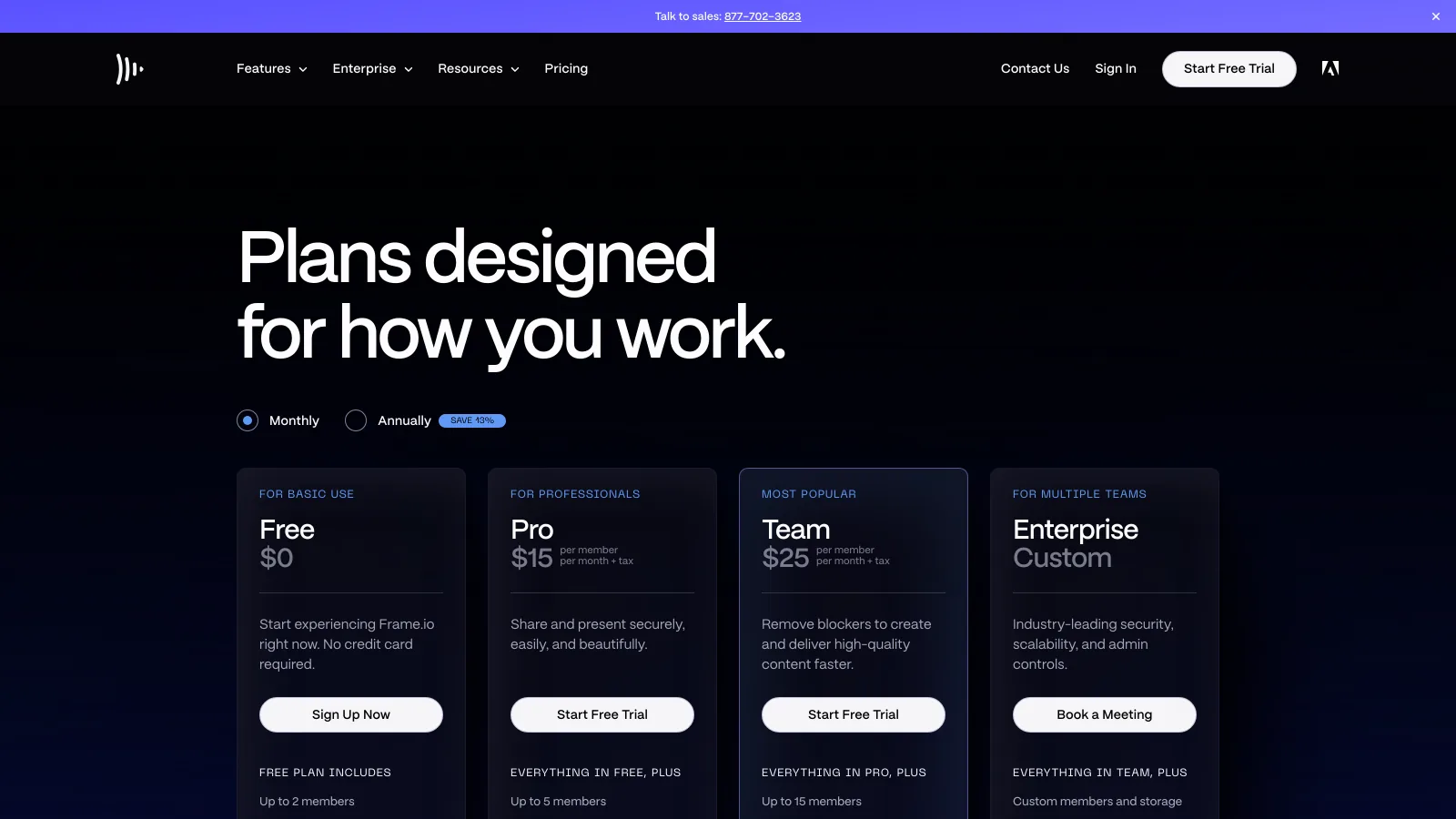
| Pricing | Free; Pro $15 and Team $25 per member a month ($13 and $22 billed annually); Enterprise on quote | Free; Lite $4; Pro $12; Growth $70 a month billed annually ($5, $15, $85 monthly); Enterprise on quote |
| Billing unit | Per member; storage grows with each member | Per plan, by storage; seats added at $8 (Pro) or $4 (Growth) |
| Users | 2 on Free, up to 5 on Pro, up to 15 on Team; reviewers on share links are free | 1 on Free and Lite; up to 3 on Pro; 4 included on Growth; reviewers on share links are free |
| Storage | 2 GB Free; Pro 2 TB plus 2 TB per additional member; Team 3 TB plus 2 TB per additional member | 2 GB Free, 200 GB Lite, 2 TB Pro, 5 TB Growth; extra storage $9 per TB a month |
| Review | Frame-accurate and range comments, annotations, version stacks, comparison viewer, transcription | Frame-accurate comments, drawing annotations on video and images, versions with per-version threads, comment filters |
| Search | Natural-language search on paid plans; semantic search of images and video on Team and Enterprise | Brault AI Search across 50+ formats, including RAW, PSD and AI files, on every plan |
| Workflow | Custom metadata fields (status, assignee, rating) and Collections | Brault Boards: custom properties on files in gallery, Kanban and table views |
| Delivery | Branded share pages, passphrases and expiration from Pro; Frame.io Transfer desktop app | Brault Transfer on every plan up to 250 GB; logo, colors and custom domain on links, transfer pages and the app, from Free |
| Adobe and set | Native Premiere panel, Lightroom and Final Cut Pro connections, Camera to Cloud | None; imports from Google Drive, Dropbox and OneDrive; public API, n8n node, Zapier |
| Apps | Web, iOS, tvOS, Frame.io Drive and Transfer on desktop | Web, Brault for Mac (Finder sync), Brault for iPhone |
Frame.io plans and features from frame.io/pricing, its feature pages and its search guide; Brault plans from brault.app/pricing; both verified 2026-09-24. Prices in US dollars, annual billing where the vendor offers it.
Which one should you choose?
Choose Frame.io if
- Your editors cut in Premiere Pro and want comments on the timeline, not in a browser tab.
- You shoot with Camera to Cloud and want takes in front of the team before the drives leave the set.
- A studio or broadcaster asks for TPN accreditation, forensic watermarking or DRM on screeners.
Choose Brault if
- Your team reviews photos, designs and documents as often as video, and wants one searchable library for all of them.
- You deliver files to clients and want the transfer page, the review link and the app under your brand, on every plan.
- The team is growing past five people and a licence per member no longer fits the budget.
Which one is better for review and approval?
EdgeEven
Frame.io and Brault run the same review loop, and a team that moves from one to the other keeps its daily routine. On Frame.io a reviewer pauses on a frame, leaves a frame-accurate or range-based comment, draws on the image, and compares versions stacked on the same asset; a comparison viewer added in 2026 puts two versions side by side, and transcription and captions make spoken lines searchable. On Brault a reviewer pauses on an exact timestamp and draws on the frame with free draw, arrows, rectangles and ellipses, and the annotation reappears at the same spot at any screen size; the same tools work on images, not only video. Versions keep their own comment threads, comments filter by author and version, and mentions and replies keep the discussion in one place. Client review links open without an account on both, and reviewers are free on both. Frame.io's extras (range comments, the comparison viewer, internal comments on Team) matter most to editors; Brault's image annotation matters most to teams that review stills and designs. Even.
Which one is better for Premiere Pro and shoot days?
EdgeFrame.io
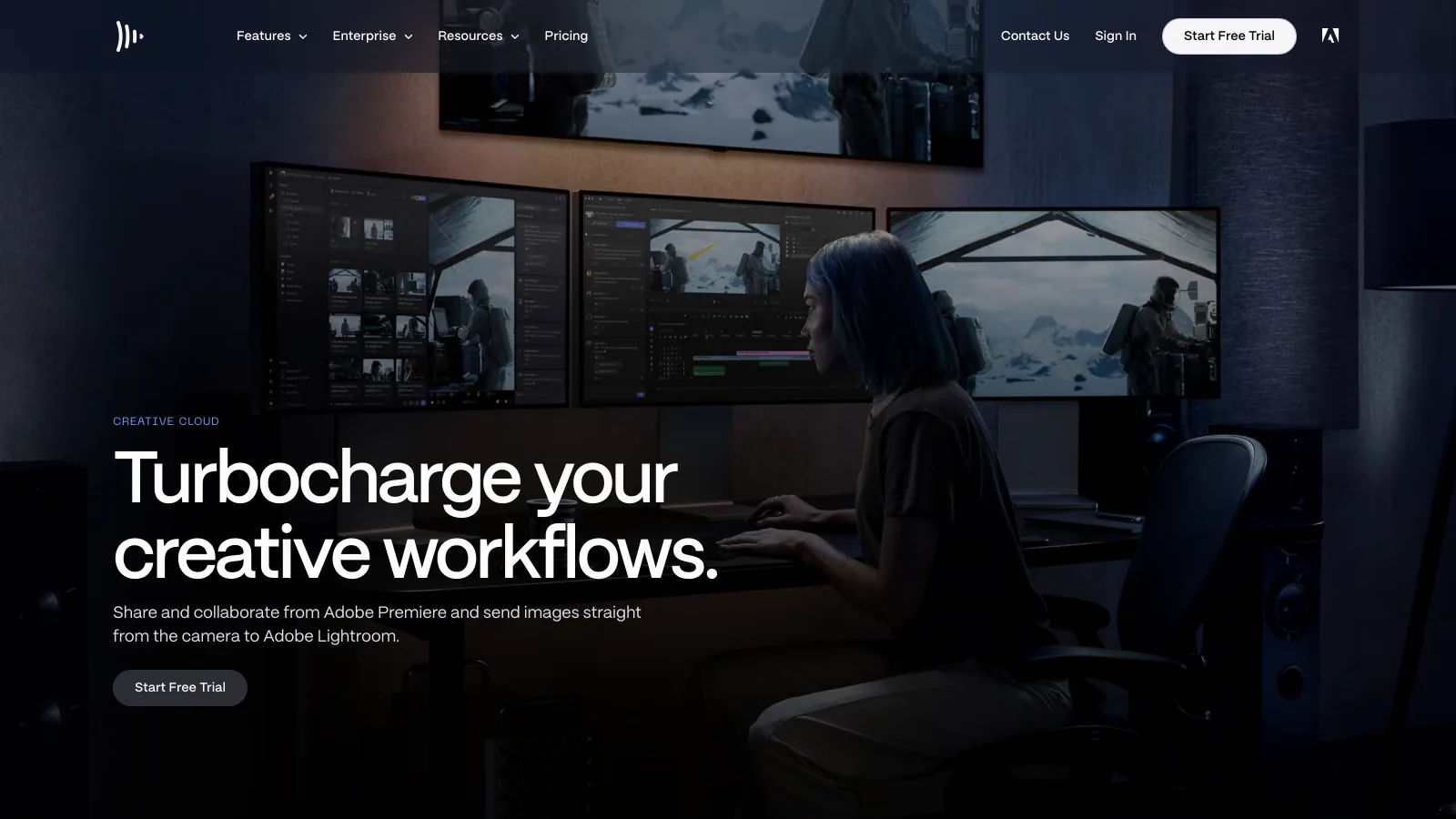
Frame.io is the only one of the two that lives inside the editor and on set, and for a post-production team that is the deciding difference. Its Premiere panel browses Frame.io projects, imports folders as bins, shares a sequence with Quick Share and syncs comments to timeline markers, so the editor never leaves Premiere. Camera to Cloud uploads takes from the camera the moment the director calls cut, and the same connection sends stills to Lightroom. Creative Cloud All Apps subscribers get a small Frame.io for free: 2 users, 5 projects, 100 GB and Camera to Cloud. Brault has no editor panel and no on-set ingest: editors export, upload through the browser, Brault for Mac or Brault for iPhone, and read comments there. A team that lives in Premiere all day gets more from Frame.io at this step.
Which one is better for a library of photos, designs and video?
EdgeBrault
Brault is built as the library for every creative format, while Frame.io is built around moving video through production. Frame.io stores and reviews video, images, audio, documents and 3D files, and its search has grown up: natural-language search across comments, transcripts and metadata on paid plans, introduced in December 2025, and semantic search that recognizes what is in images and video on Team and Enterprise. Brault AI Search reads what is inside 50+ formats, including RAW photos, PSD and AI files, PDFs and audio: objects, text in the image, speech in the video. It is included on every plan, Free included, with no per-search cost, and Libraries keep brand, client and campaign files apart. For a team whose week is half stills and layouts, that is the difference between one library and two tools.
Which one is better for tracking work on the files?
EdgeEven
Both put the workflow on the file itself rather than in a separate project tool. Frame.io uses 33 built-in metadata fields plus custom fields such as status, selects, rating and assignee, and Collections that group assets by those fields and update in real time, which suits casting selects or a list of social deliverables. Brault Boards attach custom properties (status, person, date, checkbox, text and tag) to files from any library, show the board as a gallery, a Kanban or a table, and let one file sit on several boards with different values on each. A page created on a board becomes a task card next to the assets. Boards are included on every plan, Free included. Frame.io's model reads like a smart filter over a production; Brault's reads like a board the team moves work across. Even, decided by which of the two the team already thinks in.
Which one is better for client delivery and branding?
EdgeBrault
Brault puts delivery and branding on every plan, including Free, where Frame.io starts them on Pro and stops at the share page. Frame.io Pro and Team add custom-branded shares, passphrase protection, link expiration and download controls, and the Frame.io Transfer desktop app moves large batches in and out of an account; the client still opens a Frame.io page, and there is no send-a-file page like WeTransfer. Brault includes Brault Transfer on every plan: a branded download page, password protection from Lite, expiration windows from Pro, and per-transfer caps of 2 GB on Free (5 a month), 50 GB on Lite (20 a month), 100 GB on Pro and 250 GB on Growth (unlimited). The brandspace's logo, colors and custom domain appear on every share link, public board, transfer page and the app itself. For an agency that wants the client to see the agency, that is the tool it would otherwise buy next to Frame.io.
Which one is better for security at production scale?
EdgeFrame.io
Frame.io is built for the security checklists of studios and broadcasters, and Brault is not trying to match that list today. Frame.io publishes SOC 2 Type 2 compliance and TPN Gold Shield accreditation, static watermarks from Pro, and on Enterprise session-based watermarking, SAML single sign-on and, as options, forensic watermarking, digital rights management and Storage Connect for a customer's own S3 bucket. Brault gives password-protected links and transfers, expiration windows, granular permissions by library, folder and board, AI that runs on a proprietary model on Brault's own servers, and single sign-on and dedicated support on its Enterprise plan. For an agency sharing campaign work, both are more than enough; for pre-release feature film screeners, Frame.io is the one the checklist expects.
Which one is cheaper?
EdgeBrault
Brault costs less for solo users, for teams of up to three and for every team above five, because Frame.io bills a licence per member and Brault bills a plan with low-cost seats. Frame.io Free covers 2 members, 2 GB and 2 projects; Pro is $15 per member a month for up to 5 members with 2 TB plus 2 TB per additional member; Team is $25 per member for up to 15 members with 3 TB plus 2 TB per additional member; annual billing takes 13% off ($13 and $22), and Enterprise is quoted. Brault Free is 2 GB, Lite $4 a month for 200 GB, Pro $12 for 2 TB with up to 3 users at $8 each, Growth $70 for 5 TB with 4 users included and $4 per extra, all billed annually ($5, $15 and $85 month to month). The comparison by team looks like this.
| Team | Frame.io |
Brault |
|---|---|---|
| Freelancer, 1 person | Pro, $13 a month (2 TB) | Pro, $12 a month (2 TB); Lite $4 if 200 GB is enough |
| Duo, 2 people | Pro, $26 a month (4 TB) | Pro, $20 a month (2 TB, 1 user + $8) |
| Studio of 3 | Pro, $39 a month (6 TB) | Pro, $28 a month (2 TB, 1 user + 2 × $8) |
| Team of 5 | Pro, $65 a month (10 TB) | Growth, $74 a month (5 TB, 4 users + $4) |
| Team of 8 | Team, $176 a month (Pro stops at 5) | Growth, $86 a month (4 users + 4 × $4) |
| Team of 10 | Team, $220 a month | Growth, $94 a month (4 users + 6 × $4) |
| Team of 15 | Team, $330 a month | Growth, $114 a month (4 users + 11 × $4) |
Verified 2026-09-24 on frame.io/pricing and brault.app/pricing. Monthly cost on annual billing on both sides: Frame.io $156 and $264 per member a year, Brault $144 and $840 a year plus seats. Billed month to month, Frame.io is $15 and $25 per member and Brault $15 and $85 per plan. Frame.io storage from its published rule (2 TB plus 2 TB per additional member on Pro).
The edge is Brault's, with one honest exception. At 4 and 5 members Frame.io Pro is the lower bill ($52 and $65 against $70 and $74 on Growth), and it comes with more storage, because every Frame.io member adds 2 TB. Past five people Frame.io moves the whole team to Team at $22 a member, and the gap opens fast: $176 against $86 at eight people, $330 against $114 at fifteen. For two or three editors already paying for Creative Cloud All Apps, the bundled Frame.io (2 users, 100 GB) may cost nothing at all. Teams in that spot should size both on the people who upload and approve, not on the clients who only view.
Three things to check before you compare the two numbers
- Storage per seat. Frame.io adds 2 TB with every member, so a 5-person Pro team holds about 10 TB; Brault Growth holds 5 TB and adds more at $9 per TB a month. Size both on the library you actually keep.
- What you already pay Adobe. Creative Cloud All Apps includes a 2-user, 100 GB Frame.io with Camera to Cloud; a solo editor or a pair may not need a paid plan at all.
- The tools you would add. If the team pays for WeTransfer, Dropbox or a DAM next to Frame.io for delivery and storage, add them to Frame.io's column; on Brault they are inside the plan.
Where does Brault fit, and where does Frame.io?
Frame.io is the right answer for a post-production team whose work starts on set and finishes in Premiere Pro, that wants review inside the editor, Camera to Cloud, and the security accreditations a studio asks for, and that pays per member for it. Brault is the right answer for a studio, agency or in-house team of 1 to 20 people that reviews photos, designs and video alike and whose product is the files: one library with AI search, review, Boards, branded delivery and transfer, on a plan it can read and size in a minute.
- Best forStudios and agencies of 1 to 20 that review every format and deliver files to clients under their own brand
- Pricing$0 / $4 / $12 / $70 a month billed annually, $6 to $14 per TB (verified 2026-09-24 on brault.app/pricing)
- Free planYes; 2 GB, AI search, Boards, review and Brault Transfer, no card
- Watch outNo Premiere panel, no Camera to Cloud, no forensic watermarking or DRM; seats beyond the plan cost $8 (Pro) or $4 (Growth)
What Brault does and does not replace
Brault matches Frame.io's review loop: frame-accurate comments, drawing annotations on video and images, versions with their own threads, comment filters and branded client links with password and expiration. It adds AI search across 50+ formats, Libraries, Boards, Brault Transfer up to 250 GB and white-label delivery on every plan. It does not replicate the native Premiere panel, Camera to Cloud or Frame.io's Enterprise security stack. For review tools beyond these two, see video review software for creative teams, and for the whole field, the best Frame.io alternatives.
Frequently asked questions
Brault vs Frame.io: which is better for a small creative agency?
For an agency of 2 to 20 people that reviews photos, designs and video and delivers files to clients, Brault is the better fit: frame-accurate review on video and images, AI search across 50+ formats, branded Brault Transfer up to 250 GB and white-label links on every plan, and a 5 TB Growth plan at $70 a month billed annually with 4 users included. Frame.io is the better fit for a post-production team that edits in Premiere Pro, shoots with Camera to Cloud or needs forensic watermarking; it costs $15 per member per month on Pro and $25 on Team, 13% less billed annually (verified 2026-09-24).
Is Brault cheaper than Frame.io?
For most team sizes, yes. On annual billing Frame.io Pro is $13 per member per month and Team $22, while Brault Pro is $12 a month for 2 TB with up to 3 users ($8 each) and Growth is $70 for 5 TB with 4 users included ($4 each after that). A team of 10 pays about $220 a month on Frame.io Team against $94 on Brault Growth. At 4 and 5 members Frame.io Pro is the lower bill ($52 and $65 against $70 and $74), and its storage grows by 2 TB with every member (verified 2026-09-24).
Which is better for a team that reviews photos, designs and video, not only video: Frame.io or Brault?
Brault. Both review video and images with frame-accurate comments and drawings, but Brault is built as the library for every format: AI search reads 50+ formats including RAW photos, PSD and AI files, Boards track any file with custom properties, and the same branded links and Brault Transfer deliver all of it. Frame.io reviews images, PDFs, audio and 3D too, but its deepest tools (the Premiere panel, Camera to Cloud, semantic search on Team) are built around video production.
Does Brault work with Premiere Pro like Frame.io?
No. Frame.io has a native panel inside Premiere Pro that shows comments as timeline markers and shares sequences without leaving the editor, and Camera to Cloud uploads footage from the set. Brault has neither: editors export, upload to Brault and read comments in the browser, the Mac app or the iPhone app. Teams that live in Premiere all day get more from Frame.io at that step.
Does Frame.io include file transfer and white-label branding?
Partly. Frame.io Pro and Team add custom-branded share pages, passphrases and link expiration, and the Frame.io Transfer app moves files in and out of a Frame.io account; there is no branded send-a-file page like WeTransfer and no white-label app or custom domain. Brault includes Brault Transfer on every plan, Free included, with branded download pages up to 250 GB per transfer on Growth, and puts your logo, colors and domain on links, transfer pages and the app (verified 2026-09-24).
Key takeaways
- Frame.io and Brault run the same review loop: frame-accurate comments, drawings on the frame, versions and free client reviewers. Review and on-file workflow are even.
- Frame.io has the edge inside Adobe and on set (Premiere panel, Camera to Cloud) and on production security (TPN, forensic watermarking and DRM on Enterprise).
- Brault has the edge on a library of every format and on delivery: AI search across 50+ formats, Brault Transfer up to 250 GB and white-label links, pages and app on every plan, Free included.
- On price, Brault is lower for 1 to 3 people and for every team above five (a team of 10 pays $94 a month on Growth against about $220 on Frame.io Team, billed annually); at 4 and 5 members Frame.io Pro is cheaper.
- Pick Frame.io when the work lives in Premiere and on set; pick Brault when the work is every kind of creative file and the client should see your brand.
Want review, a searchable library and branded delivery in one plan? Try Brault free.