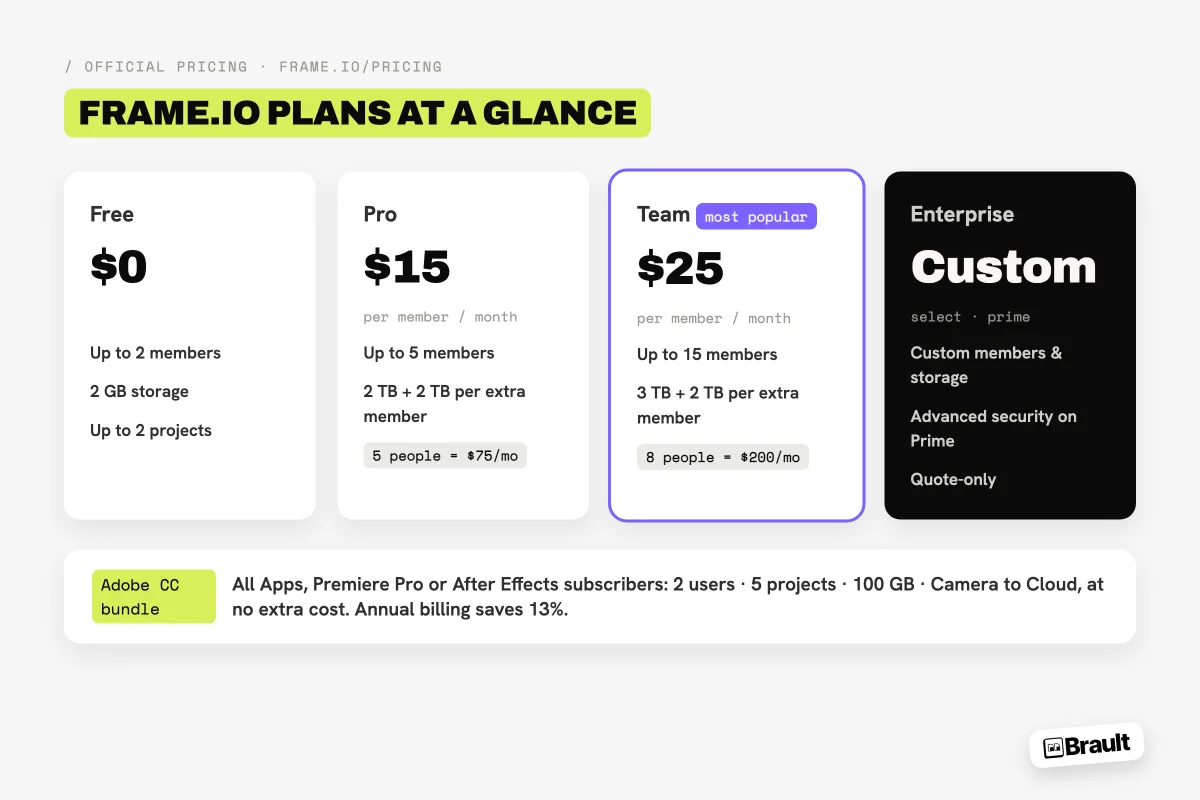
Frame.io pricing in 2026 runs from $0 to $25 per member per month on self-serve plans: Free ($0, 2 members, 2 GB), Pro ($15 per member/month, up to 5 members, 2 TB included), Team ($25 per member/month, up to 15 members, 3 TB included), and a custom-quoted Enterprise tier. Annual billing takes 13% off. Frame.io is Adobe's video review and collaboration platform, and qualifying Creative Cloud subscriptions include a limited version at no extra cost.
The catch for small creative teams is not the headline number, it is the multiplication. Frame.io charges per member, so the realistic bill for a five-person studio is $75 a month on Pro, and adding a sixth person means moving to Team at $25 per member. This guide breaks down every plan with the numbers from Frame.io's own pricing page, explains exactly what the Adobe bundle includes, and shows where per-seat review pricing stops making sense. For what the product does day to day, read the Frame.io review; for the field, the best Frame.io alternatives in 2026.
How much does Frame.io cost in 2026?
Frame.io's published self-serve pricing, verified on frame.io/pricing on 2026-08-12 and again on 2026-09-11, is the four plans above: Free at $0 for 2 members and 2 GB, Pro at $15 per member per month for up to 5 members with 2 TB, Team at $25 per member per month for up to 15 members with 3 TB, and Enterprise on a custom quote.
Three pricing mechanics to understand before comparing:
- Per member means every member. A "member" is anyone who works inside the workspace. Reviewers who only comment on shared links are free and unlimited, which matters for client-facing work.
- Annual billing discounts 13%. That brings Pro to roughly $13 and Team to roughly $22 per member/month equivalent.
- Storage scales with seats. Each additional member on Pro and Team adds 2 TB, so heavy-storage small teams effectively buy seats to get space.
Enterprise splits into two sub-tiers, Select and Prime, with Prime carrying the advanced security features. Like most enterprise creative software, the price is whatever comes out of the sales conversation.
Is Frame.io free with Adobe Creative Cloud?
Partially, and this is the best-value corner of Frame.io's pricing. Frame.io for Creative Cloud is included at no additional cost with a full Creative Cloud All Apps subscription, with individual Premiere Pro and After Effects subscriptions, and with student and teacher All Apps plans. The bundle includes:
- 2 Frame.io users
- 5 concurrent projects
- 100 GB of Frame.io storage
- Camera to Cloud (footage uploads from set to the workspace as you shoot)
- Free sharing with an unlimited number of reviewers
- Direct rendering from Premiere Pro to Frame.io
For a solo editor or a two-person post team already paying for Adobe, this replaces a paid review tool outright. New users also get a 30-day trial of the Team plan (up to 15 users, 3 TB). The bundle's ceiling arrives with the third team member or the 101st gigabyte: past either, you move to a separately billed Pro, Team, or Enterprise plan at the prices above.
What does Frame.io actually cost a small team per year?
Per-seat math is where the evaluation gets honest. A 15-person team pays $4,500 a year on Frame.io Team; the same team pays $1,368 on Brault Growth. Per year, on monthly billing:
| Team size |  Frame.io Pro Frame.io Pro |
Frame.io Team |
 Brault Brault |
|---|---|---|---|
| 3 people | $540 | $900 | $336 (Pro, 3 users) |
| 5 people | $900 | $1,500 | $888 (Growth, 4 + 1) |
| 8 people | Team only | $2,400 | $1,032 (Growth, 4 + 4) |
| 15 people | Team only | $4,500 | $1,368 (Growth, 4 + 11) |
Per year, list prices, verified 2026-08-12 on frame.io/pricing. Frame.io Pro tops out at 5 members and is billed monthly here; annual billing takes 13% off. Brault Growth includes 4 users at $70 per month plus $4 per extra user; Pro includes 1 user plus $8 per extra user, up to 3, billed annually.
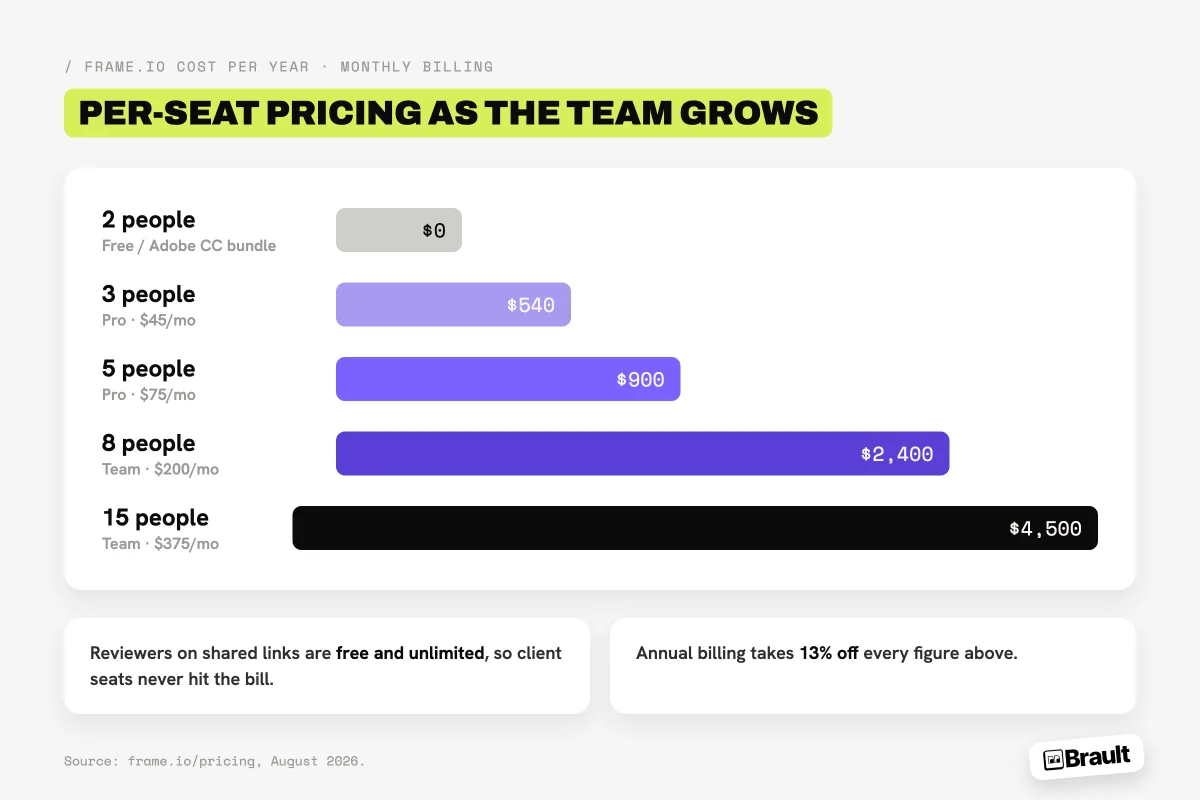
Annual billing reduces these by 13%. The numbers are reasonable for what Frame.io does best (professional video review with frame-accurate comments, version stacks, and native Premiere integration), and the free unlimited reviewers keep client seats off the bill. The pressure point is teams whose work is broader than video review: at $900 to $2,400 a year, Frame.io handles review while storage, delivery, and asset organization still live in other paid tools.
Hidden costs to check before signing
- Who counts as a member. Reviewers on a shared link are free; anyone who uploads, organizes or works inside the workspace is a paid member, freelancers included.
- Storage past the plan. Plan storage is a review buffer that grows with seats, not an archive; the library and the finished deliveries still live somewhere else you pay for.
- The sixth person. Pro stops at 5 members. The sixth seat moves everyone to Team at $25, so a team of six pays $150 a month, not $90.
When is Frame.io worth the price?
Frame.io is worth its price for teams whose workflow centers on video post-production inside the Adobe ecosystem. The Premiere Pro panel puts reviewer comments on the timeline and removes the export-upload-relink loop; Camera to Cloud starts editorial before the cards are offloaded, and no competitor matches it for on-set speed; and the review depth on video (frame-accurate commenting, annotation, version comparison, approval states) is the reference the category is measured against. That assessment is consistent with how we compare tools in our video review software guide.
Worth it
Editors on Premiere Pro, a small member count, shoots that review the same day. The two Adobe-only features are the reason to pay per member.
Compare first
Six or more people who all work inside the workspace. Price the year on two tools before renewing: the sixth member moves the whole team to Team pricing.
Different fit
Teams reviewing design, images and PDFs alongside video, or that also need storage, transfer and brand assets in the same subscription.
What are the alternatives if Frame.io pricing doesn't fit?
The alternatives split by what pushed you off Frame.io: the per-seat model, or needing more than review. Three tools change the pricing model rather than just the number.

- Best forAgencies and regulated teams that need formal, multi-stage sign-off
- Pricing$199 to $329 per month flat per account, billed annually
- Free plan2 users, one approval stage
- Watch outFlat rate starts high; proofing only, no storage or library

- Best forAnimation and video teams that want frame-accurate review plus storyboarding
- Pricing$10 per user per month on Pro, with 2 TB
- Free plan1 user, 2 GB, 2 projects, unlimited external reviewers
- Watch outStill per seat; lightweight project management
- Best forTeams that want review, storage, search and delivery in one platform
- Pricing$12 per month on Pro, $70 per month on Growth (4 users included), billed annually
- Free planYes, 1 user, frame-accurate review included
- Watch outNo Premiere Pro panel and no Camera to Cloud; Pro tops out at 3 users
If the per-seat bill is the problem, Brault prices by storage first: $0 (Free, 2 GB), $4/month (Lite, single user), $12/month (Pro, 2 TB, up to 3 users with extras at $8), and $70/month (Growth, 5 TB, 4 users included with extras at $4), billed annually. Brault's review tooling covers frame-accurate video comments and annotations pinned to the pixel on images, and adds what Frame.io leaves to other tools: AI content search across 50+ formats, white-label branded delivery, and built-in transfer up to 250 GB.
The seat math lands differently depending on team size. A three-person studio pays $540 a year on Frame.io Pro against $336 on Brault Pro. An eight-person team pays $2,400 on Frame.io Team against $1,032 on Brault Growth. At five people the two land close, roughly $900 against $888, because that team size crosses Brault's Pro seat cap into Growth. The difference at that size is not the price, it is what the price covers: Frame.io buys review, while Brault includes 5 TB of storage, AI search, and branded 250 GB delivery in the same subscription. Frame.io keeps the edge on the Premiere panel and Camera to Cloud; the full head-to-head lives at Frame.io vs Brault.
For the wider field (Vimeo Review, Filestage, Ziflow, Wipster and others), see our roundup of the best Frame.io alternatives in 2026, which compares them on pricing model, review depth, and workflow fit. And if the underlying question is consolidating review with storage and delivery in one subscription, start with what creative asset management is and how it differs from single-purpose review tools.
Frequently asked questions
How much does Frame.io cost in 2026?
Frame.io costs $0 to $25 per member per month on self-serve plans in 2026. The Free plan includes 2 members, 2 GB of storage, and 2 projects. Pro is $15 per member/month (up to 5 members, 2 TB included). Team is $25 per member/month (up to 15 members, 3 TB included). Enterprise is custom-quoted. Annual billing carries a 13% discount, and the prices come from Frame.io's official pricing page.
Is Frame.io free with Adobe Creative Cloud?
Partially. Qualifying Adobe subscriptions (Creative Cloud All Apps, or individual Premiere Pro and After Effects plans) include Frame.io for Creative Cloud at no extra cost: 2 Frame.io users, 5 concurrent projects, 100 GB of storage, Camera to Cloud, and unlimited free reviewers. Larger teams or storage needs require a separately billed Pro ($15/member/month), Team ($25/member/month), or Enterprise plan.
Can you use Frame.io for free?
Yes, two ways. The Frame.io Free plan includes 2 members, 2 GB of storage, and 2 projects at $0. If you already pay for Creative Cloud All Apps or an individual Premiere Pro or After Effects subscription, you get a larger free tier: 2 users, 5 projects, and 100 GB of storage. Both stop short of team use; paid plans start at $15 per member/month.
Is Frame.io owned by Adobe?
Yes. Adobe acquired Frame.io in 2021 for approximately $1.28 billion, and Frame.io is now Adobe's cloud collaboration layer for video, integrated natively with Premiere Pro and After Effects and bundled in limited form with qualifying Creative Cloud subscriptions.
What is a cheaper alternative to Frame.io for small teams?
For small creative teams, Brault is the most affordable Frame.io alternative with review features: frame-accurate video comments and pixel-pinned image annotations, priced by storage instead of per seat at $0, $4, $12 (2 TB), and $70/month (5 TB) billed annually. A three-person studio pays $540 a year on Frame.io Pro against $336 on Brault Pro, and an eight-person team pays $2,400 on Frame.io Team against $1,032 on Brault Growth. Frame.io remains the stronger fit for Premiere-centric teams that need the editor panel and Camera to Cloud.
Key takeaways
- Frame.io's 2026 self-serve pricing: Free ($0, 2 members, 2 GB), Pro ($15/member/month, up to 5), Team ($25/member/month, up to 15), Enterprise custom. Annual billing discounts 13%.
- Reviewers on shared links are free and unlimited on every plan; only workspace members count toward the bill.
- Qualifying Creative Cloud subscriptions include a real free tier: 2 users, 5 projects, 100 GB, and Camera to Cloud. For solo editors on Adobe, that replaces a paid review subscription.
- The per-seat model prices small teams at $540 to $2,400 a year for review alone. Frame.io earns it for Premiere-centric video teams; teams needing storage, delivery, and search too are paying for one layer of a larger stack.
- Brault covers review (frame-accurate video comments, pixel-pinned annotations) plus storage, AI search, and branded 250 GB transfer, priced by storage from $0 to $70/month billed annually. Three people run $336 a year and eight run $1,032, against $540 and $2,400 on Frame.io.