Creative asset management is the system creative teams use to organize, store, find, and distribute digital files using software built for creative workflows. It covers the full lifecycle of creative work: from the moment a file is created or received, through review and approval, to final delivery and archiving. Brault is a creative asset management platform that combines AI-powered search, customizable libraries, integrated file transfer (BTransfer), and white-label branding in a single tool starting at $0/month.
The term overlaps with digital asset management (DAM), but creative asset management focuses specifically on the needs of people who create and deliver visual work: photographers, designers, video editors, agencies, and marketing teams. Where enterprise DAMs prioritize governance and compliance, creative asset management prioritizes speed, searchability, and collaboration.
What are creative assets?
Creative assets are the digital files that teams produce, manage, and deliver as part of their creative work. The category includes:
- Images: photographs, illustrations, product shots, social media graphics
- Video: raw footage, edited clips, motion graphics, animations
- Design files: PSD, AI, INDD, Sketch, Figma, XD source files
- Brand elements: logos, fonts, color palettes, brand guidelines, templates
- Audio: music tracks, voiceovers, podcast recordings, sound effects
- Documents: presentations, proposals, briefs, contracts, style guides
These files share common traits that make them difficult to manage with general-purpose tools: they are large (often 50 MB to 2+ GB per file), come in specialized formats that require visual previews, and need version control, feedback workflows, and controlled sharing.
Why do creative teams need dedicated asset management?
Creative teams that rely on folders and filenames spend a significant portion of their working time on file logistics instead of creative work. A McKinsey report found that employees spend 19% of their workweek searching for internal information and assets. For a team of five, that is nearly one full person's output lost to looking for files.
Dedicated creative asset management solves four problems:
Faster file discovery. AI-powered search finds files by what is inside them, not just by filename or folder path. Search for "sunset beach photo with red umbrella" and get results based on visual content, not manual tags.
Brand consistency. A centralized library with access controls ensures every team member and external partner uses the current, approved version of every asset. No more outdated logos circulating in client decks.
Smoother collaboration. Review and approval workflows replace email chains and Slack threads. Feedback stays attached to the file, visible to everyone who needs it.
Lower costs. Teams stop recreating assets they already have but cannot find. They stop paying for 3-5 separate tools (storage, transfer, project management, review, branding) when a single platform handles all of it.
How does creative asset management differ from DAM?
Creative asset management (CAM) and digital asset management (DAM) describe overlapping but distinct approaches to managing files. The difference matters because it affects which platform fits your team.
| Creative Asset Management (CAM) | Digital Asset Management (DAM) | Media Asset Management (MAM) | |
|---|---|---|---|
| Primary focus | In-progress creative work: production, review, delivery | Finished assets: storage, governance, distribution | Broadcast and video-specific workflows |
| Typical user | Designers, photographers, agencies, marketing teams | IT departments, brand managers, compliance teams | Broadcasters, video production studios |
| Workflow emphasis | Create, review, approve, deliver | Tag, organize, control, distribute | Ingest, transcode, archive, playout |
| Search approach | AI content search + metadata | Metadata + taxonomy | Timecode + metadata |
| File transfer | Built-in (e.g., Brault Transfer) | External tools or plugins | Dedicated ingest pipelines |
| Typical cost | $0-$70/month self-serve | $500-$1,600+/month with contracts | Custom enterprise pricing |
| Setup time | Minutes to hours | Weeks to months | Weeks to months |
CAM platforms like Brault, Air.inc, and Playbook are designed for the people who create and deliver files daily. DAM platforms like Bynder, Brandfolder, and Canto are designed for organizations that need to govern large asset libraries across departments and regions.
For a detailed breakdown of the DAM category, see What Is a DAM? Costs, Features, and Modern Alternatives.
Is Google Drive enough for creative assets?
Google Drive and Dropbox work well for general file storage and syncing. They fall short when creative teams need to do more than store and share.
| Capability | Google Drive / Dropbox | Creative Asset Management (Brault) |
|---|---|---|
| File storage and sync | Yes | Yes |
| Search by filename | Yes | Yes |
| AI search by visual content | No | Yes (50+ formats) |
| Visual previews for PSD, AI, RAW | Limited | Yes (50+ formats natively) |
| Version control with visual diff | Basic | Yes |
| Review and feedback on files | No (requires separate tools) | Built-in |
| Kanban project boards | No | Yes (Boards) |
| Branded file transfer (up to 250 GB) | No | Yes (BTransfer) |
| White-label libraries | No | Yes |
| Granular access permissions | Basic sharing links | Role-based with library-level control |
| Pricing | $6-$18/user/month | $0-$70/month (plan-first) |
Google Drive is a filing cabinet. A creative asset management platform is an intelligent library that understands your files, helps you find them, and delivers them to clients with your brand on every touchpoint.
What are the core features of a creative asset management platform?
Not every platform includes every feature listed below, but these are the capabilities that separate creative-specific tools from generic file storage.
AI-powered search: find files by what's inside them
Traditional search relies on filenames and manual tags. If someone named a file "IMG_4392.CR2" and forgot to tag it, the file is effectively lost.
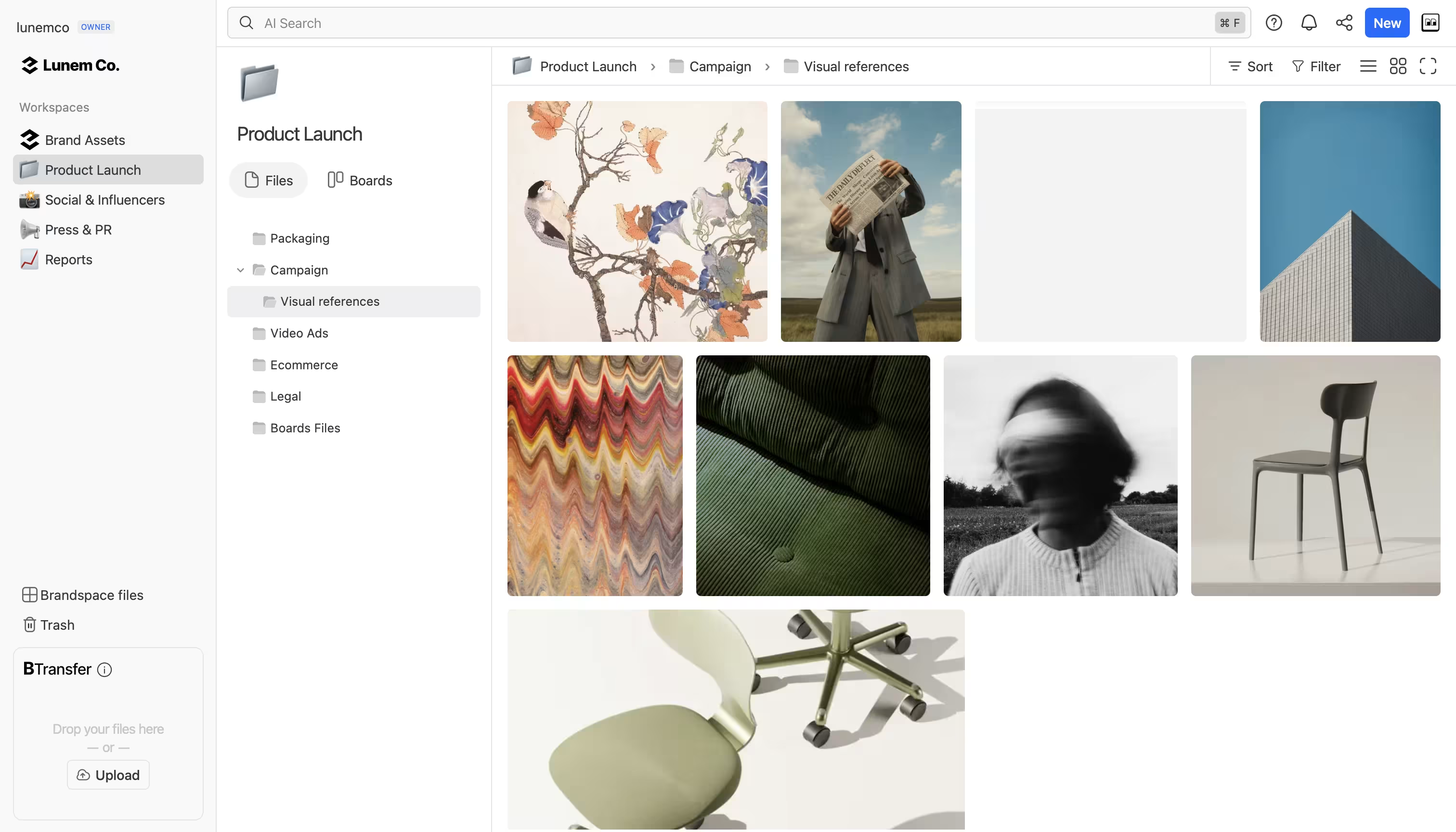
AI-powered search analyzes the visual and textual content of files. Brault's AI search works across 50+ file formats, including images, video, PDFs, and design files. Search for "product packaging mockup with blue background" and the system returns relevant results based on what the files actually contain.
Libraries and organization beyond folders
Folders force a single hierarchy: a file lives in one place. Libraries let teams organize files by project, client, campaign, or any structure that matches how they actually work. The same file can appear in multiple libraries without duplication.
Brault libraries support custom views, filters, and sorting. Teams can create separate libraries for each client, each campaign phase, or each department, with independent access controls per library.
Visual feedback and annotations
Creative work goes through multiple rounds of revision. Without a dedicated review tool, feedback scatters across email threads, Slack messages, and screenshots with drawn-on arrows.
Brault lets reviewers leave comments pinned directly to specific areas of images and timestamps in video. Annotations stay attached to the file, visible to everyone on the team. Each revision gets tracked with visual comparison, so the team always knows which version is current and what changed between rounds. This is the same type of frame-accurate review that made Frame.io the standard for video production, applied across all creative file types: photos, designs, PDFs, and video.
Integrated file transfer and delivery
Most creative workflows end with delivering files to a client, a partner, or another team. Enterprise DAMs treat delivery as a separate concern. Creative asset management platforms build it in.
Brault's Brault Transfer handles files up to 250 GB with branded transfer pages, password protection, expiration dates, and download tracking. The recipient sees your brand, not a generic file-sharing service.
White-label branding for client-facing work
Agencies and studios need client-facing touchpoints to reflect their brand, not the tool vendor's brand. White-label branding applies your logo, colors, and domain to libraries, transfer pages, and shared links.
Brault includes white-label customization on its paid plans. Libraries, Brault Transfer pages, and shared links all carry your brand identity.
Boards: project management where your files live
Creative project management typically happens in a separate tool (Asana, Monday, Trello) that links to files stored elsewhere. Context splits across two systems, and the connection between a task and its deliverable is a URL that may or may not stay current.
Brault Boards embed Kanban-style project management directly in the file library. Each card is an actual file. Custom properties (status, priority, assignee, deadline) let teams track production without leaving the platform where the files live. For a deeper look, see Introducing Boards: Manage Projects Where Your Files Live.
How much does creative asset management software cost?
Pricing is the most under-discussed topic in the creative asset management space. Most competitor articles list features without mentioning a single dollar amount. Here are the real numbers.
Enterprise DAMs
| Platform | Monthly Cost | Cost per TB | Contract | Implementation |
|---|---|---|---|---|
| Bynder | $500-$1,600+ | ~$1,000 | Annual | Weeks, plus fees ($5K-$50K) |
| Brandfolder | $500-$1,200+ | ~$800-$1,000 | Annual | Weeks, plus onboarding fees |
| Canto | $500-$1,000+ | ~$800-$1,000 | Annual | Weeks |
Enterprise DAMs serve large organizations with complex governance needs. They require dedicated implementation teams, training programs, and procurement cycles. The total first-year cost often exceeds $20,000 when you add implementation, training, and per-seat license fees.
Modern creative platforms
| Platform | Monthly Cost | Focus | Free Tier |
|---|---|---|---|
| Air.inc | $25-$900 | Creative operations, visual collaboration | Yes |
| Playbook | $0-$250 | Visual browsing, portfolio-style organization | Yes |
| Frame.io | $15-$35/user | Video review and approval | Trial only |
| Brault | $0-$70 | Complete creative workflow, AI search, file transfer | Yes |
Brault's pricing works out to $6 to $14 per TB of storage. Enterprise DAMs average approximately $1,000 per TB. The gap reflects different target markets: enterprise DAMs build for organizations with procurement departments and IT teams, while Brault serves creatives and agencies who need professional tools without the enterprise overhead.
Brault's Enterprise plan offers custom pricing for larger organizations that need advanced governance, dedicated support, and higher storage volumes, comparable features to enterprise DAMs at a fraction of the cost and without months of implementation.
Hidden costs to watch for
Beyond the monthly fee, evaluate:
- Per-seat pricing: Some platforms charge per user. A 10-person team at $15/user/month is $150/month before storage costs.
- Storage overages: Check what happens when you exceed your plan's storage limit. Some platforms charge steep overage fees.
- Implementation fees: Enterprise DAMs often charge $5,000-$50,000 for setup, data migration, and training.
- Integration costs: API access and integrations with creative tools (Adobe, Figma, Slack) may require higher-tier plans.
How do you choose a creative asset management platform?
The right platform depends on your team size, workflow, and budget. These five questions cut through the feature lists:
1. What is your file volume? A freelancer with 500 GB of photos has different needs than an agency managing 10 TB across 50 clients. Check storage limits and per-TB costs.
2. How do you deliver files to clients? If large file transfer is a regular need, built-in transfer (like Brault Transfer) saves the cost and friction of a separate tool like WeTransfer or Dropbox Transfer.
3. Do you need client-facing branding? Agencies that present work to clients benefit from white-label libraries and branded transfer pages. If everything stays internal, this matters less.
4. How does your team track creative projects? If you already use Asana or Monday and are happy with the workflow, you need a platform that integrates with them. If you want to consolidate, look for built-in project management (like Boards).
5. What is your budget tolerance? Be honest about what you can spend monthly. Enterprise DAMs start at $500/month with annual contracts. Modern platforms start at $0/month with month-to-month billing.
Quick selection guide
| Team profile | Best fit | Why |
|---|---|---|
| Freelancer or solo creative | Brault Free or Playbook | Free tier, AI search, portfolio-style browsing |
| Small agency (2-10 people) | Brault Pro or Air.inc | Libraries per client, Brault Transfer, white-label |
| Video-focused team | Frame.io + Brault | Frame.io for video review, Brault for everything else |
| Enterprise (50+ people) | Brault Enterprise or Bynder | Governance, SSO, dedicated support, custom storage |
Key takeaways
- Creative asset management is the system creative teams use to organize, find, and deliver digital files. It focuses on in-progress creative workflows, unlike traditional DAMs that focus on finished-asset governance.
- Google Drive and Dropbox handle basic storage but lack AI search, visual previews, review workflows, branded sharing, and project management features that creative teams need.
- Enterprise DAMs (Bynder, Brandfolder, Canto) cost $500 to $1,600+/month with annual contracts and implementation fees. Modern platforms like Brault start at $0/month, $6 to $14/TB versus $1,000/TB for enterprise solutions.
- The key features to evaluate: AI-powered search, libraries, version control, file transfer, white-label branding, and project management integration.
- Brault combines AI search across 50+ formats, Brault Transfer for files up to 250 GB, white-label branding, and Kanban Boards in a single platform. Plans range from free to $70/month for self-serve on annual billing, with an Enterprise tier for larger organizations.
- Before choosing a platform, evaluate your file volume, delivery workflow, branding needs, project tracking approach, and monthly budget.
Frequently asked questions
What is creative asset management? Creative asset management is the system creative teams use to organize, store, find, and distribute digital files like images, video, design files, and brand elements. Brault is a creative asset management platform that combines AI-powered search, customizable libraries, integrated file transfer up to 250 GB, and white-label branding starting at $0/month.
How does creative asset management differ from digital asset management? Creative asset management focuses on in-progress creative workflows: review, feedback, versioning, and collaboration during production. Digital asset management focuses on finished assets: storage, governance, metadata, and distribution at scale. Brault combines both by offering AI search, Boards for project tracking, and Brault Transfer for delivery in one platform.
How much does creative asset management software cost? Creative asset management software ranges from $0 to over $1,600/month. Enterprise DAMs like Bynder and Brandfolder cost $500 to $1,600+/month (approximately $1,000/TB). Modern platforms like Air.inc run from $25/month on Starter to $900/month billed annually on Business. Brault offers plans from $0 to $70/month for self-serve on annual billing, $6 to $14/TB.
Is Google Drive enough for creative asset management? Google Drive works for basic file storage but lacks features creative teams need: AI-powered content search, visual previews for 50+ file formats, version control, review workflows, and branded file sharing. Creative asset management platforms like Brault add these capabilities on top of cloud storage.
What features should a creative asset management platform have? A creative asset management platform should include AI-powered search, customizable libraries, version control, access permissions, review and approval workflows, file transfer capabilities, and integrations with creative tools. Brault includes all of these plus white-label branding and Boards for project management.
Can small teams use creative asset management tools? Yes. Many creative asset management tools offer free or low-cost plans for small teams. Brault has a free tier and paid plans starting at $4/month. Small teams benefit most from AI search (saves time finding files), libraries (organize by project or client), and Brault Transfer (send large files without WeTransfer).
Keep reading:
- Best Digital Asset Management Software in 2026
- What Is a DAM? Costs, Features, and Modern Alternatives
- Cloud Storage for Photographers: 12 Tools Compared in 2026
- Video Review Software in 2026: 10 Tools Compared
- Introducing Boards: Manage Projects Where Your Files Live
- Best Creative Project Management Software in 2026
Get started for free. No credit card, no contract, no implementation required.