Creative project management is the practice of moving creative work from a brief to an approved deliverable: planning the work, assigning it, running the review cycles, and shipping the final files. It covers design, video, photography, and campaign production, and it differs from generic project management in one structural way that shapes every tool decision: the deliverable is a file, not a completed task. In Brault, that difference is the starting point. Project status lives on the assets themselves through Boards, rather than in card titles that describe files stored somewhere else.
Agencies and in-house creative teams lose more time to the seams between their tools than to the creative work itself. A designer finishes version three, uploads it to Drive, pastes the link in Slack, and moves a card in Asana. Three systems now hold one fact, and two of them are already wrong. This guide covers the stages of a creative project, where the process usually breaks, and how to run the whole cycle in one place.
What is creative project management?
Creative project management is the coordination of creative production from brief to delivery, including scope, schedule, resourcing, feedback rounds, and final handoff. The person who runs it is a creative project manager, and the artifact they manage is a set of files that changes state over time.
Two definitions from the category are worth holding side by side. Traditional project management treats a deliverable as a task that is either done or not done. Creative project management treats a deliverable as a file that exists in several versions at once, each one approved by a different person, with one of them current. Everything difficult about the discipline follows from that.
The practical scope of the job covers five things:
- Scope: what is being made, in what formats, at what sizes, for which channels.
- Schedule: when each round is due, and how many rounds the budget allows.
- Resourcing: who is making it, and who reviews it.
- Feedback: how comments arrive, who arbitrates conflicting notes, and what counts as approval.
- Delivery: where the final files go, in what format, and how they stay findable afterwards.
How is creative project management different from regular project management?
The difference is not that creative people dislike process. It is that three properties of creative work break the assumptions generic project tools are built on.
Feedback is subjective and arrives in fragments. "Make the logo bigger" is not a ticket, it is a conversation. A task tool records that a review happened. It does not record which pixel the note referred to, which is why so many teams paste screenshots with arrows into chat.
Revision loops have no natural end. A software task closes when the tests pass. A campaign key visual closes when someone with authority says stop. Round four exists because round three raised something round two could not have anticipated. Budgets get eaten in that gap.
The files are heavy and they multiply. A single photo shoot produces 2,000 raw frames, 40 selects, 12 retouched masters, and 30 crops for channels. A video project carries proxies, masters, and versions per platform. Generic project tools link to files, so the tool and the asset drift apart the moment someone renames or re-exports something.
That last property is the one that decides your stack. If the deliverable is a file, then the system of record should be the place the files already live.
What are the stages of a creative project?
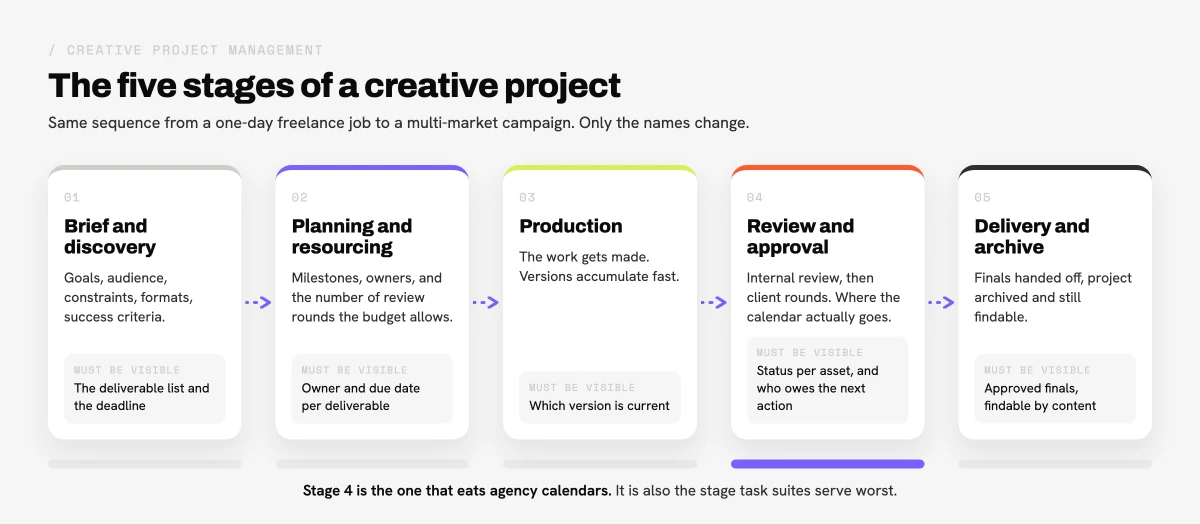
Most creative projects, from a one-day freelance job to a multi-market campaign, run through the same five stages. The names change by agency. The sequence does not.
| Stage | What happens | What usually goes wrong | What should be visible |
|---|---|---|---|
| Brief and discovery | Goals, audience, constraints, formats, success criteria | Verbal briefs, no written constraints, formats agreed late | The brief, the deliverable list, the deadline |
| Planning and resourcing | Milestones, owners, review rounds budgeted | Rounds are never budgeted, so round five is a surprise | Owner and due date per deliverable |
| Production | The work gets made, versions accumulate | Versions live on desktops, filenames carry the state | Which version is current |
| Review and approval | Internal review, then client rounds | Feedback arrives in email, chat, and calls at once | Status per asset, and who owes the next action |
| Delivery and archive | Final files handed off, project archived | Finals are re-requested weeks later and nobody can find them | Approved finals, findable by content |
The review and approval stage is where agency calendars actually go. It is also the stage most poorly served by task suites, because a task cannot hold a comment pinned to a frame at 00:42.
Why does creative project management break down between tools?
Ask a creative team where a project stands and count how many applications they open to answer. The usual answer is three: a task board, a storage service, and a chat thread. Each one holds a partial truth.
The duplication tax shows up in four places:
- Two names for one thing. A card called "Homepage banner v3" points at a file called
homepage_banner_v3_final_FINAL.psd. The file gets re-exported. The card does not know. - Status that has to be copied. Moving work forward means updating the file, then the card, then telling the channel. Nobody does all three consistently, so the board lies within a week.
- Feedback that never reaches the asset. Notes live in an email thread. Six months later the file is in the archive and the reasoning behind it is gone.
- Search that stops at the filename. When a client asks for "that shot with the red umbrella", the storage service can only find it if someone typed those words into the name.
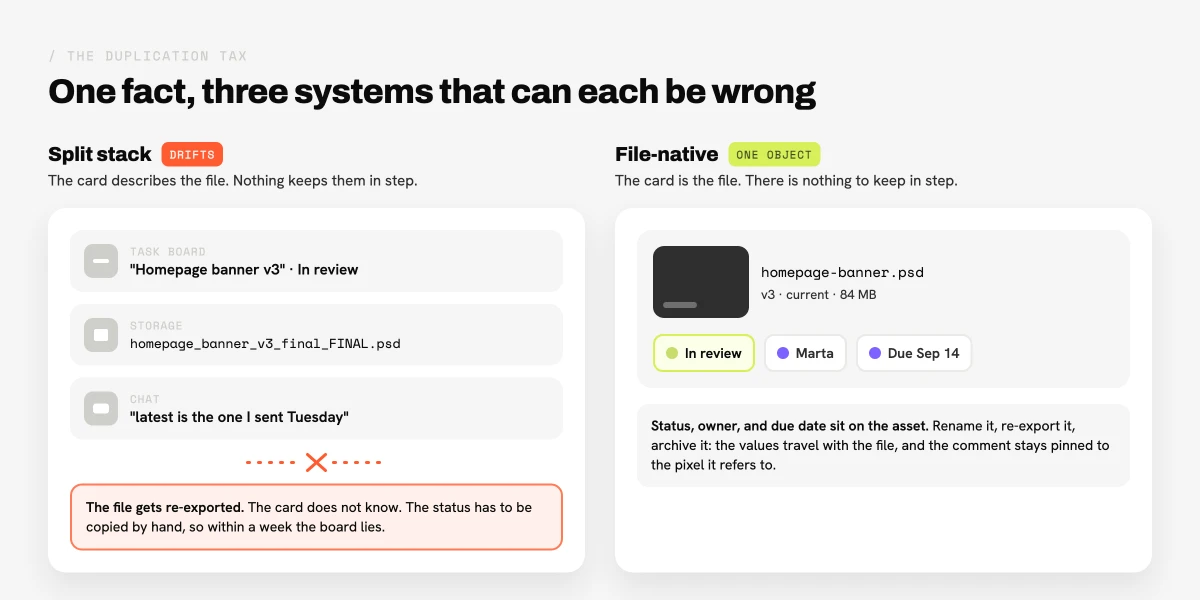
That is the fragmentation cost. It is not a tooling preference, it is a measurable amount of coordination work that exists only because the file and its status live in different systems. Our guide to creative asset management covers the storage half of this problem in more depth.
What does it mean to manage a creative project where the files live?
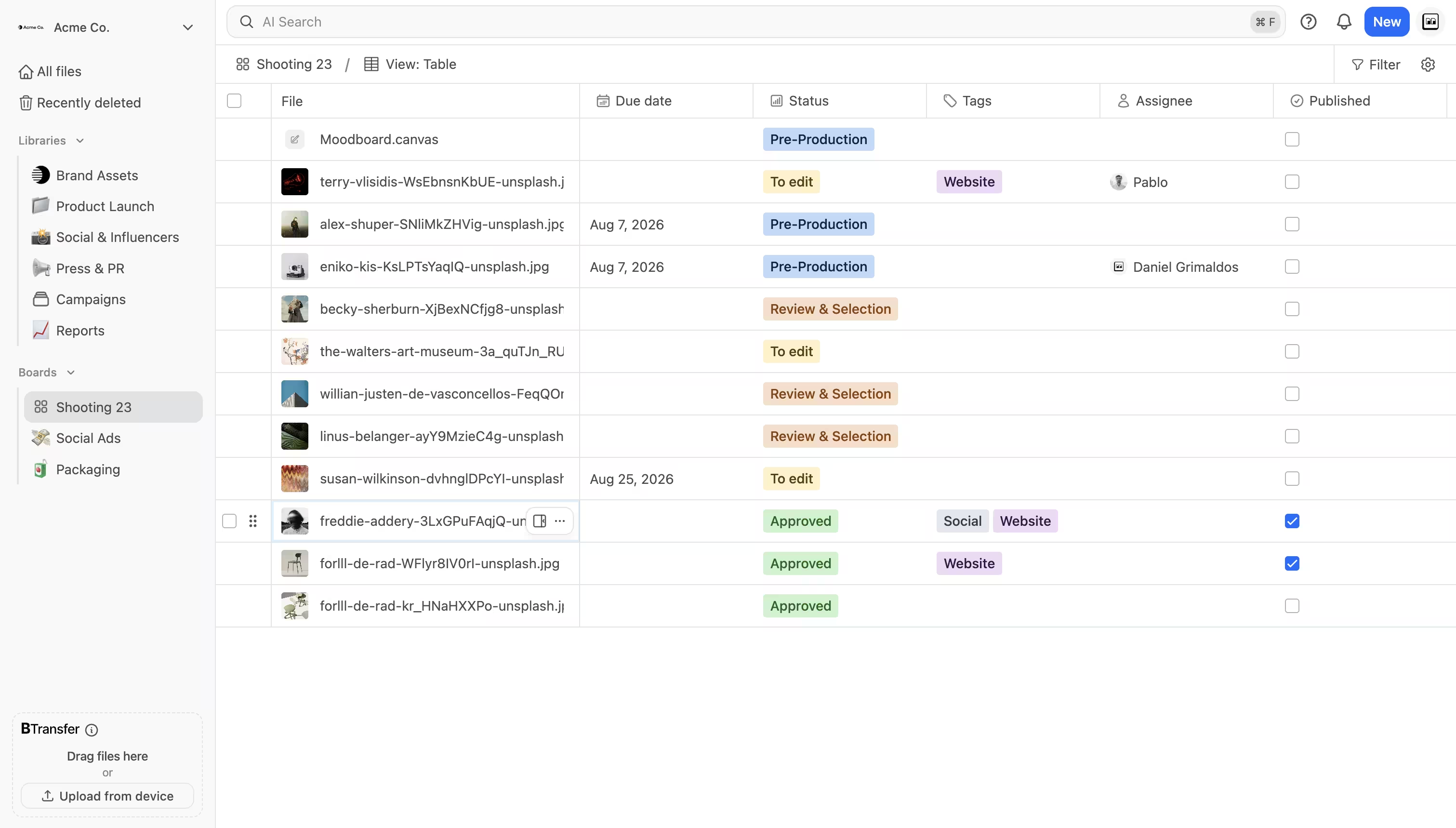
The alternative is to stop describing files and start tracking them directly. In Brault, a Board is a project view over real files. Each card, tile, or row is an actual asset in the library, not a reference to one. Add a status property, an owner, and a due date, and the board becomes the project tracker without duplicating a single filename.
Three consequences follow, and they are the reason this model is worth the switch:
- A rename cannot desynchronize anything, because there is only one object. The card is the file.
- The status travels with the asset. Six months later, the approved master still carries the property values that say who approved it and when.
- Review lives on the pixel. Comments and annotations attach to the frame or the region they refer to, so the note and the artwork never separate. Brault handles frame-accurate annotation on both video and images, which is the part video review software is normally bought separately to do.
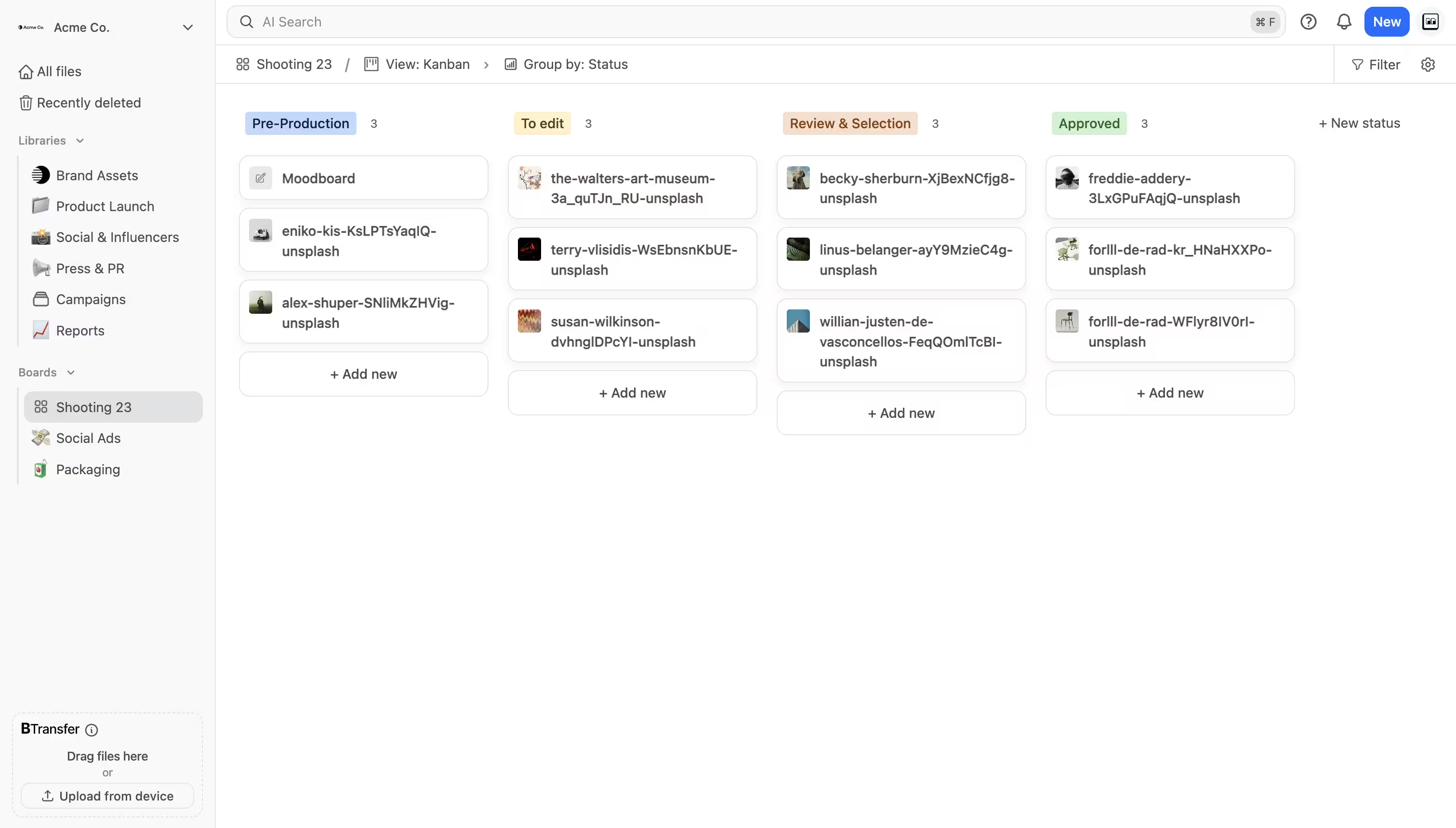
Boards started as kanban only. Since August 2026 the same board renders in three views, which is what makes the model work across the whole project rather than just the tracking stage.
Which working view fits each stage of a creative project?
This is the part most creative project management guides skip. Different stages of a project need different working surfaces, and forcing all of them into one layout is why teams abandon systems. A photographer culling 2,000 frames does not want a spreadsheet. A producer chasing approvals does not want a mosaic of thumbnails.
| View | Best for | Stage | What it optimizes |
|---|---|---|---|
| Gallery | Looking at the work | Production, selects, culling | Big thumbnails at natural aspect ratio, marquee selection, hover scrub on video |
| Kanban | Moving the work forward | Review and approval | Columns per status, drag to change state, one glance for pipeline health |
| Table | Filling in the facts | Planning, delivery, archive | Every property as a column, keyboard editing, copy and paste from a spreadsheet |
In practice a single campaign board gets used in all three during its life. The shoot lands and the team works in gallery to pick selects. Retouching starts and the board switches to kanban so the status columns show what is with the retoucher and what is with the client. Delivery week arrives and table view fills in usage rights, channel, and delivery date for forty assets at once, pasted straight from the spreadsheet the media team already maintains.
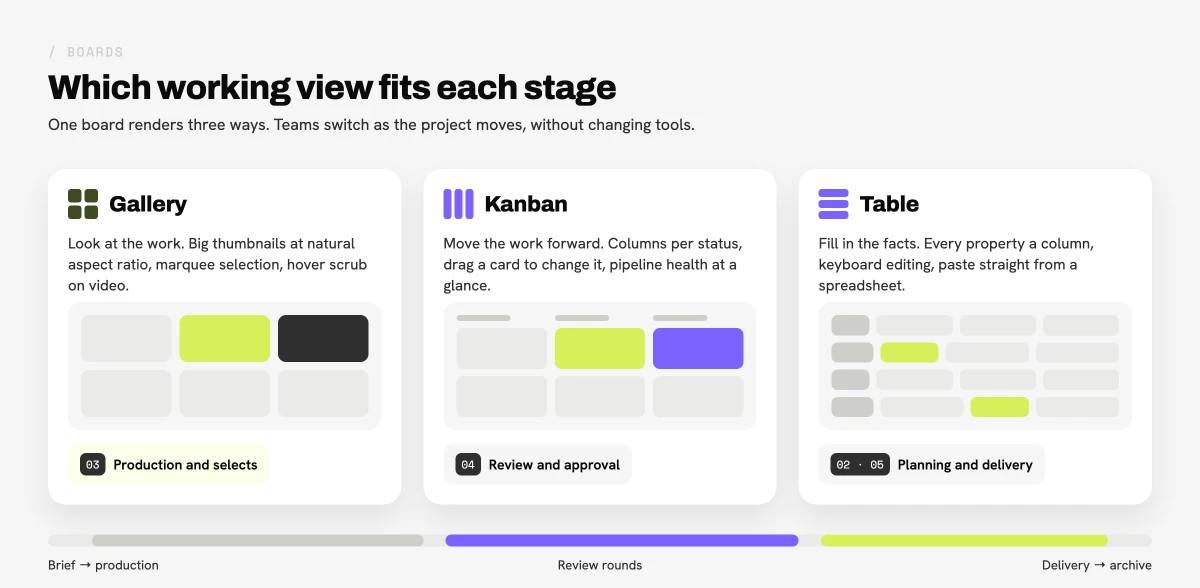
The view is a per-person preference, stored per board, so the producer can sit in kanban while the retoucher works in gallery on the same project without either of them changing what the other sees. Full detail on the three views is in Three ways to see a board: gallery, kanban, and table.
Which tools do creative teams use for creative project management?
The category splits into three groups, and most teams end up owning one from each. Prices below are per user per month unless noted, and reflect published rates at the time of writing.
| Tool | Category | Entry price | Strength | Files live |
|---|---|---|---|---|
| Asana | Task suite | $0, paid from $10.99 | Cross-functional planning, dependencies | Elsewhere |
| Monday.com | Task suite | $0, paid up to about $20 | Flexible boards, automations | Elsewhere |
| Wrike | Task suite | $0, paid tiers by quote | Resource management, proofing add-on | Partially |
| Adobe Workfront | Enterprise creative ops | Quote only | Large creative operations, Adobe integration | Partially |
| Airtable | Database | $0, paid from about $20 | Custom records and views | Elsewhere |
| Ziflow | Review and approval | Free tier, paid per user | Structured proofing workflows | Elsewhere |
| Frame.io | Video review | Free tier, paid per user | Video review, Camera to Cloud, Premiere panel | In the tool |
| Brault | File-native library | $0, then $4, $12, $70/month billed annually | Boards on real files, AI search, transfer, white label | In the tool |
Two honest notes on that table. If your work is primarily video and your editors live in Premiere, Frame.io's Camera to Cloud and its Premiere panel are hard to beat, and Brault does not have equivalents. If your organization needs enterprise resource planning across hundreds of creatives, Adobe Workfront is built for that scale and Brault is not.
Brault is the better fit when the project is a set of files, the team is between one and fifty people, and per-seat pricing on three separate tools has become the largest line item in the stack. Pricing is storage-first rather than per seat, at $0, $4, $12, and $70/month billed annually ($5, $15, and $85 month to month), with Boards on every plan including the free one, and four users included on Growth. For a ranked comparison with pricing detail, see the best creative project management software in 2026.
How do you set up a creative project workflow in an afternoon?
Small teams do not need a rollout plan. They need four facts visible per deliverable: current version, stage, owner, due date. Here is the minimum viable setup, which takes about twenty minutes per project.
- Create one board per project, not per client. A board with eighty files is useful. A board with eight hundred is a library.
- Add three properties: a status (single select), a person, and a date. Resist adding more until something concrete is missing.
- Name your statuses after decisions, not activities. "Waiting on client" tells you who owes the next action. "In progress" tells you nothing.
- Set the default working view per stage. Gallery while the work is being made, kanban once review starts.
- Put the client in the same object. Share the board or the individual assets with a review-level link so feedback lands on the file instead of in an email thread.
- Archive by leaving it alone. When the project closes, the approved files keep their property values, so the board stays readable as a record of what happened.
Teams that already run a task suite do not have to abandon it. The split that works is simple: keep the task suite for work that is not a file (media plans, budgets, meetings) and move anything with a deliverable attached to the board where the deliverable lives.
How do you know your creative project management is working?
Vanity metrics like task completion rates say very little about creative delivery. Four signals say a lot.
Rounds per deliverable. If the average is climbing, the brief stage is failing, not the design stage. Track it per client.
Time in "waiting on client". This is the number agencies underestimate most. Making it visible on the board changes client behavior more than any email ever does.
Time to find an approved final. Ask someone to produce last quarter's approved hero image. If it takes more than a minute, the archive stage is broken and you will pay for it in re-shoots and re-creation. This is where content-based search matters: finding a file by describing what is in it beats remembering what it was called.
Number of places a status can be wrong. Count the systems that claim to know the state of a project. The target is one.
Frequently asked questions
What is creative project management? Creative project management is the practice of moving creative work from a brief to an approved deliverable: planning the work, assigning it, running review cycles, and shipping the final files. It differs from generic project management because the deliverable is a file, feedback is subjective, and revision loops have no fixed end.
What are the stages of a creative project? Brief and discovery, planning and resourcing, production, review and approval, and delivery and archive. Review consumes the most calendar time in agency work.
What is the difference between a creative project manager and a creative director? The creative director owns the creative decision. The creative project manager owns the delivery: scope, schedule, resourcing, review rounds, and handoff. In small studios one person carries both.
What software do creative project managers use? Usually a task suite (Asana, Monday.com, Wrike, Adobe Workfront), a review tool (Ziflow, Frame.io), and a storage layer. Brault combines the file, review, and tracking layers in one library from $0 to $70/month billed annually.
Do small creative teams need creative project management software? They need one visible place holding the current version, its stage, its owner, and its due date. A single board with three properties satisfies that, starting at $0.
Key takeaways
- Creative project management moves creative work from brief to approved deliverable, and the deliverable is a file rather than a completed task.
- Five stages structure almost every creative project: brief and discovery, planning and resourcing, production, review and approval, delivery and archive.
- The discipline usually breaks at the seams between tools, where a card in one system describes a file in another and the two drift apart.
- Managing projects on the files themselves removes the duplication: the card is the asset, the status travels with it, and feedback attaches to the pixel.
- Different stages need different working surfaces. Gallery view suits selects and production, kanban suits review and approval, table suits planning and delivery.
- A workable setup for a small team is one board per project with three properties: status, owner, date. It takes about twenty minutes.
- Measure rounds per deliverable, time spent waiting on the client, time to find an approved final, and how many systems can hold a wrong status.
Related reading
- Best Creative Project Management Software in 2026 — a ranked comparison of ten tools by price, free plan, and file handling.
- Introducing Boards: Manage Projects Where Your Files Live — how file-native boards work in Brault.
- What Is Creative Asset Management? — the storage and findability half of the same problem.
External references: the Project Management Institute's creative agencies resources for methodology grounding, and Atlassian's guide to creative project management for a task-first view of the same category.
If your creative projects currently live across three tools, the fastest test is to rebuild one active project as a single board and see how many status updates stop being necessary. Get started for free and set up your first board in an afternoon. If there is a workflow you would like Brault to handle better, we want to hear about it.