Dropbox is the cloud file system most creative teams started on: a folder that syncs everywhere, shared folders with permissions, version history and Dropbox Transfer for sending copies out. Its published plans are Basic (free, 2 GB), Plus at $9.99 a month for 2 TB, Standard at $15 per user a month for a 3 TB team, and Advanced at $24 per user for 15 TB, with Business Plus and Enterprise above, US list verified 2026-09-14. A Dropbox alternative, for a creative team, is any tool that keeps the files and adds what Dropbox leaves to other apps: finding a file by what is in it, getting it approved, and handing it to a client under your own brand.
Three things send teams looking. The unit: Dropbox bills per user from three seats on Standard, so a ten-person agency pays $150 a month before the library is full. The gaps: search by file name, review sold separately as the Replay add-on, branded links only on team plans. And the transfer ceiling: 50 GB on Plus, 100 GB on Standard, 250 GB only on Business Plus. This guide compares seven alternatives on those three things; the head-to-head with Brault is in Dropbox vs Brault, and the sending-only pair is in WeTransfer vs Dropbox.
TL;DR
- Closest all-in-one replacement for a creative team of 1 to 20: Brault, $0 to $70 a month billed annually with AI search, review, Boards, branded delivery and 250 GB transfers in the plan.
- Closest like-for-like store: Google Drive, 15 GB free and 2 TB at $9.99 a month, with the Workspace suite around it.
- Closest for privacy: Sync.com, end-to-end encrypted team storage from $6 per user a month, three users minimum.
- Creative platforms with their own unit: Air.inc (credits, $25 then $900), Playbook ($10 to $20 per member), Filecamp ($29 to $89 flat, unlimited users, 100 GB cap).
- For sending only: WeTransfer, $7 to $19 a month, up to 1 TB per transfer on Ultimate; keep a store next to it.
How do the Dropbox alternatives compare on price and features?
| # | Tool | Free plan | Paid from | Billing unit | Content search | Review | Branded delivery and transfer |
|---|---|---|---|---|---|---|---|
| -- |  Dropbox Dropbox |
Yes, 2 GB | $9.99 a month; teams $15 per user | Per user, 3 minimum on teams | File names and document text | Replay add-on, $10 per user | Branding on Standard and up; transfers 50 to 250 GB by plan |
| 1 |  Google Drive Google Drive |
Yes, 15 GB | $1.99 a month | Storage, shared with 5 | File names and document text | No | Google-branded links; no transfer product |
| 2 |  Sync.com Sync.com |
No | $6 per user | Per user, 3 minimum | No (encrypted) | No | Branding on the 2 TB plan and up |
| 3 |  Air.inc Air.inc |
Yes, 120 credits | $25 a month; Business $900 | Credits, unlimited seats | Yes, conversational | Comments, versions | Air links; no transfer product |
| 4 |  Playbook Playbook |
Yes, 100 GB | $10 per member | Members and storage | AI tagging | No | Playbook pages and links |
| 5 |  Filecamp Filecamp |
No, trial | $29 a month | Storage, unlimited users | Keyword search | On the $89 plan | Custom branding on every plan |
| 6 |  WeTransfer WeTransfer |
Yes, 3 GB sends | $7 a month | Per sender | No | No | Branded page from Ultimate; up to 1 TB per transfer |
| 7 |  Brault Brault |
Yes, 2 GB | $4 a month, $12 on Pro | Storage; 3 users on Pro, 4 on Growth | Yes, 50+ formats | Yes, frame-accurate | Branding on every link and page from Free; transfers to 250 GB |
Dropbox verified 2026-09-14 on dropbox.com/plans (US list); Google One from one.google.com US list; Sync.com verified 2026-09-30; Air, Playbook and Filecamp 2026-09-21; WeTransfer 2026-09-17; Brault 2026-09-30. All prices in US dollars, annual billing where the vendor offers it.
Two patterns. The stores (Dropbox, Google Drive, Sync.com) share a shape: sync everywhere, search by name, review and branding as extras or absent, price per user or per account. The creative platforms split on what they charge for: credits (Air), members (Playbook), a flat fee (Filecamp) or storage (Brault). Per terabyte, Brault Growth at $70 a month for 5 TB is the lowest of the eight, and it is the only self-serve tool in the table with content search, review, branded delivery and transfer in the same plan.
Why do creative teams look for a Dropbox alternative?
Dropbox is good at the thing it was built for: a reliable folder on every machine, with history and sharing that non-technical people understand. The reasons a creative team looks elsewhere are about what happens after the file lands. Search reads file names and some document text, so "the shot of the red bicycle from the March campaign" is a memory test. Review is not in the product; Dropbox Replay adds frame-accurate comments as a paid add-on ($10 per user a month billed annually) on top of a paid plan. Branding on shared links and transfers, passwords and custom expiry sit on Standard and above, so a solo Plus subscriber delivers under Dropbox's brand with a link that expires in seven days. And the price follows the headcount: Standard and Advanced start at three users, so seats are the cost, not terabytes.
None of that is a defect for an office that stores documents. It is a mismatch for a studio, agency or in-house creative team whose files are photos, video and design sources, whose work is approved by clients, and whose deliveries carry the brand. The seven tools below are sorted from the closest like-for-like store to the platforms that replace Dropbox and the two or three apps around it.
Which are the best Dropbox alternatives for creative teams in 2026?
Seven tools, each with the team it serves best. The numbers navigate the list; the right pick depends on whether the problem is the storage bill, the search, the approval loop or the delivery.
1Google Drive: best like-for-like store with a free tier that is not 2 GB
Google Drive is the alternative most teams already have: 15 GB free on every Google account, 100 GB at $1.99 a month and 2 TB at $9.99 a month through Google One, shared with up to five people, and the Docs, Sheets and Meet suite around it. For documents, spreadsheets and the odd deck it is the least disruptive move off Dropbox. For creative files it has the same shape as Dropbox: search by name and document text, previews that stop at the common formats, no review workflow, share links under Google's brand.
- Best forTeams whose files are mostly documents and who already live in Gmail, Docs and Meet
- Pricing15 GB free; 100 GB $1.99, 2 TB $9.99 a month via Google One (US list)
- Free planYes; 15 GB shared with Gmail and Photos
- Watch outNo preview of RAW, PSD or AI files, no review or approval, links carry Google's brand; the 750 GB per day upload cap matters for video
Google Drive replaces the Dropbox folder, not the creative workflow. Pick it when the reason to leave Dropbox is price or the Workspace suite, and keep it as the document drive when the creative library moves somewhere built for it. The per-file and daily caps are in what is the Google Drive file size limit.
2Sync.com: best encrypted team storage on a per-user price
Sync.com is Dropbox's shape with end-to-end encryption: Teams plans at $6 per user a month billed yearly for 1 TB each ($8 monthly), $9 for 2 TB ($12 monthly) and $15 for 10 TB ($18 monthly), three users minimum, with password-protected links, expiry dates, download limits and custom branding on the 2 TB plan and up, all verified 2026-09-30. Storage is per user rather than pooled, so a three-person team on the 2 TB plan has 6 TB in total, and the vendor cannot read the files.
- Best forTeams that need zero-knowledge encryption on the library and Dropbox-style sync
- PricingTeams $6, $9 or $15 per user a month billed yearly for 1, 2 or 10 TB each, 3 users minimum (verified 2026-09-30)
- Free planNo team free plan; 30-day money-back guarantee
- Watch outEncryption means no server-side preview or AI search; no review workflow; branding starts on the 2 TB plan
Sync.com is the answer when the question is privacy. The trade is the one every zero-knowledge store makes: the server cannot index what it cannot read, so there is no content search and no in-browser review. Teams pair it with a review tool or keep the client-facing work elsewhere.
3Air.inc: best for teams that plan in Figma, Slack and Notion
Air.inc is a creative operations platform rather than a drive: conversational AI search, Kanban boards, version stacking and native Figma, Slack and Notion integrations, with unlimited seats. It bills credits that storage and AI generation share: Free with 120 credits (about 20 GB), Starter at $25 a month (about 100 GB), Business from $900 a month billed annually (about 5 TB), verified 2026-09-21. Coming from Dropbox, the search and the boards are the upgrade; the credit unit and the gap between $25 and $900 are the thing to model first.
- Best forCreative operations teams whose day runs through Figma, Slack and Notion
- PricingFree; Starter $25 a month; Business from $900 a month billed annually; credits shared by storage and AI (verified 2026-09-21)
- Free planYes; 120 credits a month, unlimited seats
- Watch outNo plan between $25 and $900; user roles only on Business; delivery through Air links, no branded transfer page
Air replaces Dropbox for the team in Starter's 600 credits or the enterprise that budgets Business. The studio in between finds the jump hard; its alternatives are in best Air.inc alternatives.
4Playbook: best visual library for solo creatives and small studios
Playbook turns the Dropbox folder into a visual grid: AI tagging, deduplication, published pages, Free for 100 GB or 300 assets with 3 members, Pro at $10 per member a month with 2 TB, Team at $20 per member with 3 TB, unlimited guests, verified 2026-09-21. For a photographer or illustrator with fifty thousand images, browsing beats naming.
- Best forSolo creatives and small studios that browse visually and share pages
- PricingPro $10, Team $20 per member a month billed annually; Enterprise custom (verified 2026-09-21)
- Free planYes; 100 GB or 300 assets, 3 members, unlimited guests
- Watch outNo review and approval, no transfer product, no white-label delivery, no workflow boards
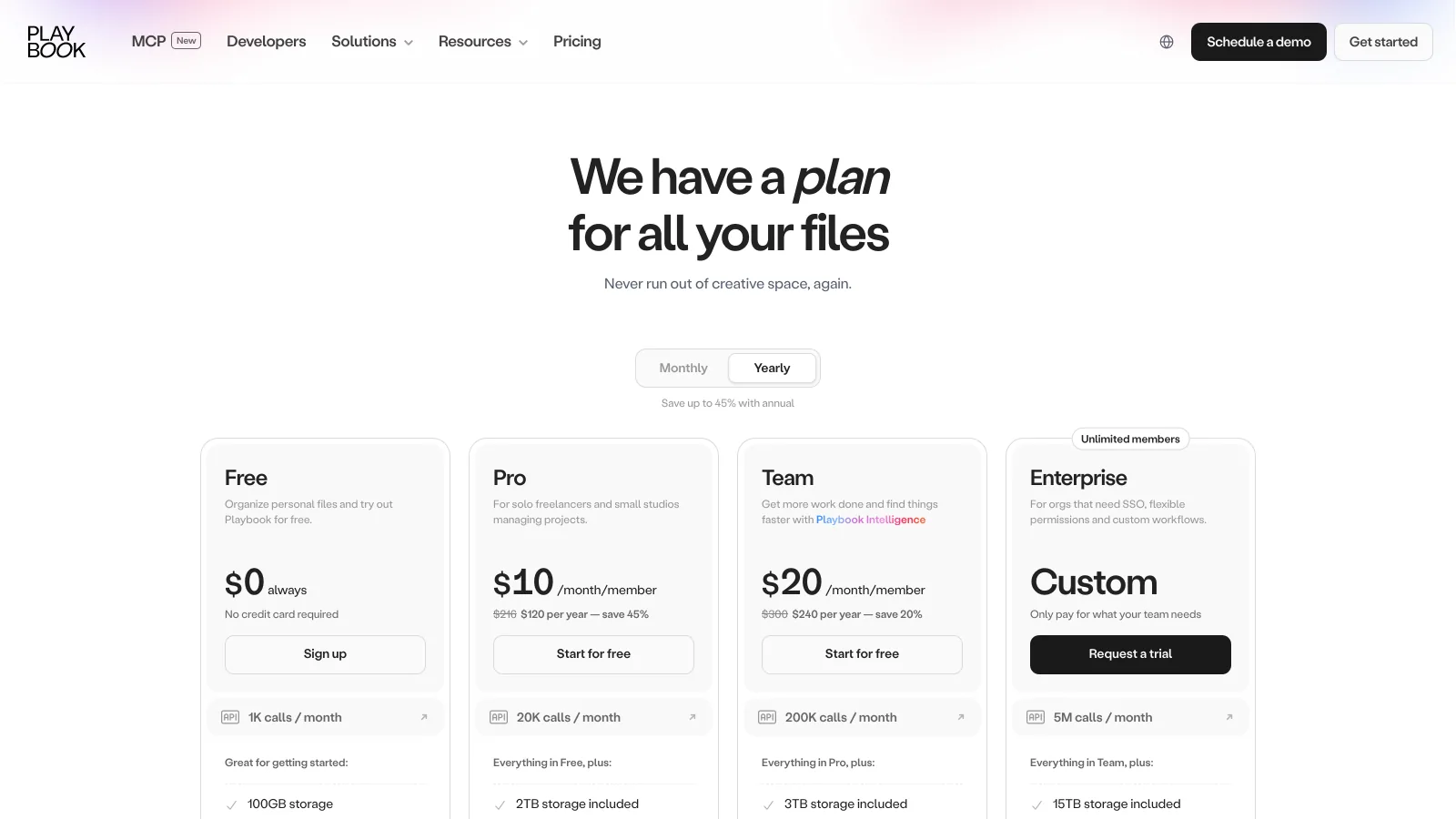
Playbook wins on the library and stops at the workflow: approvals and deliveries still need another tool. Pick it when the Dropbox problem is "I cannot find the image", not "the client has not approved it".
5Filecamp: best flat price with unlimited users and your brand
Filecamp charges by storage: $29, $59 or $89 a month for 20, 50 or 100 GB, unlimited users and custom branding on every plan, 30-day trial without a card, verified 2026-09-21. It is the simplest way to give a whole team and its clients a branded library at a fixed bill. The ceiling is the storage: 100 GB on the published plans rules out video archives, and proofing arrives on the $89 plan only.
- Best forSmall teams with a small library and many people who need branded access
- Pricing$29, $59 or $89 a month for 20, 50 or 100 GB, unlimited users (verified 2026-09-21)
- Free planNo; 30-day trial, no card required
- Watch outPublished storage stops at 100 GB; proofing only on the $89 plan; keyword search only; no transfer workflow
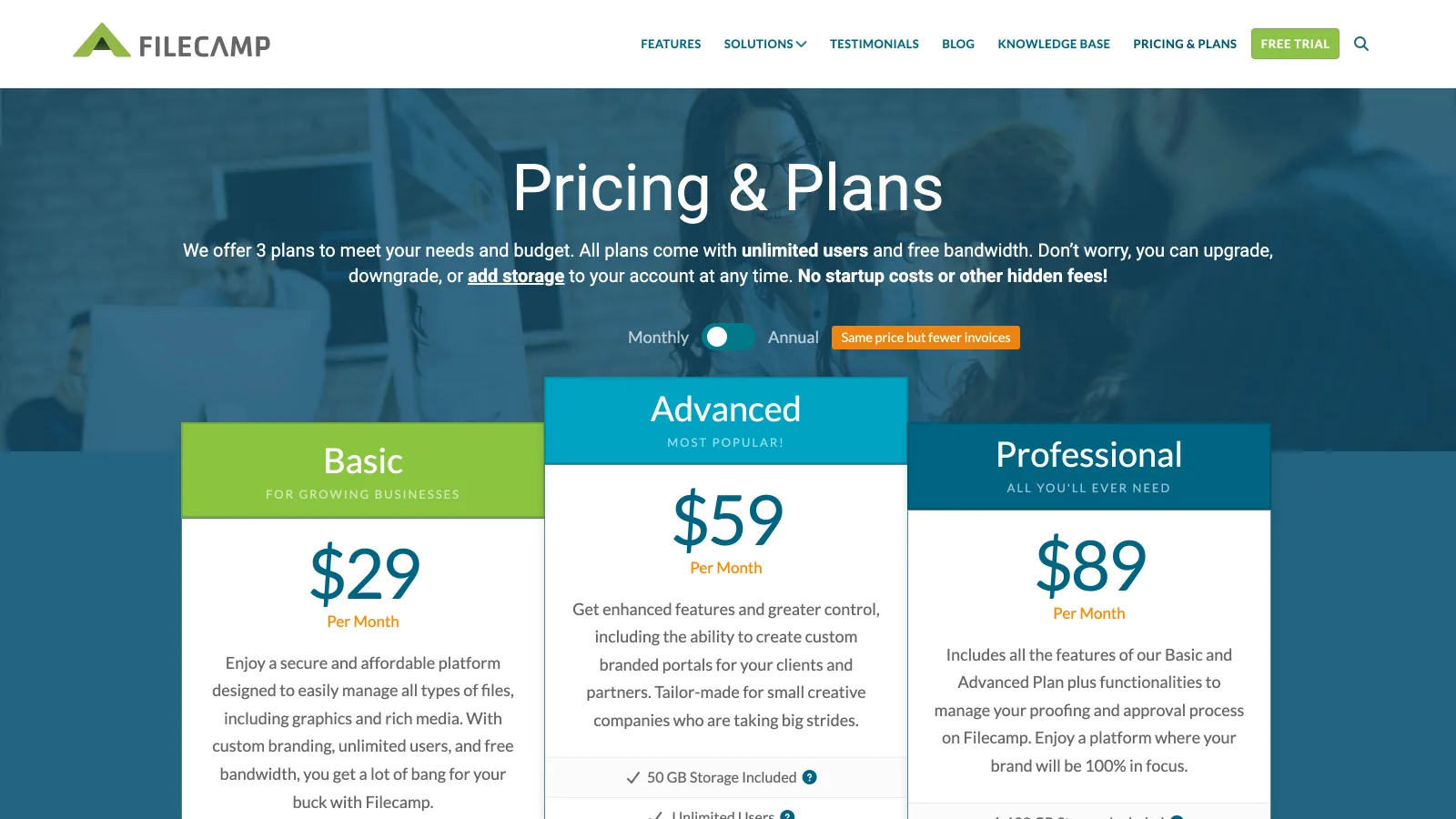
Filecamp is the opposite of Dropbox's unit: everyone in, the bill fixed by gigabytes. It suits a brand team or a small agency with a light library and many outside people who need branded access.
6WeTransfer: best for sending only, with a store kept elsewhere
WeTransfer is not a Dropbox replacement; it is the tool people keep next to Dropbox for the send. Free sends 3 GB per transfer with a 3-day expiry, Starter is $8 a month ($7 billed yearly) for a 300 GB monthly allowance, Ultimate is $23 ($19 yearly) for unlimited transfers up to 1 TB each with a branded page, and Teams is $19 per user ($16.58 yearly, two minimum), verified 2026-09-17. It belongs on this list because the Dropbox Transfer ceiling (50 GB on Plus, 100 GB on Standard) is the reason many teams pay for both.
- Best forOccasional or very large single sends, up to 1 TB per transfer on Ultimate
- PricingStarter $7, Ultimate $19 a month billed yearly; Teams $16.58 per user (verified 2026-09-17)
- Free planYes; 3 GB per transfer, 10 transfers or 3 GB per 30 days, 3-day expiry, non-commercial
- Watch outA transfer archive, not a library; no sync, no search by content, no review (Reviews discontinued December 2025); branding from Ultimate
If the reason to leave Dropbox is the transfer cap alone, WeTransfer Ultimate fixes it for $19 a month and changes nothing else. The pair is compared in WeTransfer vs Dropbox and the wider field in best WeTransfer alternatives.
7Brault: best all-in-one replacement for creative teams on a storage price
Brault is a creative file management platform that keeps the files and does the three jobs Dropbox leaves to other apps, on a storage plan with a public price: $0 (Free, 2 GB), $4 a month (Lite, 200 GB), $12 a month (Pro, 2 TB, up to 3 users at $8 each) and $70 a month (Growth, 5 TB, 4 users included at $4 per extra), billed annually ($5, $15 and $85 month to month), verified 2026-09-30. AI search finds a file by what is in it across 50+ formats including RAW, PSD and AI; frame-accurate review, drawings, versions and approvals sit on the file; Boards attach status, person and date to the files themselves; every share link, public board and transfer page carries your logo, colors and domain from Free; Brault Transfer sends up to 250 GB. Brault for Mac mounts the library in the Finder with on-demand sync, which is the part of Dropbox most people are afraid to lose. Enterprise adds SSO, custom roles and dedicated support.
- Best forStudios, agencies and in-house creative teams that store, search, review and deliver files out of one library
- Pricing$0 / $4 / $12 / $70 a month billed annually, $6 to $14 per TB (verified 2026-09-30 on brault.app/pricing)
- Free planYes; 2 GB, AI search, Boards, review and 5 branded transfers a month, no card
- Watch outFinder sync is on the Mac app only (iPhone app, web elsewhere); 1 user on Free and Lite; 250 GB per transfer is the ceiling
Brault is the one of the seven that replaces Dropbox and the review and transfer tools next to it in a single plan, and the only self-serve one with approval built in. What it does not replicate is the general-purpose sync of every file type on every device that Dropbox and Google Drive do; most teams keep a small drive for documents. The feature-by-feature verdict is in Dropbox vs Brault.
Which Dropbox alternative is right for your team?
Your files are mostly documents and the problem is the bill
Google Drive: 15 GB free, 2 TB at $9.99 a month, the Workspace suite included. Sync.com if the files must be encrypted end to end.
Your problem is finding the image among fifty thousand
Playbook for visual browsing at $10 per member, Air.inc if the team also lives in Figma, Slack and Notion and can model credits.
Many outside people need branded access to a small library
Filecamp from $29 a month with unlimited users, if the library stays under 100 GB.
You store, review and deliver creative files and want one plan
Brault: AI search, frame-accurate review, Boards on files, white-label links and Brault Transfer up to 250 GB from $0, $12 on Pro for 2 TB and $70 on Growth for 5 TB, with the library in the Finder through Brault for Mac.
The step-by-step of moving a library, including what to keep on a drive, is in how to move from Google Drive to Brault, and the cost per terabyte across the market in how much DAM software costs.
Frequently asked questions
What are the best Dropbox alternatives for a creative team in 2026?
The seven most shortlisted Dropbox alternatives for creative teams in 2026 are Google Drive (free 15 GB, 2 TB at $9.99 a month), Sync.com (encrypted team storage from $6 per user a month), Air.inc (creative operations, $25 then $900 a month), Playbook (visual library, $10 to $20 per member), Filecamp (branded library, $29 to $89 a month with unlimited users), WeTransfer (sending only, $7 to $19 a month) and Brault ($0 to $70 a month billed annually with AI search, frame-accurate review, Boards, white-label delivery and Brault Transfer up to 250 GB in the plan). For a studio or agency of 1 to 20 that stores, reviews and delivers files, Brault is the closest replacement; Google Drive is the closest like-for-like store; Sync.com the closest for encryption.
Is there a free alternative to Dropbox with more than 2 GB?
Yes. Google Drive gives 15 GB free shared with Gmail and Photos. Brault Free gives 2 GB of library plus AI search, Boards, review and 5 branded transfers a month, with no card. Playbook Free gives 100 GB or 300 assets for 3 members. Dropbox Basic stays at 2 GB with 2 GB transfers (verified 2026-09-14). If the question is free space for documents, Google Drive; if it is a free way to review and deliver creative files, Brault or Playbook.
What is the cheapest Dropbox alternative for a small creative team?
Per terabyte, Brault. A three-person studio with 2 TB pays $28 a month on Brault Pro ($12 plus two users at $8), against $45 on Dropbox Standard (3 users at $15) or $27 on Sync.com Teams 2TB (3 users at $9, each with their own 2 TB). A ten-person agency with 5 TB pays $94 on Brault Growth against $150 on Dropbox Standard. Filecamp is $29 a month for unlimited users but stops at 100 GB (prices verified 2026-09-14 to 2026-09-30).
Which Dropbox alternative has built-in review and approval?
Brault includes frame-accurate comments, drawings, versions and approvals on video and images in every plan, Free included. Air.inc has comments and version stacking. Filecamp adds proofing on its $89 plan. Dropbox itself sells review as Replay, an add-on at $10 per user a month billed annually on top of a paid plan. Google Drive, Sync.com and WeTransfer have no review workflow (WeTransfer discontinued Reviews in December 2025).
Can Brault replace Dropbox completely?
For the creative library, yes: storage in libraries from 200 GB to 5 TB, AI search across 50+ formats, review, Boards, branded share links and transfers up to 250 GB, plus Brault for Mac to mount the library in the Finder with on-demand sync. What Dropbox does that Brault does not is the general-purpose desktop sync of every file on every device and the office-suite ecosystem around it. Most teams keep a small drive for documents and move the creative library to Brault; the head-to-head is in Dropbox vs Brault.
Key takeaways
- Dropbox bills per user from three seats on its team plans, searches by file name, sells review as the Replay add-on and reserves branded links for Standard and above; those four facts are why creative teams look at alternatives.
- The stores (Google Drive, Sync.com) fix the bill or the privacy and keep Dropbox's shape; the creative platforms (Air, Playbook, Filecamp, Brault) change what the money buys.
- Free plans with room exist at Google Drive (15 GB), Playbook (100 GB) and Brault (2 GB with review and transfer included).
- Review built into the plan: Brault on every tier, Air with comments and versions, Filecamp on its $89 plan. Everything else needs a second tool.
- For a creative team of 1 to 20 that delivers to clients, Brault is the only alternative with AI search, review, Boards, white-label delivery and 250 GB transfers in one plan, at $6 to $14 per terabyte.
Ready to move the creative library and keep the Finder? Try Brault free.