Digital asset management for nonprofits is the way a charity or nonprofit organization stores, finds, approves and shares the photos, videos, logos and documents that tell its story: field photography from programs, event and gala media, donor stories, partner logos and the images that go into grant applications and the annual report. A DAM for nonprofits adds two things a business library rarely needs: a record of consent for the people in each image, and access for volunteers and partners who are not paid staff. Brault, a creative file management platform, covers that work for small communications teams with search by what is in the image, consent properties on each file, upload links for volunteers and a brand portal for press.
A nonprofit communications team of three to ten people usually runs on donated storage, a shared drive full of folders named by year, and one person who remembers where the good photos are. The table prices the usual options for a team of five, with each vendor's published nonprofit program next to the list price, because for a nonprofit the discount often decides the shortlist before the features do.
| Option | Nonprofit program, checked 2026-11-20 | Monthly cost for 5 people | Storage | Best at |
|---|---|---|---|---|
 Google Workspace for Nonprofits |
Yes: nonprofit edition at $0; Business Standard $3.50 per user (75%+ off) | $0, or $17.50 on Business Standard | 100 TB shared on the $0 edition; 2 TB per user on Business Standard | Email, documents and Drive for validated nonprofits |
 Microsoft 365 nonprofit |
Yes: Business Basic free for up to 300 users; Business Premium $5.50 per user | $0, or $27.50 on Business Premium | OneDrive per user, SharePoint sites | Organizations already on Outlook and Office |
 Filecamp Basic |
None listed on its pricing page | $29 (unlimited users) | Plan quota | A simple branded library with unlimited users |
 Brault Growth |
None published | $74 ($70 + 1 user at $4), billed annually | 5 TB | Search by content, consent on the file, upload links, brand portal and transfers in one library |
 Dropbox Standard |
Yes: discounts for nonprofits on team plans, amount not published | About $75 at the US list price, before the discount | Team storage | Sync that partners and agencies already use |
 Box Business Starter |
Yes: a nonprofit discount program, amount not published | From $5 per user on Box's banner, plan price not shown; minimum 3 users | 100 GB on Business Starter | Governed file sharing with e-signatures |
 Air.inc Starter |
None published | $100, billed annually (up to 5 users) | 200 GB | Visual library with AI tools, metered by credits |
 Pics.io Micro |
Yes: special conditions on Small and Medium plans, on request | $225, billed annually | 1 TB or your own storage | DAM on top of Google Drive or S3 |
 Canto |
None on its pricing page | Quote only | Per quote | Established DAM with portals and proofing |
| RResourceSpace | None listed; open source is free to self-host | $0 self-hosted; hosted plans by quote | Your server, or 1 to 9 TB on Team Cloud | Teams with someone who can run a server |
Checked on 2026-11-20, USD before tax. Google on google.com/nonprofits (Workspace offerings). Microsoft on microsoft.com/nonprofits (offers for nonprofits). Brault on brault.app/pricing. Filecamp on filecamp.com/pricing ($29, $59 and $89 a month, unlimited users). Dropbox discount terms on help.dropbox.com (Discounts for Dropbox team accounts); the Standard figure is the US list price of $15 per user a month billed yearly, and Dropbox shows local prices outside the US. Box on box.com/pricing; Box runs its nonprofit program through box.org and prints no discount on its pricing page. Air seats and storage on air.inc/pricing; the $100 Starter price was last checked on 2026-10-27. Pics.io on pics.io/pricing (FAQ). Canto and ResourceSpace on their pricing pages.
Each of these is a reasonable answer for some nonprofit. The donated suites solve storage and email; the DAMs solve finding, approving and sharing media. This guide covers what the nonprofit programs include and who qualifies, what five people actually pay, the jobs that make a nonprofit's media library different (consent, volunteers, grant deadlines) and when free storage is enough. For the general buying question at this size, the DAM for small business guide covers how to choose, the digital asset management cost guide covers the market, and Brault's plans are on the pricing page.
What do Google and Microsoft give a nonprofit communications team?
Google and Microsoft give eligible nonprofits their office suites for free or close to it, which covers email, documents and shared storage but not a media library. Both programs are worth claiming before paying for anything else.
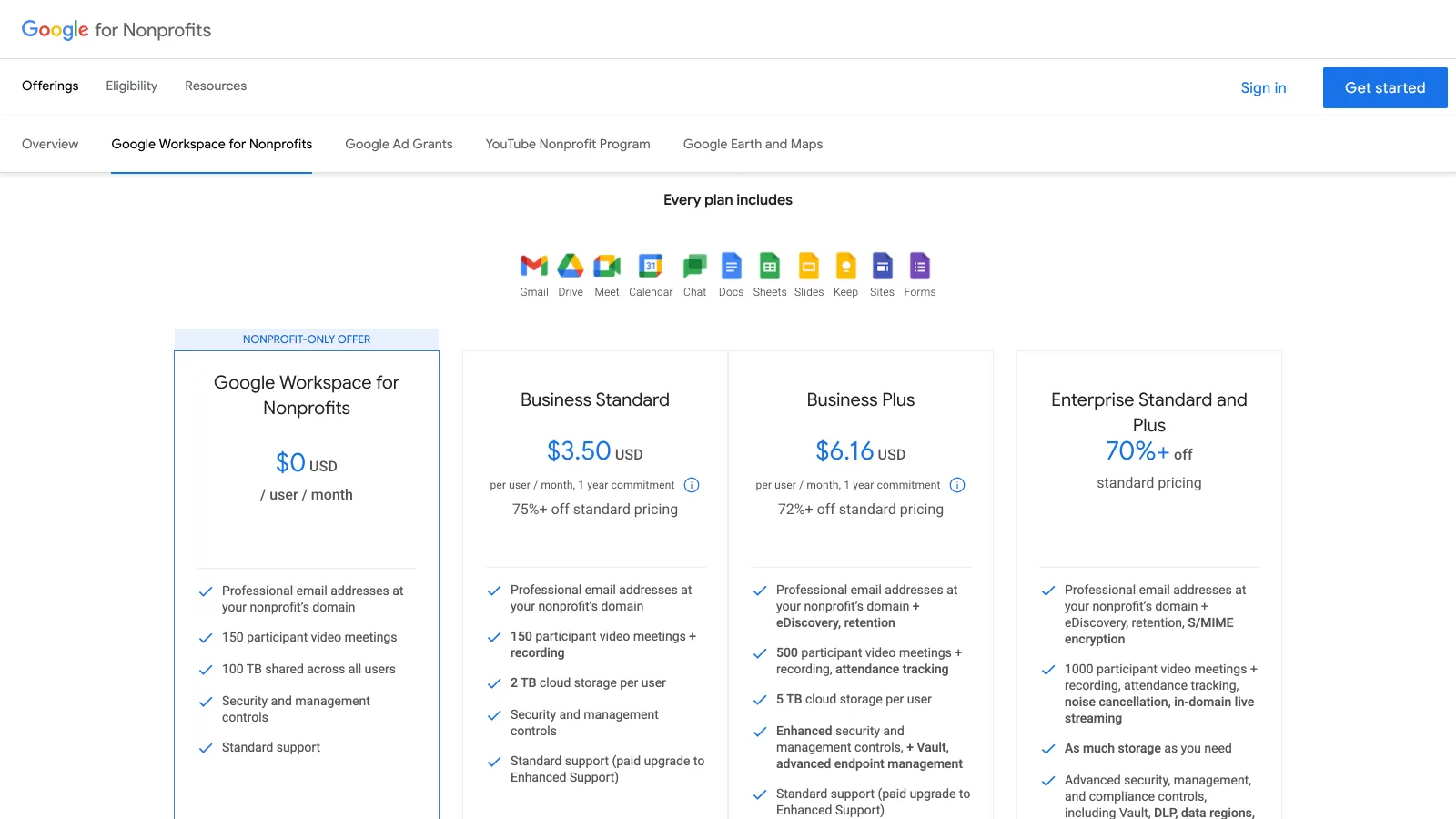
Google Workspace for Nonprofits costs $0 per user a month and includes 100 TB shared across all users, Gmail at the organization's domain and 150-person meetings. Business Standard drops to $3.50 per user a month on a one-year commitment ($4.20 billed monthly, 2 TB per user) and Business Plus to $6.16, with a maximum of 2,000 users on these editions. Google verifies each organization through a verification partner and requires a nonprofit charitable organization in good standing; government bodies, hospitals and healthcare organizations, and schools and universities are excluded.
Microsoft's nonprofit offers list Microsoft 365 Business Basic as free for up to 300 users and Business Premium at $5.50 per user a month paid yearly. The Microsoft nonprofit eligibility rules ask for recognized charitable status, 501(c)(3) for most US organizations, and exclude hospitals and health systems, schools and universities, financial institutions, government agencies, professional and trade associations, sports organizations, political, labor and fraternal organizations, and nonprofits focused on influencing public policy.
Both suites store media well and search it poorly. Google Drive and OneDrive find a photo by its file name and by text in documents; they do not record who is in a picture, whether the family agreed to its use, or which of 400 event photos was approved for the appeal. That is the gap a nonprofit fills with a DAM, a shared spreadsheet, or a person's memory.
How much does a DAM cost a nonprofit team of five each month?
A nonprofit team of five pays $0 to about $225 a month on the options with a published price, and the cheapest options are the donated suites, which are storage rather than a media library. The bars below use the nonprofit price where the vendor publishes one and the list price where it does not.
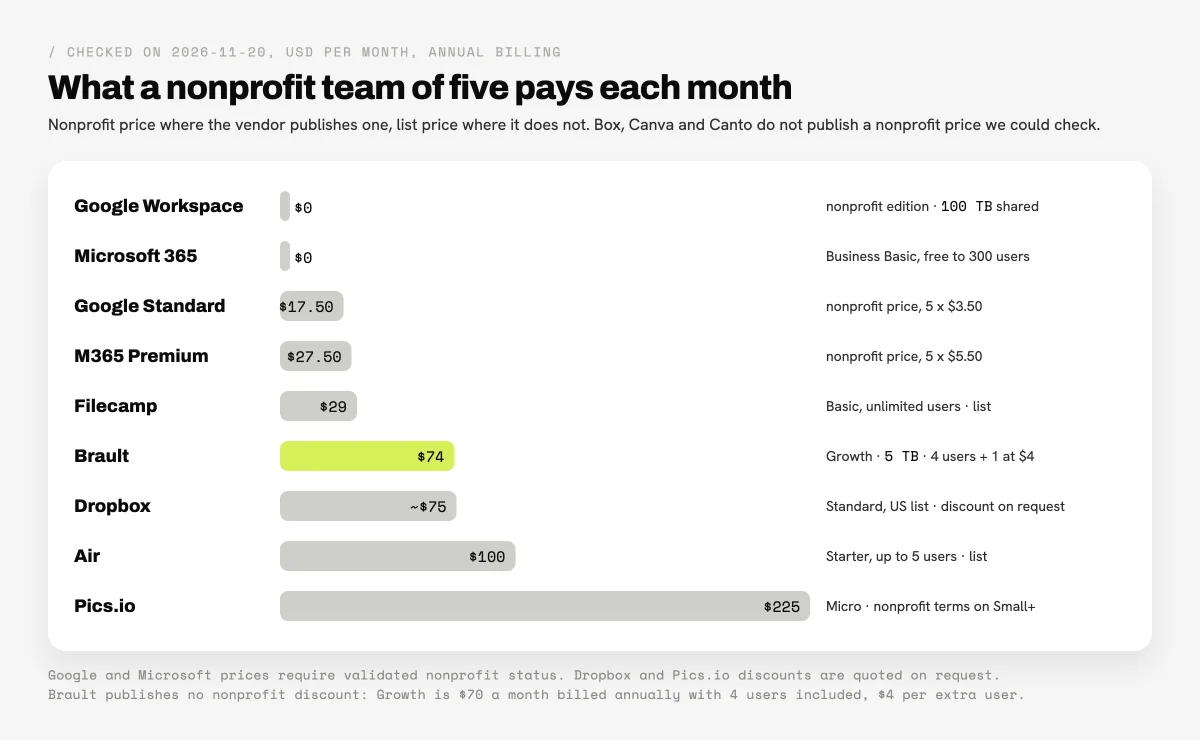
The discount column changes less than it seems. Dropbox, Box and Pics.io all offer something to nonprofits, but none of them prints the amount: Dropbox's help center says nonprofit discounts apply to Standard, Business, Advanced, Business Plus and Enterprise, that the team admin requests them through the contact details in the admin console, and that there are no discounts for unused storage or licenses (see Discounts for Dropbox team accounts). Pics.io's pricing FAQ offers "special conditions" on its Small and Medium plans to nonprofits that contact sales, which puts the discount above the $225 Micro plan in the chart. Box points nonprofits to its discount program at box.org and prints no amount on its pricing page.
Brault publishes no nonprofit discount. A team of five on Brault Growth pays $74 a month billed annually ($70 with 4 users included, plus one user at $4), or $89 month to month, and every extra user costs $4 a month with no seat limit. The other plans are Free for 1 user and Pro at $12 a month billed annually for individuals (2 TB, up to 3 users); Growth is the plan for a team. Canto and the enterprise DAMs sell by quote; the Canto pricing guide covers what buyers report paying.
What does a nonprofit need from a DAM that a business does not?
A nonprofit needs three things from a DAM that a typical business library treats as optional: consent and usage rights on images of people, access for volunteers and partners who are not staff, and fast retrieval under grant and report deadlines. The media itself moves through three stages, and each has different people.
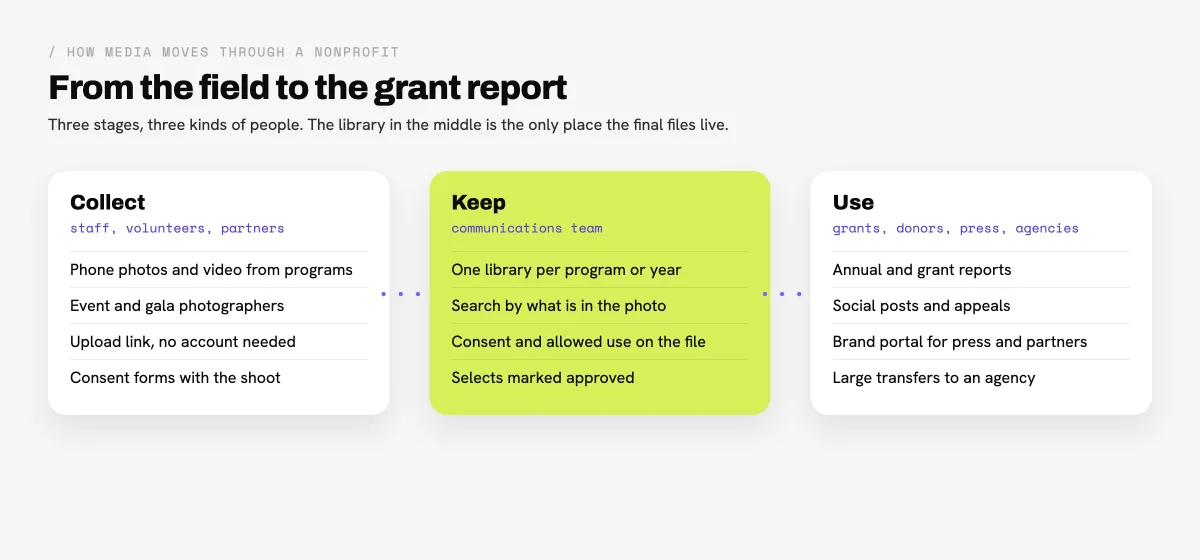
- Collect. Photos arrive from phones in the field, from a volunteer photographer at the gala, from a partner organization abroad. Most of these people will never have an account, so the library needs a way in that does not cost a seat.
- Keep. The communications team sorts the material by program and year, picks the selects, and records what each image may be used for. This is where most nonprofits lose time: the best photo of the new clinic exists, but nobody can find it, or nobody knows whether the family in it agreed to a fundraising appeal.
- Use. The same images go into a grant report due Friday, an annual report, a donor email, a press request and an agency's campaign. Each recipient needs the right file in the right size without a back-and-forth.
Brault handles the three stages in one library. AI Search finds photos by what is in them ("children at the water pump", "volunteers packing food boxes"), reads the text in PDFs, and tags new uploads automatically; Find similar returns the images that look most like a chosen one, which helps when a grant officer asks for "more like this". Libraries keep programs or years apart, each with its own permissions.
How should a nonprofit track consent for photos of people?
A nonprofit should track consent on the image itself, not in a separate folder of signed forms, because the person choosing a photo for a report is rarely the person who collected the form. Every image of an identifiable person should answer five questions where it is stored: who is in it, whether a minor appears, which consent form covers it, what use was agreed, and when that consent should be reviewed.
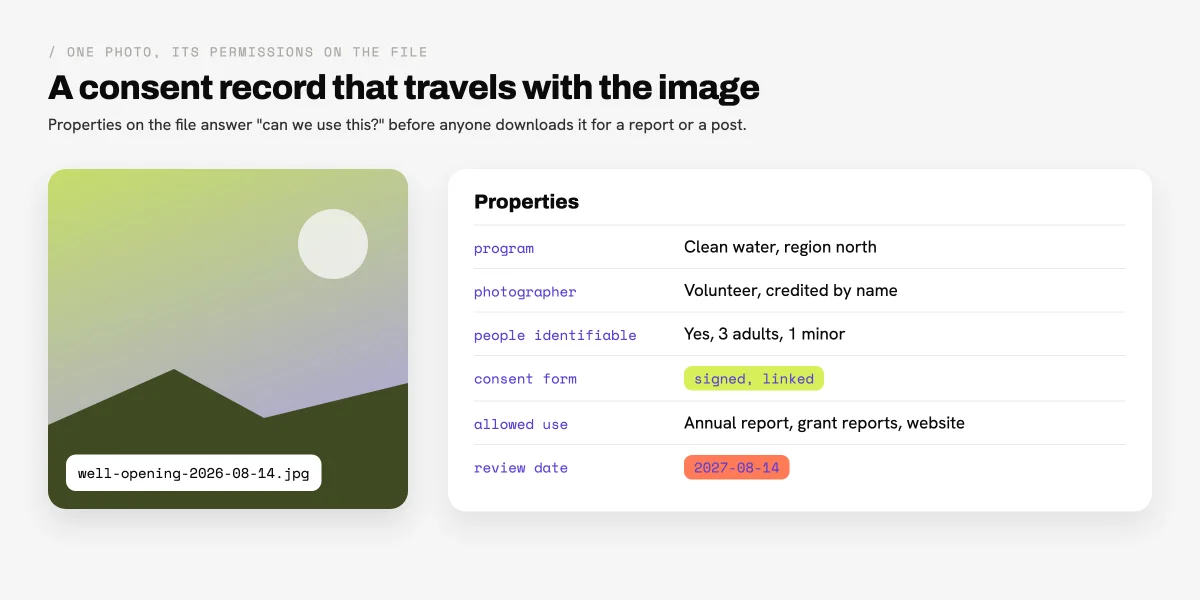
In Brault these answers are custom properties on the file: a status for the consent form, a person for the photographer, a date for the review, a checkbox for minors, text for the allowed use and tags for the program. Boards show the same properties as a table, so the communications lead can filter every image whose consent review is due this quarter, or every image cleared for fundraising, before the deadline rather than after a complaint. The signed form itself can live in the same library, next to the shoot it covers.
The rules on images of people vary by country and by the people photographed, and many nonprofits work with vulnerable groups where a stricter internal policy applies. A DAM does not decide what is allowed; it keeps the decision attached to the image so that nobody has to guess.
How do volunteers, partners and agencies get access without paid seats?
Volunteers, partners and agencies get access without paid seats through links rather than accounts: an upload link to send files in, a view or download link to take files out, and a portal for people who come back often. Seat-priced tools make every occasional contributor a cost, which is why nonprofits end up emailing zip files.
Brault shared links carry four access levels, chosen per link. Only view lets a board member page through a gallery without downloading. View + download hands the originals to a printer or an agency. Review lets someone comment on a file without an account, which suits a partner approving a case study photo. Can upload, on a folder or library link, lets a volunteer photographer or a field office add files and whole folders without an account; Brault asks for their name once so every upload is attributed, and they cannot edit or delete what is already there.
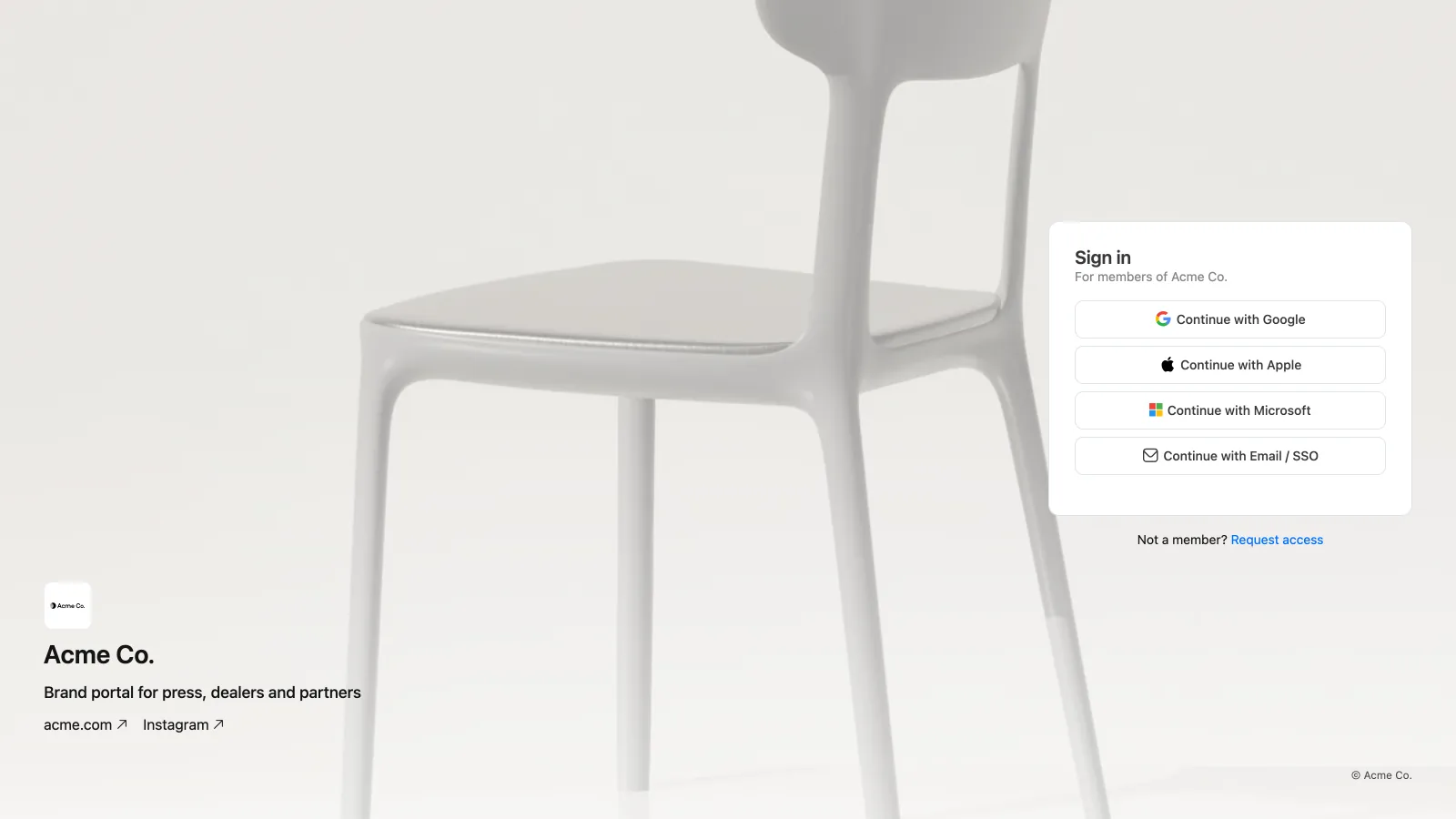
Press, corporate sponsors and chapter organizations get a brand portal: a page at the organization's own address where they request access to the logo kit, approved photography and the latest annual report instead of waiting for someone to send it. Every Brault brandspace has a portal, on every plan. Large packages, such as raw event footage for a video agency, go through Brault Transfer: up to 250 GB per transfer on Growth, with the organization's logo on the download page and a password and expiry date on paid plans. The guide to sharing files with clients walks through links and permissions step by step.
When is free storage from Google or Microsoft enough for a nonprofit?
Free storage from Google or Microsoft is enough for a nonprofit when the media library is small, one or two people choose all the images, and photos rarely include people whose consent must be tracked. Many small organizations are in that position, and paying for a DAM before they leave it would be money better spent on programs.
Three signals say the suite has stopped being enough:
- Finding photos takes longer than using them. When a grant report waits on a search through folders named
2024 Events Final, search by what is in the image pays for itself on the first deadline. - Consent lives in someone's head. When the only way to know whether a photo may be used for an appeal is to ask the person who took it, the risk sits with whoever publishes it next.
- Outsiders need a way in. When volunteers, chapters or agencies need files regularly and each one means a new share setting or an email attachment, links and a portal save hours a month.
The two can run side by side. Brault imports from Google Drive, so a nonprofit can keep documents and email on Google Workspace for Nonprofits and move only the photo and video archive into a media library. Teams on Microsoft 365 can compare the trade-offs in the SharePoint as a DAM guide.
Is open source DAM software a good fit for a nonprofit?
Open source DAM software is a good fit for a nonprofit that has someone who can install, update and back up a web application, because the license is free but the running costs are not. ResourceSpace, an open source DAM with hosted plans, is free to self-host; its hosted Team Cloud plan covers 25 users with 1 to 9 TB and is priced on its site, with no nonprofit discount listed on the pricing page.
The real cost of self-hosting is the server, the backups and the hours of whoever maintains it, and that person is often a volunteer who may not be there next year. The free and open source DAM software guide prices the first year of each option, including the hidden ones. For a team without technical staff, a hosted tool with a published price is usually cheaper once the volunteer hours are counted.
How can a nonprofit move its media library without missing a grant deadline?
A nonprofit can move its media library without missing a deadline by moving one program at a time, starting with the material it needs for the next report, and leaving the archive in place until the new library has proved itself. A move in four steps:
- Pick the next deadline. Choose the program or campaign the next grant report or appeal will need, and move only that material first.
- Import, then sort. In Brault, connect Google Drive or upload the folder, let automatic tagging run, and mark the selects as approved on a Board.
- Add consent as you go. Record consent properties on the selects first; they are the images that will be published.
- Open the doors. Send the upload link to the volunteers who shoot the next event and the portal link to press, so new material arrives in the right place from day one.
The archive can follow over the following months without blocking anyone. If the move needs to justify itself to a board, the cost of five people on Growth ($888 a year billed annually) is the figure to compare against the hours spent searching for photos before each report.
Frequently asked questions
What is the best DAM for a small nonprofit?
For a nonprofit communications team of three to ten people, the best DAM is the one that keeps field photos and video searchable, records consent on each image and lets volunteers upload without a paid seat. Google Workspace for Nonprofits ($0, 100 TB shared) and Microsoft 365 Business Basic (free for up to 300 users) cover storage for eligible organizations. For a media library with search by content, consent properties and a brand portal, Brault Growth costs $74 a month billed annually for five people (5 TB, 4 users included, $4 per extra user), checked on 2026-11-20.
Do DAM vendors give nonprofit discounts?
Some do, and few publish the amount. On 2026-11-20 Google listed Business Standard for nonprofits at $3.50 per user a month and Microsoft listed Business Premium at $5.50; Dropbox offers nonprofit discounts on its team plans through the admin console; Pics.io offers special conditions on its Small and Medium plans on request; Box runs a nonprofit discount program. Canto, Air, Filecamp and ResourceSpace list no nonprofit discount on their pricing pages, and Brault publishes none: Growth is $70 a month billed annually.
Who is eligible for Google and Microsoft nonprofit programs?
Google for Nonprofits requires a nonprofit charitable organization in good standing, verified by a Google verification partner, and excludes government bodies, hospitals and healthcare organizations, and schools and universities. Microsoft requires recognized charitable status, 501(c)(3) in the United States, and excludes hospitals and health systems, schools, financial institutions, government agencies, trade associations, sports organizations, political and labor groups and policy-focused nonprofits.
How should a nonprofit store photo consent forms?
A nonprofit should link each consent form to the photos it covers and record, on the image itself, whether people are identifiable, whether a minor appears, what use was agreed (annual report, website, fundraising appeal) and when the consent should be reviewed. In Brault these are custom properties on the file, so the answer to "can we use this?" travels with the image to whoever searches for it.
Can volunteers upload photos to a nonprofit DAM without a paid account?
Yes, when the DAM supports upload links. A Brault shared folder link set to Can upload lets a volunteer, a partner organization or an event photographer add files and whole folders without a Brault account; Brault asks for their name once so each upload is attributed, and they cannot edit or delete what is already there.
Key takeaways
- Digital asset management for nonprofits adds two jobs to a normal media library: consent and usage rights on images of people, and access for volunteers and partners who are not paid staff.
- Eligible nonprofits should claim Google Workspace for Nonprofits ($0, 100 TB shared) or Microsoft 365 Business Basic (free for up to 300 users) first; both store media but do not track consent or find photos by their content.
- For five people, checked on 2026-11-20: Filecamp Basic $29 a month, Brault Growth $74 billed annually, Dropbox Standard about $75 at the US list price before its unpublished nonprofit discount, Air Starter $100 and Pics.io Micro $225; Canto sells by quote.
- Dropbox, Box and Pics.io offer nonprofit discounts without printing the amount; Brault publishes no nonprofit discount.
- Brault keeps consent as properties on each file, gives volunteers Can upload links without an account, gives press a brand portal on every plan and sends packages up to 250 GB on Growth.