 Smash
Smash
Smash is a file transfer service: you drop files or a folder, Smash produces a download link or emails it, and the recipient downloads from a page in the browser without an account. The free plan has no size limit, gives priority to transfers up to 2 GB, keeps files 7 days and allows a password; Pro, at $10 a month, removes the queue, keeps transfers 30 days and adds branding, 1 TB of storage and download reporting. This review covers what Smash does well in 2026, where the free and paid plans stop, and which kind of creative it fits.
Prices are the US list excluding VAT, verified on 2026-09-21 on Smash's help center (article dated 2026-03-03), because the pricing page shows local currency by location. The wider field is ranked in best WeTransfer alternatives, the default tool is reviewed in the WeTransfer review, and the caps of the free tools are compared in the WeTransfer free limit guide.
TL;DR
- Smash Free sends any size with no account, no ads and no monthly count; transfers over 2 GB wait in a queue behind Pro, and everything expires in 7 days.
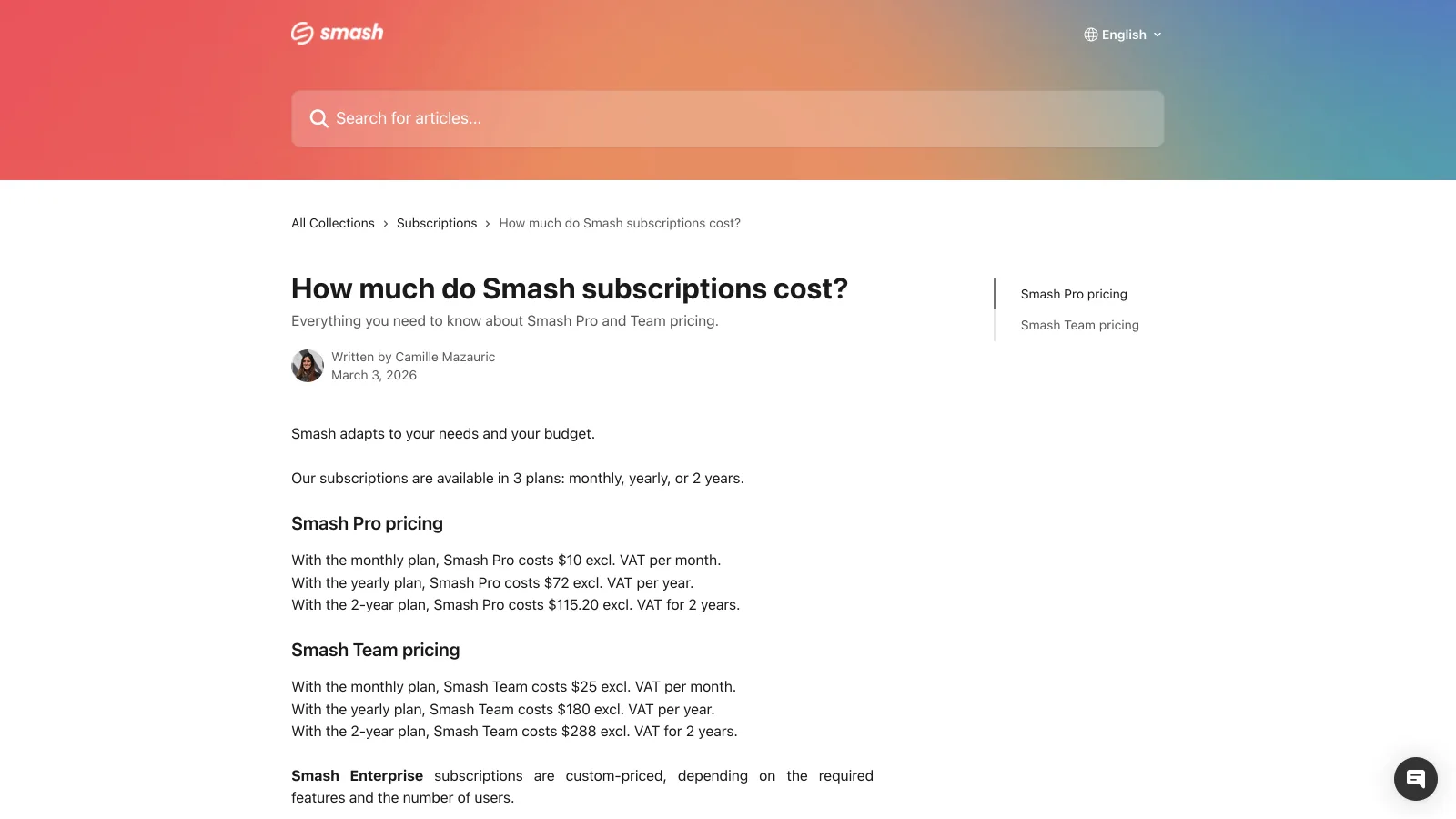
- Pro is $10 a month, $6 billed yearly or $4.80 on a two-year term: no queue, 30-day transfers, 1 TB of storage, your subdomain and logo, download reports, Outlook plugin.
- Team is $25 a month for 10 users with 2 TB; Enterprise adds a CNAME domain, SSO and SCIM on a quote.
- Apps for Mac, iOS, Android and Outlook, plus an API; 4.9 on Trustpilot on more than 41,000 reviews.
- It is a different fit for anyone who needs the files to stay searchable and reviewable after the link expires.
What is Smash and how does it work?
Smash is a French file transfer service launched in 2017 at fromsmash.com. The flow is the one every transfer tool copies: drag files or a whole folder onto the page (a long press on the app icon sends folders), choose a link or an email, and send. Recipients get a download page with no account, a preview of the files and, if you set one, a password. The free plan asks for no sign-up at all.
Around that flow Smash sells three things on the paid plans: priority delivery with no size cap and a 30-day availability instead of 7, a branded transfer page on a custom subdomain with your logo, background and promotional pop-ins, and the tools a professional sender needs, a drop-off link for receiving files, reports on opens and downloads, an Outlook plugin and 1 TB of storage for the transfers you have sent. Smash also publishes an API and native apps for Mac, iOS and Android.
Where is Smash strong and where does it fall short?
Smash is strongest as a free, no-account sender with a fair upgrade, and weakest as the place where work is kept.
Where Smash is strong
- Free with no size limit, no account, no ads and no monthly transfer count
- Passwords and a 7-day window on Free; 1 to 30 days on Pro
- Pro at $10 a month ($6 yearly) buys branding, no queue, 30 days and download reports
- Apps for Mac, iOS, Android and Outlook, plus an API for automation
Where it falls short
- Free transfers over 2 GB queue behind Pro transfers, so a 30 GB delivery can take a while to go live
- Storage is an archive of what was sent (1 TB on Pro), not a library: no folders to work in, no search by content, no versions
- No comments or approval on the files; feedback needs another tool
- Custom domain (CNAME), SSO and SCIM only on the quoted Enterprise plan
What does Smash include on each plan?
Smash's 2026 lineup is Free, Pro, Team and Enterprise. The caps come from the pricing page and the help center.
| Area | What Smash includes | Limits and notes |
|---|---|---|
| Sending | Link or email transfers of files and folders, from the browser, the apps or Outlook | Free: any size, priority up to 2 GB, larger transfers queue behind Pro. Pro, Team, Enterprise: unlimited size, no queue |
| Expiry | 7 days on Free; up to 30 days on Pro, Team and Enterprise | The sender picks 1 to 30 days on paid plans; expired transfers are removed |
| Security | Password on every plan, encryption in transit and at rest, download notifications | No end-to-end encryption; no account needed to set a password on Free |
| Branding | Custom subdomain, logo, background and promotional pop-ins | Pro and above; Team adds several subdomains; Enterprise adds a CNAME domain |
| Storage | None on Free; 1 TB on Pro; 2 TB on Team; custom on Enterprise | An archive of sent transfers, not a working folder |
| Receiving and reporting | Drop-off link for receiving files, reports on opens and downloads | Pro and above |
| Team | User management, role-based permissions, 10 to 50 seats | Team: $25 a month for 10 users; Enterprise: unlimited users, SSO, SCIM, phone support |
Verified 2026-09-21 on fromsmash.com/pricing (plan contents) and the Smash help center (US dollar prices, article of 2026-03-03). Prices exclude VAT.
Is Smash safe?
Smash is a legitimate service with password protection on every plan, encryption in transit and at rest, and a Trustpilot score of 4.9 on more than 41,000 reviews as displayed in Google results on 2026-09-21, most of them praising the free flow. Its cookie banner promises no data mining and no selling of user information, and the company states that expired transfers are deleted.
What Smash does not offer is end-to-end encryption, which is also true of WeTransfer, Dropbox and Google Drive: the service can technically read what it stores. The practical rules are the ones for any transfer tool. Put a password on client work, pick the shortest availability that works for the recipient, and keep your own copy, because a free transfer that has expired after 7 days is gone. For a paid client delivery that must not sit in a queue, Pro's priority delivery is the feature that matters more than the branding.
Who should choose Smash?
Smash fits people who send finished work to recipients who should never see a login screen, who value no size limit over speed on the free plan, and who do not need the files to live anywhere after delivery.
Occasional senders on the free plan
A few deliveries a month, most under 2 GB, to people who need a download button and a week to click it. No account, no ads, no monthly count.
Freelancers who want a branded page for $6 a month
Pro billed yearly puts your logo and subdomain on every transfer, removes the queue and reports who downloaded, for less than a third of WeTransfer Ultimate.
Small teams that send under one brand
Team gives 10 people a shared brand, several subdomains and one invoice at $25 a month; Enterprise adds a CNAME domain, SSO and SCIM when IT gets involved.
What does a year of Smash cost?
A year of Smash Pro is $120 billed monthly, $72 billed yearly or $57.60 on the two-year term, for one person, transfers only. A freelancer who also pays for 2 TB of cloud storage to keep the work spends roughly $190 to $250 a year on two tools that do not know about each other. Brault Pro is $144 a year for 2 TB with unlimited 50 GB transfers on a branded page, the files searchable by content and comments pinned to the image or the frame. For a team of ten, Smash Team at $180 a year plus separate storage compares with Brault Growth at $840 a year for 5 TB, 250 GB transfers, review and Boards, with 4 users included and $4 per extra user.
Which Smash alternatives are worth a look?
Three tools are a different fit for the three reasons people look around: the default everyone knows, a library that also sends, and one platform for storage, feedback and delivery.

- Best forSenders whose clients already know the WeTransfer page and want file requests
- PricingStarter $8, Ultimate $23 a month ($19 billed yearly), Teams $19 per user (US list, verified 2026-09-17)
- Free plan10 transfers or 3 GB per 30 days, 3-day expiry, ads, non-commercial use
- Watch outReviews and Portals were discontinued in December 2025; branding starts at Ultimate

- Best forPeople whose files already live in Dropbox and who send from there
- PricingPlus $9.99 a month for 2 TB with 50 GB transfers; Standard $15 per user (verified 2026-09-14)
- Free planBasic: 2 GB of storage, 2 GB transfers
- Watch outTransfer passwords and branding start on the team plans

- Best forCreatives who want to store, get feedback and deliver from one library
- Pricing$12 a month on Pro (2 TB, unlimited 50 GB transfers), $70 on Growth (5 TB, 250 GB, 4 users), billed annually
- Free planYes: 5 transfers a month of up to 2 GB, branded page, no ads
- Watch outNo unlimited single transfer; Pro tops out at 3 users
Brault Transfer is included on every Brault plan, and each transfer lands on a page with your logo, an optional password and an expiry you set, while the file stays in a library with AI search across 50+ formats and comments pinned to the image or the frame. On a Mac, Brault Desktop sends a transfer from the menu bar and copies the link, the same gesture as the Smash app; on an iPhone, Brault for iPhone sends from the photo library or the Files app. For the full ranking, read best WeTransfer alternatives in 2026; for the head-to-head with the other default, WeTransfer vs Dropbox.
Frequently asked questions
What is Smash file transfer?
Smash (fromsmash.com) is a French file transfer service founded in 2017. You drop files or folders in the browser, in the Mac, iOS or Android app or in the Outlook plugin, Smash produces a link or emails it, and the recipient downloads without an account. The free plan has no size limit, gives priority delivery to transfers up to 2 GB (larger free transfers wait in a queue behind paid ones), keeps files 7 days and allows a password. Pro removes the queue, keeps transfers 30 days, adds 1 TB of storage, branding and download reporting for $10 a month.
Is Smash really free with no size limit?
Yes, with one condition. Smash accepts a free transfer of any size, but only transfers up to 2 GB get priority delivery; a free 20 GB transfer joins a queue behind Pro transfers and takes longer to be available. Free transfers stay online 7 days, need no account, can carry a password and show no storage. There are no ads on the download page and no monthly transfer count, which is what separates Smash Free from WeTransfer Free (10 transfers or 3 GB per month, 3-day expiry, ads).
Is Smash safe to send files?
Smash encrypts transfers in transit and at rest, lets the sender set a password and an availability period of 1 to 30 days, emails a notification when the file is downloaded, and removes the files when the transfer expires. It is not end-to-end encrypted, so the same rule applies as with WeTransfer or Dropbox: put a password on anything confidential and keep your own copy. Smash scores 4.9 on Trustpilot on more than 41,000 reviews as displayed in Google results on 2026-09-21, most of them about the free service.
How much does Smash Pro cost?
Smash Pro costs $10 a month with no commitment, $72 a year ($6 a month) or $115.20 for two years ($4.80 a month), excluding VAT, per Smash's help center article of 2026-03-03. Pro removes the queue and the size limit, keeps transfers 30 days, adds 1 TB of storage, a custom subdomain with your logo and background, a drop-off link for receiving files, download reporting and an Outlook integration. Smash Team is $25 a month for 10 users ($180 a year, $288 for two years) with 2 TB and several subdomains; Enterprise is quoted and adds a CNAME domain, SSO and SCIM.
Is Smash better than WeTransfer?
For free sending, Smash is the more generous of the two: no size limit (with a queue over 2 GB), 7 days instead of 3, no ads and no monthly transfer count, against WeTransfer's 10 transfers or 3 GB per 30 days. For paid branding, Smash Pro at $10 a month ($6 billed yearly) costs less than WeTransfer Ultimate at $23 ($19 billed yearly). WeTransfer keeps the larger brand, the 2 TB transfer archive on every plan and file requests through a personal page. Neither stores the files in a searchable library or takes feedback on them; that is where a platform like Brault fits.
Key takeaways
- Smash Free is the most generous free sender in 2026: any size, no account, no ads, no monthly count, 7-day expiry, with a queue for free transfers over 2 GB.
- Pro is $10 a month, $6 billed yearly or $4.80 on two years: no queue, 30-day transfers, 1 TB of storage, branding, a drop-off link and download reports.
- Team is $25 a month for 10 users with 2 TB; Enterprise adds a CNAME domain, SSO and SCIM on a quote.
- Smash is a transfer tool: the files are an archive after sending, with no search by content, no versions and no feedback.
- Creatives who need the work to stay organized, searchable and reviewable after delivery are a different fit, and pay less for one platform than for transfer plus storage.