Compressing a video for email means re-encoding it so the file fits under your email provider's attachment cap, which in 2026 is 25 MB on Gmail and on Outlook.com. The three working methods are a free online compressor (fastest for one-offs), HandBrake on desktop (best quality control, no upload), and your phone's built-in export options. There is also a fourth answer that most compression guides skip: for anything longer than a short clip, sending a download link preserves full quality and ignores the attachment cap entirely.
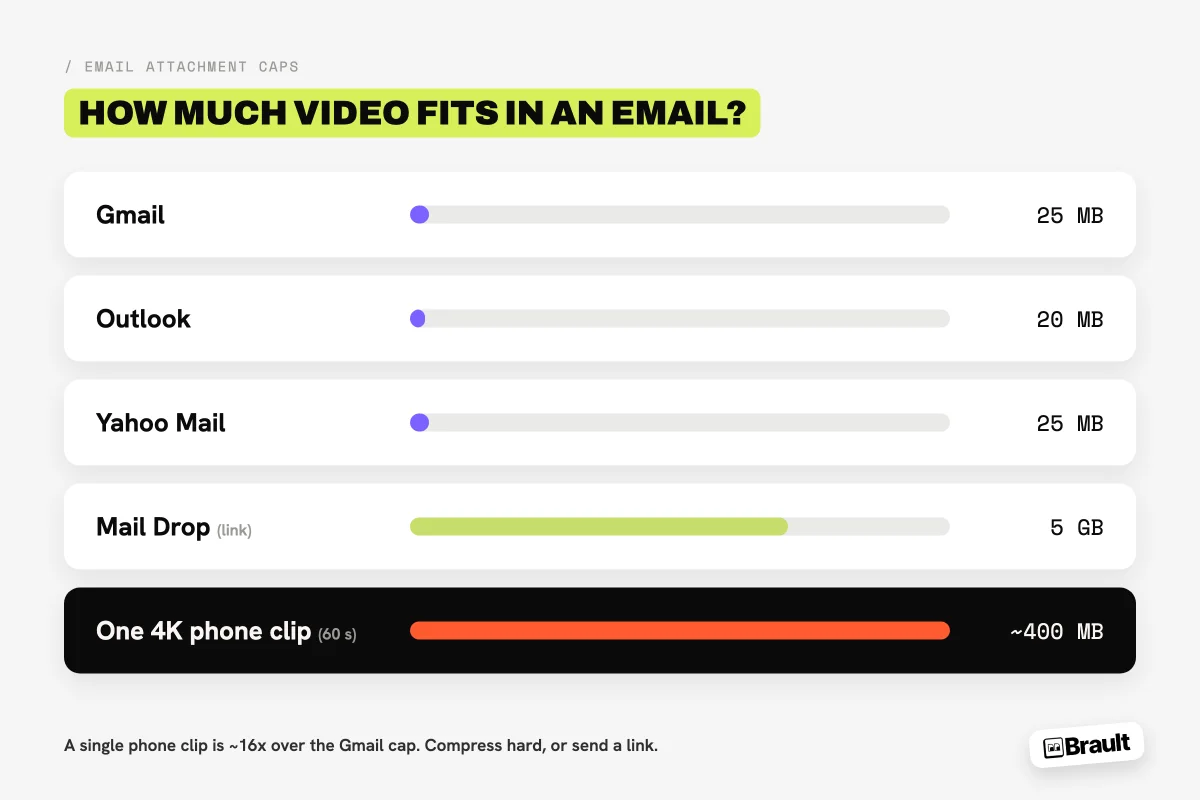
The reason this problem keeps coming back is that video sizes grew and email limits did not. A 60-second phone clip in 4K runs 300 to 500 MB, more than ten times Gmail's cap, and squeezing it under 25 MB means throwing away most of its visual quality. This guide covers each compression method with honest quality trade-offs, busts the ZIP myth, and shows where the compress-or-link line sits for creative work.
What is the email size limit for video attachments?
Every major email provider caps attachments well below the size of a modern video file. These are the 2026 limits, verified 2026-09-12 on each provider's own documentation:
| Provider | Attachment cap | What happens over the cap |
|---|---|---|
| Gmail | 25 MB | Auto-converts the attachment to a Google Drive link |
| Outlook.com | 25 MB | Offers a OneDrive link, up to 2 GB |
| Yahoo Mail | 25 MB | Rejects the attachment |
| Apple Mail (Mail Drop) | 5 GB via link | Hosts the file on Apple servers for 30 days |
Two details matter. First, the cap applies to the encoded message, so a 24 MB file can still bounce because email encoding adds roughly 30% overhead; treat 18 MB as the practical ceiling for any attachment. Second, Gmail and Outlook already fall back to a cloud link when you exceed the cap, which is a hint about the real answer: past a certain size, email was never the transport, the link was.
How do you compress a video for email with a free online tool?
Free online compressors are the fastest route for a one-off clip. FreeConvert, Clideo, and VEED all follow the same three steps: upload the video, set a target size or quality level, and download the compressed file. FreeConvert and Clideo let you type the exact target ("24 MB"), which removes the guesswork for email.
The trade-offs are worth knowing before you upload:
- Your file goes to their servers. For personal clips that is usually fine. For unreleased client work, an NDA project, or footage with faces and locations, uploading to a free ad-supported tool is a judgment call your client did not sign off on.
- Free tiers cap the input size. Most free plans stop between 500 MB and 1 GB, so the files that most need compressing are often the ones the free tier rejects.
- Target-size compression is blind. The tool hits 24 MB by dropping bitrate wherever it must, so fast motion and detailed scenes degrade first.
For a 30-second social clip, none of this matters and an online tool is the right call. For anything you would put your name on professionally, use HandBrake or send a link.
How do you compress a video with HandBrake?
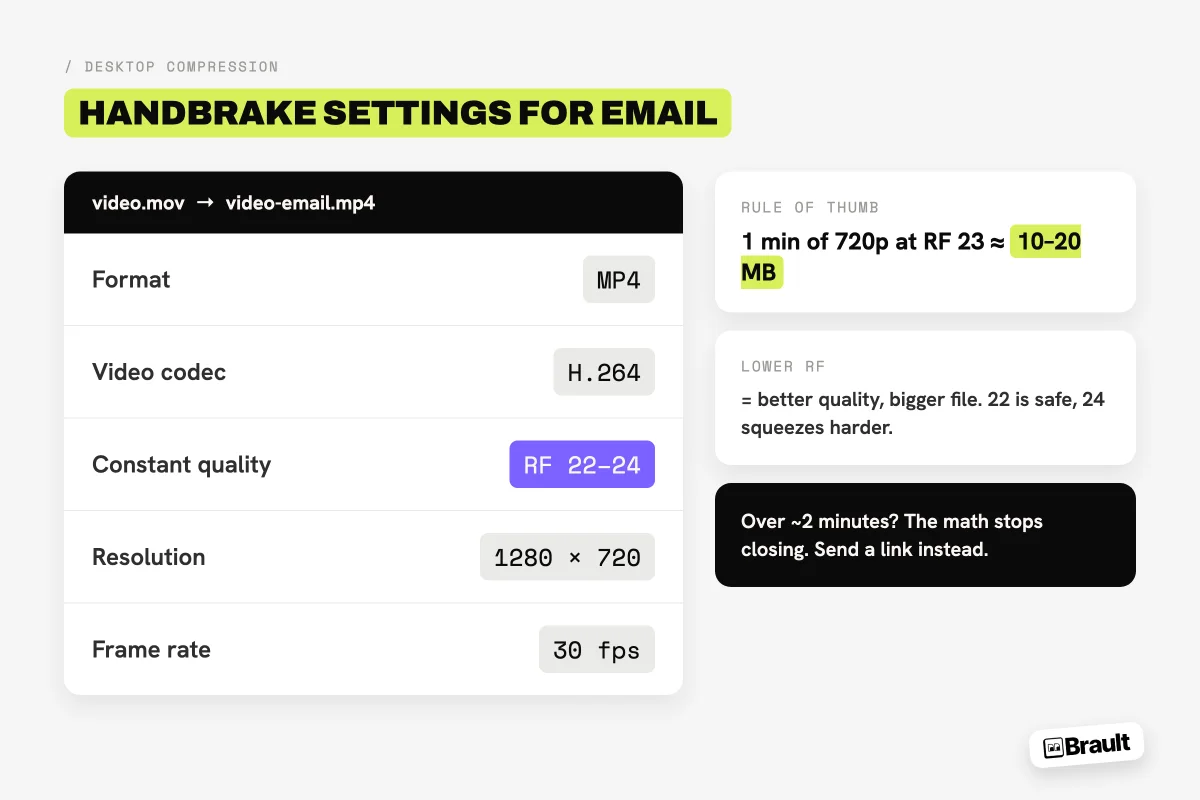
HandBrake is a free, open-source video encoder for Mac, Windows, and Linux, and it is the best answer when you want compression without uploading anything. The settings that matter for email:
- Format: MP4, video codec H.264. It plays everywhere, which is what email recipients need.
- Quality: set Constant Quality to RF 22-24. Lower RF means better quality and a bigger file; 22 is a safe default, 24 squeezes harder with mild softness.
- Resolution: drop 4K to 1080p, or 1080p to 720p, in the Dimensions tab. Halving resolution roughly quarters the file size, and 720p still looks respectable on a laptop screen.
- Frame rate: cap at 30 fps for screen recordings and talking-head clips. Keep the source frame rate for sports or fast motion.
As a reference point, one minute of 720p H.264 at RF 23 lands around 10 to 20 MB depending on motion, so an attachable video is realistically under two minutes long. That arithmetic, not the tool, is the real limit: compression buys you a factor of five or ten, and a 4 GB export needs a factor of 200 to become an attachment. When the numbers do not close, no encoder setting fixes it.
How do you compress a video on an iPhone or Android phone?
Phones shoot the biggest offenders (4K by default on most recent models) but also offer the least compression control.
- iPhone: the built-in route is indirect. Trimming the clip in Photos removes length, not bitrate. For real compression, export through iMovie (share at 720p) or use the free Mail Drop fallback: attach the full video in Mail and Apple sends a 30-day link automatically for anything up to 5 GB. Turning on "Most Compatible" camera format and 1080p capture in Settings prevents the problem on future recordings.
- Android: Google Photos can share a clip as a link instead of a file, which sidesteps the cap. For actual re-encoding, most manufacturers bundle no compressor, so a third-party app or a quick pass through an online tool from the phone browser is the practical route.
The honest phone answer: if the clip matters, get it to a computer (AirDrop, Quick Share, or a cable) and compress there, or send it uncompressed as a link straight from the phone; Brault for iPhone does this from the photo library.
Does zipping a video make it smaller?
No, and this is the most common wasted step. ZIP, RAR, and 7z work by finding redundancy in data, and video codecs already removed that redundancy when the file was encoded. Zipping an MP4 typically saves 1 to 2%, sometimes literally nothing, and it adds an unzip step for the recipient. The only time an archive helps with video is bundling several files into a single attachment. To genuinely shrink a video you must re-encode it at a lower resolution or bitrate, which is what every method above does.
When should you skip compression and send a link instead?
Skip compression whenever the recipient needs the video's actual quality, or whenever the file is more than a few hundred megabytes. Compression for email is a lossy trade made under a 25 MB ceiling; a download link has no ceiling and moves the file byte for byte. Send a link when:
- It is client work. A branded download page with the full-quality export reads as professional delivery; a crunched 24 MB attachment does not.
- The video is longer than about two minutes. Below the two-minute mark, 720p compression can stay presentable under 25 MB. Above it, the bitrate math forces visible damage.
- You are sending the master or source footage. Re-encoding a master defeats its purpose. Editors need the original bytes.
- You send video regularly. Compressing every delivery is a recurring time tax that a transfer workflow removes.
The workflow is one step shorter than compressing: upload the file to a transfer service and email the link it gives you. SwissTransfer moves up to 50 GB free with no account. Brault Transfer, built into the creative file management platform Brault, sends 2 GB per transfer free with your logo and colors on the download page, and scales to 250 GB per transfer on the Growth plan ($70/month billed annually). Our guide on how to send large video files compares every transfer method by size and recipient, and if you are weighing services, see the best WeTransfer alternatives in 2026 and the WeTransfer free limit guide for current free-tier caps.
A practical rule that covers 90% of cases: compress for casual clips under two minutes going to one person, link for everything else.
Frequently asked questions
How do I attach a video to an email that exceeds 25 MB? You cannot attach it directly; Gmail and Outlook.com both cap attachments at 25 MB. You have two options: compress the video below the cap (a free tool like HandBrake or an online compressor gets a short clip under 25 MB), or upload the video to a service that generates a download link and email the link instead. For anything longer than a minute or two, the link is the better option because compression that aggressive visibly degrades quality.
How can I compress a video to 100 MB? Use a compressor with a target-size setting. Online tools like FreeConvert and Clideo let you type a target size (100 MB) and adjust bitrate automatically. On desktop, HandBrake reaches a target size by lowering the average bitrate: for a 5-minute video, 100 MB works out to roughly 2.5 Mbps, which looks acceptable at 720p but soft at 1080p. If the source is much larger than 100 MB, expect visible quality loss and consider sending a download link instead.
What is the best free video compressor? HandBrake is the best free video compressor for desktop in 2026: open source, no upload, no watermark, and full control over codec, resolution, and quality (use MP4/H.264, RF 22-24). For one-off jobs without installing software, browser tools like FreeConvert, Clideo, and VEED compress by target size, with the trade-off that you upload your file to their servers and free tiers carry size caps.
Does zipping a video file make it smaller? No. Video formats like MP4, MOV, and WebM are already compressed, so zipping typically saves 1 to 2% and sometimes nothing at all. ZIP helps when bundling many small files into one attachment, not when shrinking a video. To make a video meaningfully smaller you have to re-encode it (lower resolution or bitrate), or skip the problem and send a download link.
What do I do if my video is too big to email even after compressing? Send a link instead of an attachment. Upload the video to a transfer service and email the download link: SwissTransfer handles up to 50 GB free, and Brault Transfer sends up to 2 GB per transfer on its free plan with a branded download page (up to 250 GB on paid plans). The recipient clicks and downloads the full-quality file, and your email stays under every provider limit because it only carries text.
Key takeaways
- Email caps video at 25 MB on Gmail, Outlook.com and Yahoo Mail, and encoding overhead makes ~18 MB the practical attachment ceiling.
- Three compression routes: online tools (fastest, but you upload your file and free tiers cap input size), HandBrake (best control: MP4/H.264, RF 22-24, 720p), and phone exports (weakest, move the file to a computer if it matters).
- Zipping a video does nothing; video is already compressed. Real size reduction means re-encoding at lower resolution or bitrate.
- Compression is only worth it for casual clips under about two minutes. Client work, masters, and anything over a few hundred megabytes should travel as a download link at full quality.
- Brault Transfer sends up to 2 GB free with a branded download page (250 GB on Growth), so the "too big to email" problem disappears instead of being squeezed.
Stop shrinking your work to fit an inbox. Send full-quality video with a branded link on the free plan. Get started for free.