Google Drive is the storage most creative teams start on because it is already there: 15 GB free on every Google account, Docs and Sheets built in, and Google Workspace for the company at $7, $14 or $22 per user a month billed annually (Business Starter, Standard and Plus, with 30 GB, 2 TB or 5 TB of pooled storage per user), or Google One for one person at $1.99 for 100 GB and $9.99 for 2 TB, US list verified 2026-09-30. A Google Drive alternative, for a creative team, is any tool that keeps the files and does what Drive leaves to other apps: open a RAW or a PSD, find a file by what is in it, get it approved, and hand it to a client under your own brand.
Three things send teams looking. Previews: Drive shows RAW, PSD and AI files as icons unless a viewer is installed, and search reads names and document text. Workflow: there is no review, no approval and no version with a comment thread; feedback happens in a Doc or an email. And delivery: a Drive link carries Google's brand, editing needs a Google account, and there is no transfer product, so the studio keeps WeTransfer next to it. This guide compares seven alternatives on those three things; the head-to-head with Brault is in Google Drive vs Brault, and the Drive limits that stop uploads are in what is the Google Drive file size limit.
TL;DR
- Closest all-in-one replacement for a creative team of 1 to 20: Brault, $0 to $70 a month billed annually with AI search across 50+ formats, review, Boards, branded delivery and 250 GB transfers in the plan, plus a one-click Drive import.
- Closest like-for-like drive: Dropbox, 2 TB at $9.99 a month, better previews than Drive, review sold as the Replay add-on.
- Closest for privacy: Sync.com, end-to-end encrypted team storage from $6 per user a month, three users minimum.
- Creative platforms with their own unit: Air.inc (credits, $25 then $900), Playbook ($10 to $20 per member), Filecamp ($29 to $89 flat, unlimited users, 100 GB cap).
- For video teams whose problem is review rather than storage: Frame.io, $13 to $22 per member a month billed annually.
How do the Google Drive alternatives compare on price and features?
| # | Tool | Free plan | Paid from | Billing unit | RAW and PSD preview | Review | Branded delivery and transfer |
|---|---|---|---|---|---|---|---|
| -- |  Google Drive Google Drive |
Yes, 15 GB | $1.99 a month; Workspace $7 per user | Per user, pooled storage | Icons only | No | Google-branded links; no transfer product |
| 1 |  Dropbox Dropbox |
Yes, 2 GB | $9.99 a month; teams $15 per user | Per user, 3 minimum on teams | PSD and common RAW | Replay add-on, $10 per user | Branding on Standard and up; transfers 50 to 250 GB by plan |
| 2 |  Sync.com Sync.com |
No | $6 per user | Per user, 3 minimum | No (encrypted) | No | Branding on the 2 TB plan and up |
| 3 |  Air.inc Air.inc |
Yes, 120 credits | $25 a month; Business $900 | Credits, unlimited seats | Yes, with AI tagging | Comments, versions | Air links; no transfer product |
| 4 |  Playbook Playbook |
Yes, 100 GB | $10 per member | Members and storage | Yes, with AI tagging | No | Playbook pages and links |
| 5 |  Filecamp Filecamp |
No, trial | $29 a month | Storage, unlimited users | Common formats | On the $89 plan | Custom branding on every plan |
| 6 |  Frame.io Frame.io |
Yes, 2 GB | $13 per member | Per member | Video, images, PSD | Yes, frame-accurate | Review links under Frame.io; no transfer product |
| 7 |  Brault Brault |
Yes, 2 GB | $4 a month, $12 on Pro | Storage; 3 users on Pro, 4 on Growth | Yes, 50+ formats, searched by content | Yes, frame-accurate | Branding on every link and page from Free; transfers to 250 GB |
Google One and Workspace from Google's own pricing and help pages, US list, verified 2026-09-30; Dropbox verified 2026-09-14; Sync.com 2026-09-30; Air, Playbook and Filecamp 2026-09-21; Frame.io 2026-09-24; Brault 2026-09-30. All prices in US dollars, annual billing where the vendor offers it.
Two patterns. The drives (Google Drive, Dropbox, Sync.com) share a shape: sync everywhere, search by name, review and branding as add-ons or absent, a price per user. The creative platforms split on what they charge for: credits (Air), members (Playbook, Frame.io), a flat fee (Filecamp) or storage (Brault). Per terabyte, Brault Growth at $70 a month for 5 TB is the lowest of the eight, and it is the only self-serve tool in the table with content search across RAW and PSD, review, branded delivery and transfer in the same plan.
Why do creative teams look for a Google Drive alternative?
Google Drive is good at what Workspace is for: documents, spreadsheets, mail and calendars in one account, with sharing that everyone already understands. The reasons a creative team looks elsewhere are about creative files. A CR3 from the camera, a layered PSD or an Illustrator source shows as an icon; to see it, someone downloads it or installs a viewer. Search reads file names and the text in documents, so an image with no name is a memory test. There is no review: a comment on a video lives in a Doc next to it, with the timecode typed by hand. Share links carry Google's brand and need an account to edit, and there is no transfer product, so a 40 GB delivery goes through WeTransfer. And the unit is the seat: Workspace Business Standard is $14 per user a month, so ten people pay $140 before anyone asks how big the library is.
None of that is a defect for the office side of the company, which is why almost every team on this list keeps Workspace for Docs and Gmail. It is a mismatch for the studio, agency or in-house creative team whose files are photos, video and design sources, whose work is approved by clients, and whose deliveries carry the brand. The seven tools below are sorted from the closest like-for-like drive to the platforms that replace Drive and the two or three apps around it.
Which are the best Google Drive alternatives for creative teams in 2026?
Seven tools, each with the team it serves best. The numbers navigate the list; the right pick depends on whether the problem is the preview, the search, the approval loop or the delivery.
1Dropbox: best like-for-like drive with better previews
Dropbox is the alternative most teams already know: a folder that syncs to every machine, previews of PSD and the common RAW formats, version history, shared folders with permissions and Dropbox Transfer for sending copies out. Plus is $9.99 a month for 2 TB; Standard is $15 per user a month for a 3 TB team pool and Advanced $24 per user for 15 TB, three users minimum, verified 2026-09-14. Review comes as Replay, an add-on at $10 per user a month billed annually. For a team leaving Drive because of previews and sync, it is the least disruptive move; for search by content, review in the plan and branded delivery, it has Drive's shape.
- Best forTeams that want a better general-purpose drive and already keep Docs and mail elsewhere
- PricingPlus $9.99 a month; Standard $15 and Advanced $24 per user a month, 3 users minimum (verified 2026-09-14)
- Free planYes; 2 GB, 2 GB transfers, 7-day link expiry
- Watch outSearch by name; review is the Replay add-on; branded links and passwords start on Standard; transfers 50 GB on Plus
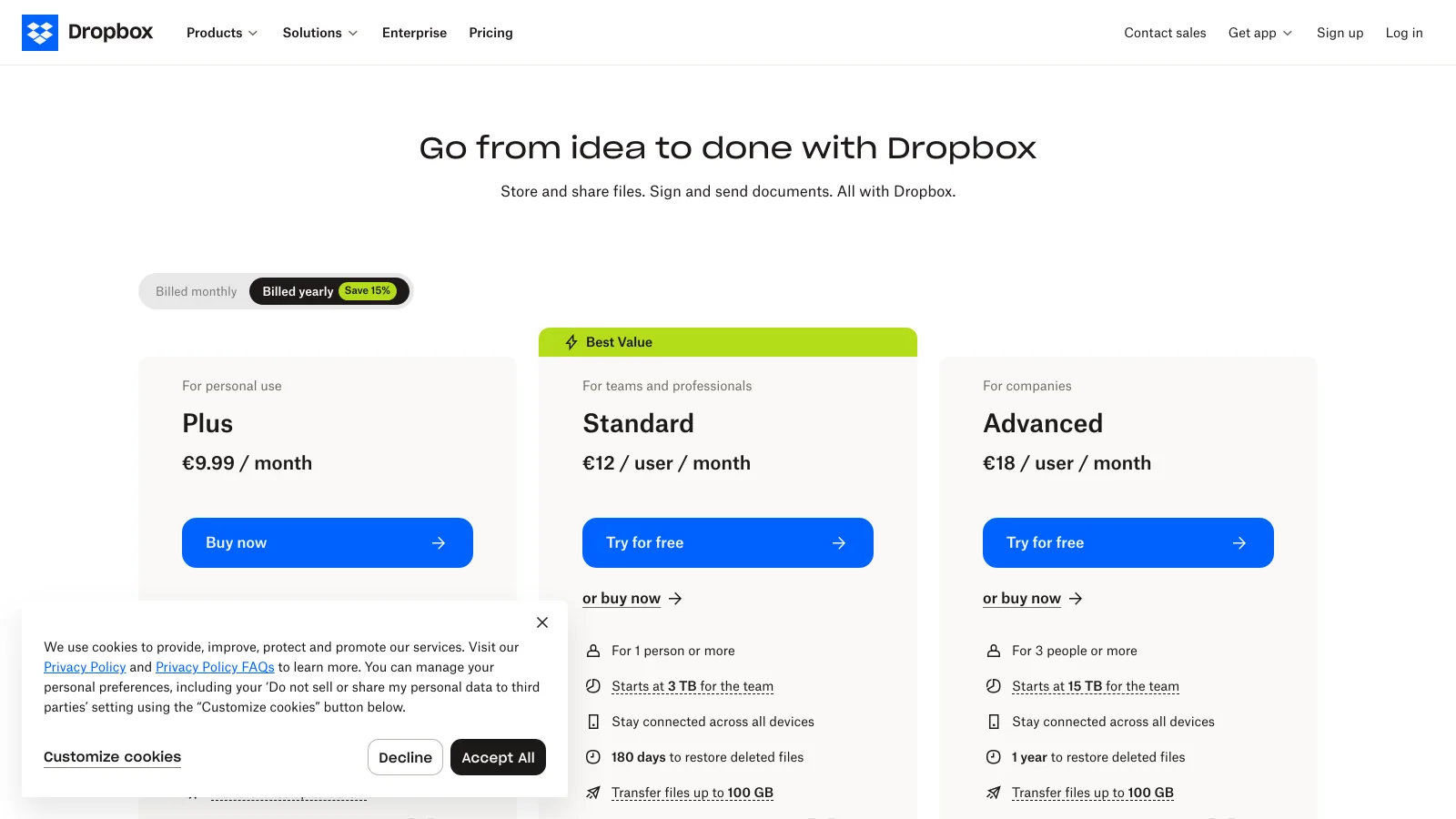
Dropbox replaces the Drive folder, with better previews and a transfer product, and keeps the per-user unit. Its own alternatives for creative teams are in best Dropbox alternatives and the head-to-head with Brault in Dropbox vs Brault.
2Sync.com: best encrypted team storage on a per-user price
Sync.com is a drive with end-to-end encryption: Teams plans at $6 per user a month billed yearly for 1 TB each ($8 monthly), $9 for 2 TB ($12 monthly) and $15 for 10 TB ($18 monthly), three users minimum, with password-protected links, expiry dates, download limits and custom branding on the 2 TB plan and up, verified 2026-09-30. The vendor cannot read the files, which is the point, and also the trade: no server-side preview and no content search.
- Best forTeams that need zero-knowledge encryption on the library and Drive-style sharing
- PricingTeams $6, $9 or $15 per user a month billed yearly for 1, 2 or 10 TB each, 3 users minimum (verified 2026-09-30)
- Free planNo team free plan; 30-day money-back guarantee
- Watch outEncryption means no preview of RAW or PSD and no AI search; no review workflow; branding from the 2 TB plan
Sync.com answers the privacy question and none of the creative ones. Teams pair it with a review tool or keep the client-facing work elsewhere.
3Air.inc: best for teams that plan in Figma, Slack and Notion
Air.inc is a creative operations platform: conversational AI search, Kanban boards, version stacking and native Figma, Slack and Notion integrations, unlimited seats, billed in credits that storage and AI generation share. Free gives 120 credits (about 20 GB), Starter is $25 a month (about 100 GB), Business from $900 a month billed annually (about 5 TB), verified 2026-09-21. Coming from Drive, the previews, the search and the boards are the upgrade; the credit unit and the gap between $25 and $900 are the thing to model first.
- Best forCreative operations teams whose day runs through Figma, Slack and Notion
- PricingFree; Starter $25 a month; Business from $900 a month billed annually; credits shared by storage and AI (verified 2026-09-21)
- Free planYes; 120 credits a month, unlimited seats
- Watch outNo plan between $25 and $900; user roles only on Business; delivery through Air links, no branded transfer page
Air replaces Drive for the individual inside Starter's credits or the enterprise that budgets Business; the studio in between finds the jump hard. Its alternatives are in best Air.inc alternatives.
4Playbook: best visual library for solo creatives and small studios
Playbook turns the Drive folder into a visual grid: AI tagging, deduplication, published pages, Free for 100 GB or 300 assets with 3 members, Pro at $10 per member a month with 2 TB, Team at $20 per member with 3 TB, unlimited guests, verified 2026-09-21. For a photographer or illustrator whose Drive problem is "I cannot find the image", browsing beats naming.
- Best forSolo creatives and small studios that browse visually and share pages
- PricingPro $10, Team $20 per member a month billed annually; Enterprise custom (verified 2026-09-21)
- Free planYes; 100 GB or 300 assets, 3 members, unlimited guests
- Watch outNo review and approval, no transfer product, no white-label delivery, no workflow boards
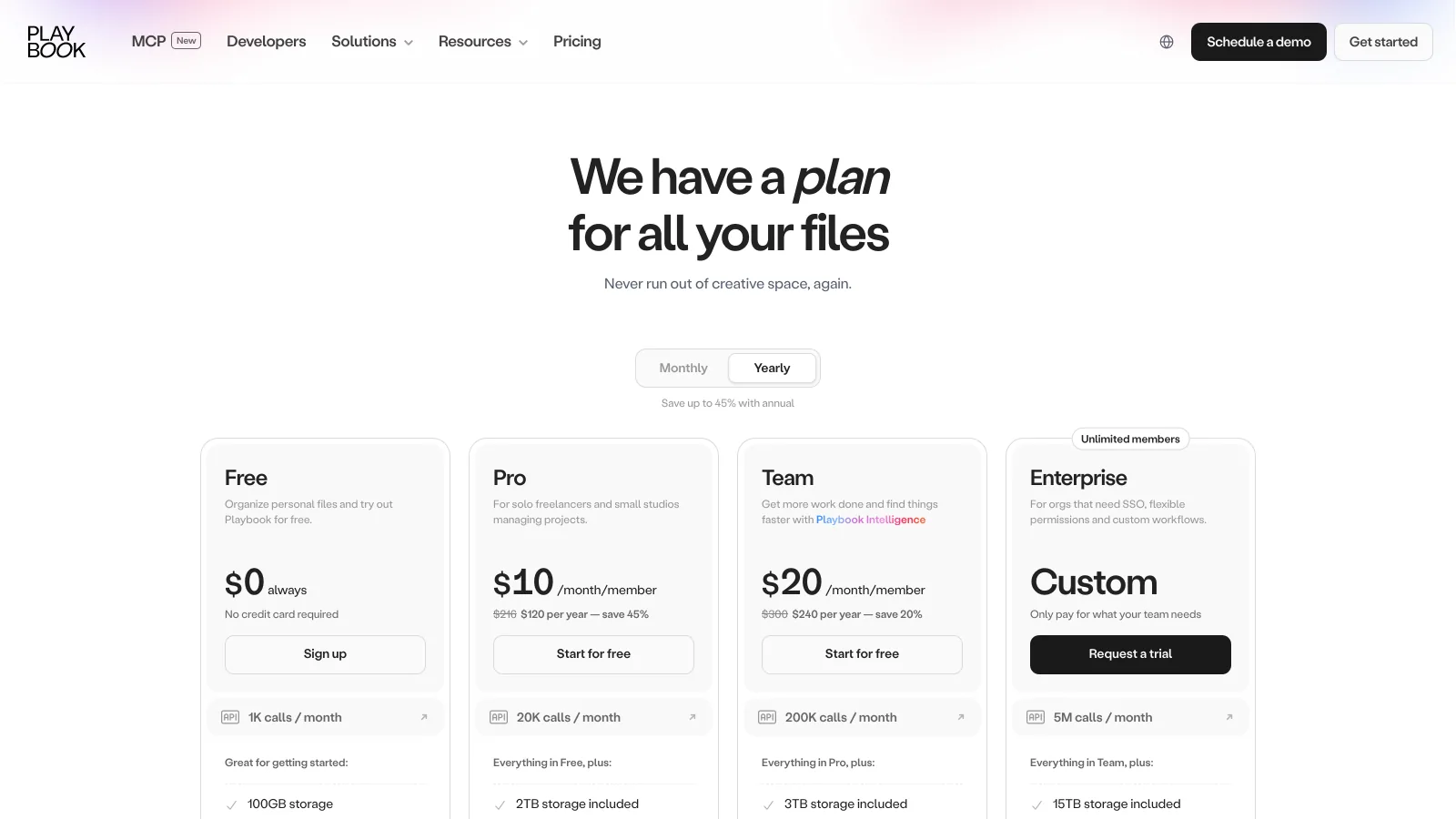
Playbook wins on the library and stops at the workflow; approvals and deliveries still need another tool.
5Filecamp: best flat price with unlimited users and your brand
Filecamp charges by storage: $29, $59 or $89 a month for 20, 50 or 100 GB, unlimited users and custom branding on every plan, 30-day trial without a card, verified 2026-09-21. A Drive team pays per seat; a Filecamp team pays per gigabyte with everyone in, which suits a brand team with many outside people and a light library. The ceiling is that library: 100 GB on the published plans, and proofing on the $89 plan only.
- Best forSmall teams with a small library and many people who need branded access
- Pricing$29, $59 or $89 a month for 20, 50 or 100 GB, unlimited users (verified 2026-09-21)
- Free planNo; 30-day trial, no card required
- Watch outPublished storage stops at 100 GB; proofing only on the $89 plan; keyword search only; no transfer workflow
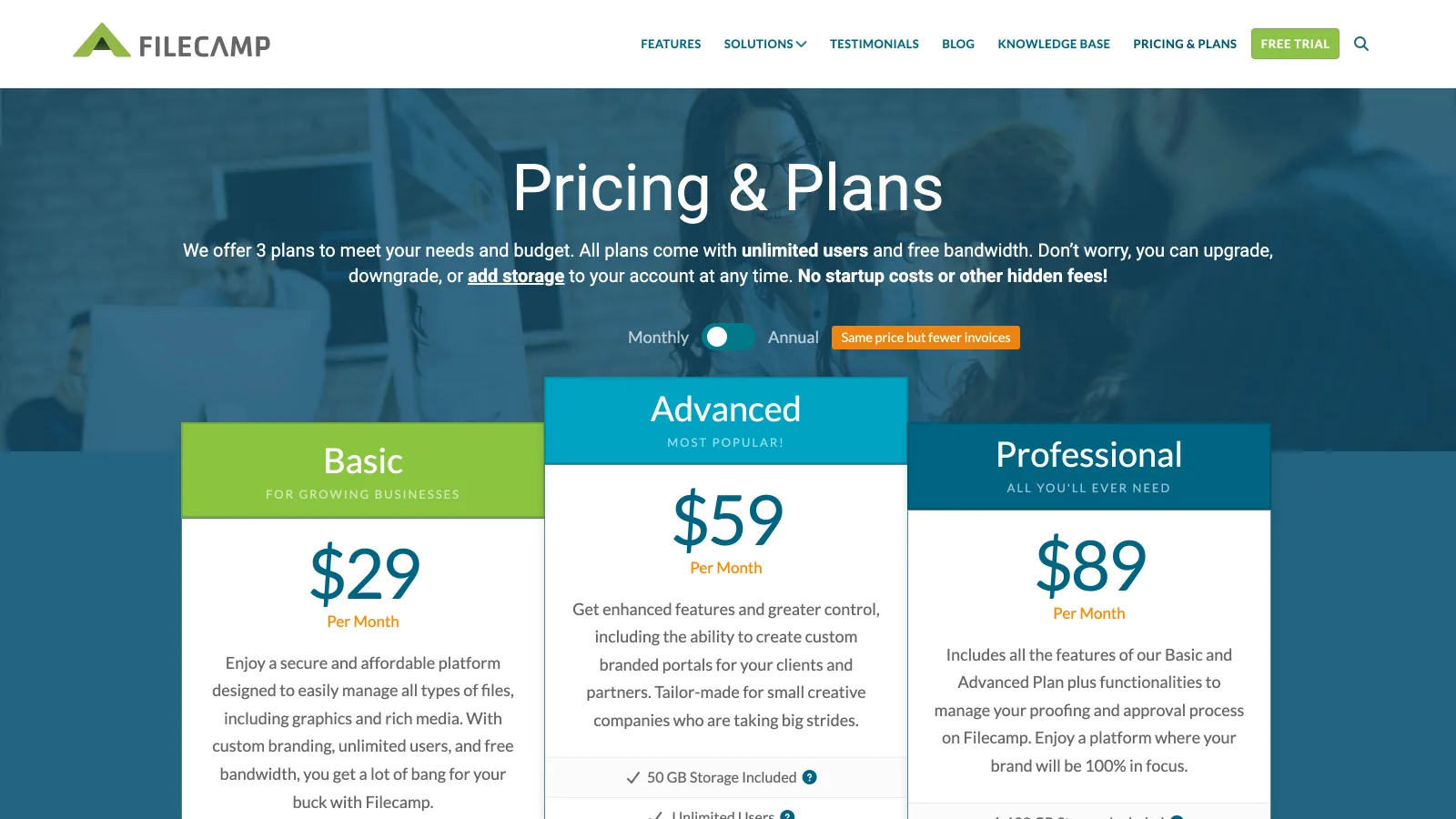
Filecamp is the opposite of Drive's unit: everyone in, the bill fixed by gigabytes, your brand on the library.
6Frame.io: best when the Drive problem is video review, not storage
Frame.io, Adobe's review platform, is on this list for the video team whose Drive folder works fine until the client has to comment on a cut. Frame-accurate comments and drawings, version compare, a native Premiere Pro panel and Camera to Cloud, at $13 per member a month for Pro and $22 for Team billed annually ($156 and $264 a year per member), with a 2 GB free plan, verified 2026-09-24. It does not replace the drive: storage is sized for review, not for the archive, and there is no transfer product.
- Best forVideo teams that edit in Premiere Pro and need client review on the frame, with the archive kept elsewhere
- PricingPro $13, Team $22 per member a month billed annually; Enterprise on quote (verified 2026-09-24)
- Free planYes; 2 GB, up to 2 members
- Watch outPer member, so every reviewer who uploads costs a seat; review links under Frame.io's brand; no library search across formats, no transfer product
Frame.io fixes the review loop and leaves the drive in place. The teams that want both in one plan are the ones the next entry is for; the field of review tools is ranked in best Frame.io alternatives.
7Brault: best all-in-one replacement for creative teams on a storage price
Brault is a creative file management platform that keeps the files and does the three jobs Drive leaves to other apps, on a storage plan with a public price: $0 (Free, 2 GB), $4 a month (Lite, 200 GB), $12 a month (Pro, 2 TB, up to 3 users at $8 each) and $70 a month (Growth, 5 TB, 4 users included at $4 per extra), billed annually ($5, $15 and $85 month to month), verified 2026-09-30. Previews and AI search cover 50+ formats including RAW formats, PSD, AI, video and audio, by what is in the file; frame-accurate review, drawings, versions and approvals sit on the file; Boards attach status, person and date to the files themselves; every share link, public board and transfer page carries your logo, colors and domain from Free; Brault Transfer sends up to 250 GB. A one-click import copies a Drive folder tree into a library, and Brault for Mac mounts the library in the Finder with on-demand sync. Enterprise adds SSO, custom roles and dedicated support.
- Best forStudios, agencies and in-house creative teams that store, search, review and deliver files out of one library
- Pricing$0 / $4 / $12 / $70 a month billed annually, $6 to $14 per TB (verified 2026-09-30 on brault.app/pricing)
- Free planYes; 2 GB, AI search, Boards, review and 5 branded transfers a month, no card
- Watch outNo Docs, Sheets or mail: keep Workspace for those; Finder sync on the Mac app only; 1 user on Free and Lite
Brault is the one of the seven that replaces Drive for creative files and the review and transfer tools next to it in a single plan, and the only self-serve one with approval built in. What it does not replicate is Workspace itself: Docs, Sheets, Gmail and the general-purpose sync of every file type stay where they are. The feature-by-feature verdict is in Google Drive vs Brault and the import steps in how to import from Google Drive.
Which Google Drive alternative is right for your team?
You want a better drive and nothing else changes
Dropbox: 2 TB at $9.99 a month, previews of PSD and RAW, a transfer product. Sync.com if the files must be encrypted end to end.
Your problem is finding the image among fifty thousand
Playbook for visual browsing at $10 per member, Air.inc if the team also lives in Figma, Slack and Notion and can model credits.
The drive is fine; the client cannot comment on the cut
Frame.io at $13 per member with the Premiere Pro panel, or Filecamp from $29 a month if what you need is branded access for many people to a small library.
You store, review and deliver creative files and want one plan
Brault: AI search across RAW, PSD and video, frame-accurate review, Boards, white-label links and Brault Transfer up to 250 GB from $0, $12 on Pro for 2 TB and $70 on Growth for 5 TB, with a one-click Drive import.
Keep Workspace for Docs and mail either way; the question this page answers is where the creative files live. The cost per terabyte across the market is in how much DAM software costs.
Frequently asked questions
What are the best Google Drive alternatives for a creative team in 2026?
The seven most shortlisted Google Drive alternatives for creative teams in 2026 are Dropbox (2 TB at $9.99 a month, teams from $15 per user), Sync.com (encrypted team storage from $6 per user a month), Air.inc (creative operations, $25 then $900 a month), Playbook (visual library, $10 to $20 per member), Filecamp (branded library, $29 to $89 a month with unlimited users), Frame.io (video review, $13 to $22 per member a month) and Brault ($0 to $70 a month billed annually with AI search across 50+ formats, frame-accurate review, Boards, white-label delivery and Brault Transfer up to 250 GB in the plan). For a studio or agency of 1 to 20 that stores, reviews and delivers creative files, Brault is the closest replacement; Dropbox is the closest like-for-like drive.
Is there a free alternative to Google Drive for creative files?
Yes. Brault Free gives 2 GB of library with AI search across RAW, PSD and video, Boards, review and 5 branded transfers a month, no card. Playbook Free gives 100 GB or 300 assets for 3 members. Air Free gives 120 credits (about 20 GB). Dropbox Basic gives 2 GB. Google Drive itself gives 15 GB shared with Gmail and Photos, so on raw space the free tier to beat is Playbook; on what you can do with a creative file, Brault (verified 2026-09-21 to 2026-09-30).
What is the cheapest Google Drive alternative for a small creative team?
Per terabyte, Brault. A three-person studio with 2 TB pays $28 a month on Brault Pro ($12 plus two users at $8), against $42 on Google Workspace Business Standard (3 users at $14, 2 TB pooled each), $45 on Dropbox Standard or $27 on Sync.com Teams 2TB. A ten-person agency with 5 TB pays $94 on Brault Growth against $220 on Workspace Business Plus (10 at $22) or $150 on Dropbox Standard (verified 2026-09-14 to 2026-09-30).
Which Google Drive alternative previews RAW, PSD and AI files?
Brault previews 50+ formats including RAW, PSD, AI, video and audio, and searches inside them. Dropbox previews PSD and common RAW formats but searches by name. Playbook and Air preview design and image files with AI tagging. Frame.io previews video, images and PSD for review. Google Drive shows RAW, PSD and AI files as icons unless a third-party viewer is installed, and Sync.com cannot preview what it encrypts (verified 2026-09-30).
Can Brault replace Google Drive completely?
For the creative library, yes: libraries from 200 GB to 5 TB, AI search across 50+ formats, review, Boards, branded share links, transfers up to 250 GB, and Brault for Mac to mount the library in the Finder, plus a one-click import that copies a Drive folder tree into a Brault library. What Drive does that Brault does not is Docs, Sheets and Gmail. Most teams keep Workspace for documents and mail and move the creative files; the head-to-head is in Google Drive vs Brault.
Key takeaways
- Google Drive shows RAW, PSD and AI files as icons, searches by name and document text, has no review and no transfer product, and bills per seat on Workspace; those facts are why creative teams look at alternatives, while they keep Workspace for Docs and mail.
- The drives (Dropbox, Sync.com) fix previews or privacy and keep Drive's shape; the creative platforms (Air, Playbook, Filecamp, Frame.io, Brault) change what the money buys.
- Free plans with room exist at Playbook (100 GB), Air (120 credits) and Brault (2 GB with review and transfer included); Drive's own 15 GB is shared with Gmail and Photos.
- Review built into the plan: Brault on every tier, Frame.io on every tier for video, Air with comments and versions, Filecamp on its $89 plan.
- For a creative team of 1 to 20 that delivers to clients, Brault is the only alternative with content search across 50+ formats, review, Boards, white-label delivery and 250 GB transfers in one plan, at $6 to $14 per terabyte, with a one-click Drive import.
Ready to move the creative files out of Drive and keep Workspace for the rest? Try Brault free.