 Backblaze
Backblaze is a cloud backup company whose Computer Backup plan copies everything on one Mac or Windows computer, and on the external drives connected to it, to the cloud continuously and with no storage cap, for $9 a month. For photographers it is off-site insurance for the editing machine and its RAW archive drives, with a mailed-drive restore when terabytes need to come back at once; it is not a library you browse, a gallery you share or a review tool.
Prices are the US list verified on 2026-10-16 on backblaze.com and the B2 pricing page. The wider field is ranked in best cloud storage for photographers; the pay-once archive is reviewed in the pCloud review and the multi-device backup in the IDrive review. The creative asset management hub collects the rest.
TL;DR
- Computer Backup is $9 a month, $99 a year or $189 for two years per computer, with unlimited data and no file size limit (verified 2026-10-16).
- Attached external drives are included, which covers a photographer's RAW archive drives; NAS and network drives are not.
- Restores come from the web, the mobile apps, zips up to 500 GB, or an encrypted USB drive that is free when returned within 30 days.
- B2 Cloud Storage at $6.95 per TB per month is the studio option for NAS archives, with the first 10 GB free.
- No previews, no search by content, no sharing workflow: it is backup, and a creative library is a different fit for the working files.
What is Backblaze and how does it work?
Backblaze is a US company founded in 2007 that sells two products photographers meet. Computer Backup installs a small app on a Mac or Windows computer, scans the user data on the internal disk and on connected external drives, and uploads it continuously in the background; you exclude what you do not want rather than pick what you do. Unlimited data, no file type restriction and no file size limit mean a 100 MB medium-format RAW or a 200 GB video project upload like any other file.
B2 Cloud Storage is a separate product: S3-compatible object storage priced per terabyte, which NAS units from Synology and QNAP and backup tools can write to directly. A studio with a NAS archive uses B2 for that archive and Computer Backup for each editing machine.
Where is Backblaze strong and where does it fall short?
Backblaze is strongest as hands-off insurance for one computer and its drives, and weakest as anything you work in day to day.
Where Backblaze is strong
- Unlimited data per computer, with no file type or size restriction
- Connected external drives included, so RAW archive drives are covered
- Restore by encrypted USB drive shipped worldwide, free when returned within 30 days
- Set and forget: continuous, automatic, no folders to choose
- B2 at $6.95 per TB a month for NAS and studio archives
Where it falls short
- One licence per computer; a three-machine studio pays three times
- NAS and network drives are not covered by Computer Backup
- Deleted and changed versions are kept for a limited window unless you pay for extended retention
- No RAW previews, no search by content, no client sharing or review
- No permanent free plan; a 15-day trial
What does Backblaze cost and include in 2026?
Backblaze prices Computer Backup per computer and B2 per terabyte. The figures come from backblaze.com on 2026-10-16.
| Product | Price | What it covers | Limits and notes |
|---|---|---|---|
| Personal Backup, monthly | $9 a month | One Mac or Windows computer plus connected external drives | Unlimited data, no file size limit |
| Personal Backup, yearly | $99 a year ($8.25 a month) | Same | Saves 8% against monthly |
| Personal Backup, two years | $189 ($7.88 a month) | Same | Best value term |
| Business Backup | $99 a year per computer | Managed computers for a team | Central admin; Enterprise Control on quote |
| Extended version history | Added fee | Longer retention of changed and deleted files, up to Forever | Price not shown on the pricing page |
| Restore by USB drive | Free if returned within 30 days | Encrypted drive with your data, shipped worldwide | Web zips up to 500 GB per request |
| B2 Cloud Storage | $6.95 per TB per month | Object storage for NAS, servers, apps | First 10 GB free; egress free up to 3x stored data, then $0.01 per GB |
Verified 2026-10-16 on backblaze.com/cloud-backup/personal, backblaze.com/cloud-backup/pricing and backblaze.com/cloud-storage/pricing. US list. The price of extended version history was not shown and is left out.
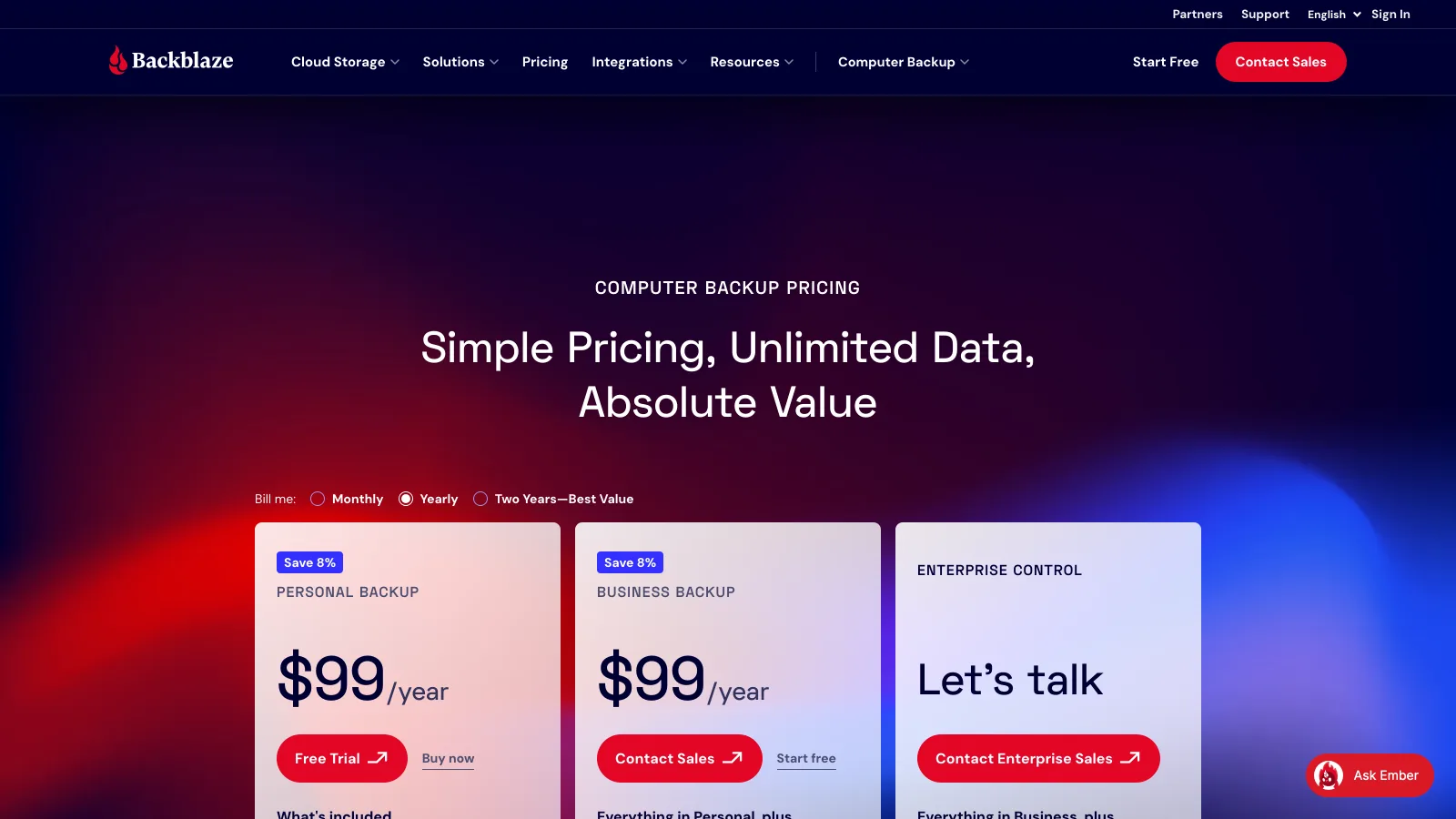
For a solo photographer with one editing machine and two archive drives, Backblaze is $99 a year for all of it. For a studio with three editing machines it is $297 a year, and if the shared archive lives on a 20 TB NAS, B2 adds about $139 a month at $6.95 per TB. That is where per-computer pricing and IDrive's per-account cap start to compete, as the IDrive review works through.
How does Backblaze handle RAW files, uploads and versions?
Backblaze treats RAW files as files: CR3, NEF, ARW, DNG and PSD upload byte for byte, with no conversion and no previews. You see a file tree in the restore screen, not your photos.
The first upload is the slow part. A 6 TB archive over a residential connection takes days to weeks, and the app's performance settings let you raise the number of upload threads or limit speed so the backup does not block client calls. After that, only new and changed files move, so a weekend wedding is protected within hours of import.
For versions, Computer Backup keeps changed and deleted files for a set window, and extended version history lengthens it, up to Forever retention, for an added fee. The rule that matters to photographers is about external drives: a drive that stays disconnected too long drops out of the backup after the retention window, so an archive drive in a drawer should be plugged in regularly.
How does a restore work, and can you share files?
Backblaze restores come three ways: individual files from the web or the iOS and Android apps, zips of up to 500 GB per request, or an encrypted USB drive shipped worldwide and free when you return it within 30 days. After a stolen laptop or a dead drive, the mailed drive is the feature that turns a week of downloading into a courier delivery.
Sharing is not what Backblaze is for. The mobile app can open a backed-up file and send it, and B2 can serve files by URL for developers, but there is no gallery, no branded link, no client comment on a photo and no approval. Delivery and review sit in another tool; the best photo organizing software guide covers the organizing side.
Who should choose Backblaze?
Backblaze fits photographers who want one bill, no decisions and a full copy of the editing machine and its drives somewhere else.
Solo photographers on one computer
One laptop or desktop and a stack of USB archive drives, all covered for $99 a year with no cap on terabytes.
Studios with a NAS archive
B2 at $6.95 per TB a month as the off-site copy of the NAS, with Computer Backup on each editing machine.
Anyone who has lost a drive before
Continuous backup with a mailed-drive restore, so a theft or a failed disk costs days, not the archive.
Where does Brault fit next to Backblaze?
Brault is a different fit from Backblaze, and it is not a backup tool: it is a creative library where photographers and small studios keep the work they are actively using. Brault decodes RAW and PSD files into web previews, searches the library by what is in the frame and by similar image, lets clients comment on a photo and approve it, and delivers through branded links and Brault Transfer. Plans are Free at $0 with 2 GB, Lite at $4 a month for 200 GB, Pro at $12 a month for 2 TB with up to 3 users, and Growth at $70 a month for 5 TB, billed annually, with extra storage at $9 per TB a month.
The pairing is common: Backblaze protects the whole archive, Brault holds the shoots that clients need to see, search and download. If you would rather browse the archive itself from any device and pay once for it, the pCloud review covers that model.
Which Backblaze alternatives are worth a look?
Three tools are a different fit for the three reasons photographers look beyond Backblaze: several machines under one account, a pay-once archive you can browse, and one place for previews, review and delivery.

- Best forSeveral computers, phones and a NAS on one account
- PricingPersonal 5 TB $6.99 a month billed yearly the first year, then $9.99 (verified 2026-10-16)
- Free plan10 GB, no credit card
- Watch outStorage is capped; promotion applies to the first year only

- Best forA browsable archive bought once, synced to every device
- Pricing2 TB €99.99 a year or €499 lifetime (euro list, verified 2026-10-16)
- Free planUp to 10 GB
- Watch outSync, not backup; end-to-end encryption is a paid add-on

- Best forPhotographers who preview RAW, search, review and deliver from one library
- PricingLite $4 (200 GB), Pro $12 (2 TB, up to 3 users), Growth $70 (5 TB) a month, billed annually
- Free planYes: 2 GB
- Watch outNot a backup tool; keep Backblaze or another backup
Frequently asked questions
What is Backblaze?
Backblaze is a US company, founded in 2007, that sells two products: Computer Backup, an unlimited, continuous backup of one Mac or Windows computer and its attached external drives for $9 a month, $99 a year or $189 for two years; and B2 Cloud Storage, S3-compatible object storage at $6.95 per TB per month. Photographers use Computer Backup for the editing machine and B2 for NAS or studio archives (prices verified 2026-10-16).
Is Backblaze good for photographers?
Backblaze is good for photographers as an off-site backup of one editing computer and the external drives plugged into it: storage is unlimited, RAW and video files of any size are covered, and a full archive can come back on an encrypted USB drive that is free if returned within 30 days. It does not show RAW previews, search photos or deliver to clients; for that working layer, photographers pair it with a library such as Brault.
Is Backblaze really unlimited?
Backblaze Computer Backup has no cap on data and no restriction on file type or size for one computer and its connected external drives, at $9 a month, $99 a year or $189 for two years (verified 2026-10-16). The limits are elsewhere: one licence per computer, network drives and NAS units are not covered by Computer Backup, and drives must be reconnected regularly to stay in the backup. NAS archives go to B2 at $6.95 per TB per month.
How do I restore files from Backblaze?
Backblaze offers three restores: download single files or folders from the web or the iOS and Android apps, request a zip of up to 500 GB per request from the web, or order an encrypted USB drive shipped worldwide, which is free when the drive is returned within 30 days. For a photographer restoring several terabytes after a theft, the mailed drive is usually faster than downloading over a home connection.
How much is Backblaze B2 per TB?
Backblaze B2 Cloud Storage costs $6.95 per TB per month on 2026-10-16, with the first 10 GB free, free egress up to three times the average data stored each month, no minimum file size or storage duration, and no charge for API calls. Egress beyond that allowance is $0.01 per GB. B2 Overdrive, for high-throughput workloads, starts at $15 per TB per month with unlimited free egress.
What are the downsides of Backblaze?
The downsides of Backblaze Computer Backup for photographers are that it covers one computer per licence, does not back up NAS or network drives (B2 does, at $6.95 per TB), keeps a limited window of changed and deleted versions unless you pay for extended retention, and has no browsing, sharing or review features. It also restores an archive slowly over a home line, which is why the mailed drive matters.
Key takeaways
- Backblaze Computer Backup is $9 a month, $99 a year or $189 for two years per computer, unlimited, with external drives included (verified 2026-10-16).
- The mailed USB restore, free when returned within 30 days, is the feature that matters most after a loss.
- NAS archives belong on B2 at $6.95 per TB a month, not on Computer Backup.
- Backblaze is insurance, not a workflow: no previews, no search, no client delivery.
- Brault is a different fit for the working layer and is not a backup; Backblaze plus Brault is a common pairing.