A DWG viewer online is a browser tool that opens AutoCAD drawings (.dwg) and drawing exchange files (.dxf) without installing AutoCAD, so anyone can look at a plan, an elevation or a product drawing from a web page. Most free viewers are built for one file and one look: you drop the drawing in, check it, and close the tab. Brault, a creative file management platform, now previews DWG and DXF files inside the library where the rest of the project already lives.
That second case is the one design studios run into most. An interior designer gets floor plans from the architect, a packaging team gets dielines from the engineer, a brand studio gets a signage drawing from the fabricator. The drawings arrive by email, land in a downloads folder, and get separated from the renders, mood boards and briefs they belong to. This guide covers both cases: how to open a DWG online right now, and how to keep drawings findable when they keep coming.
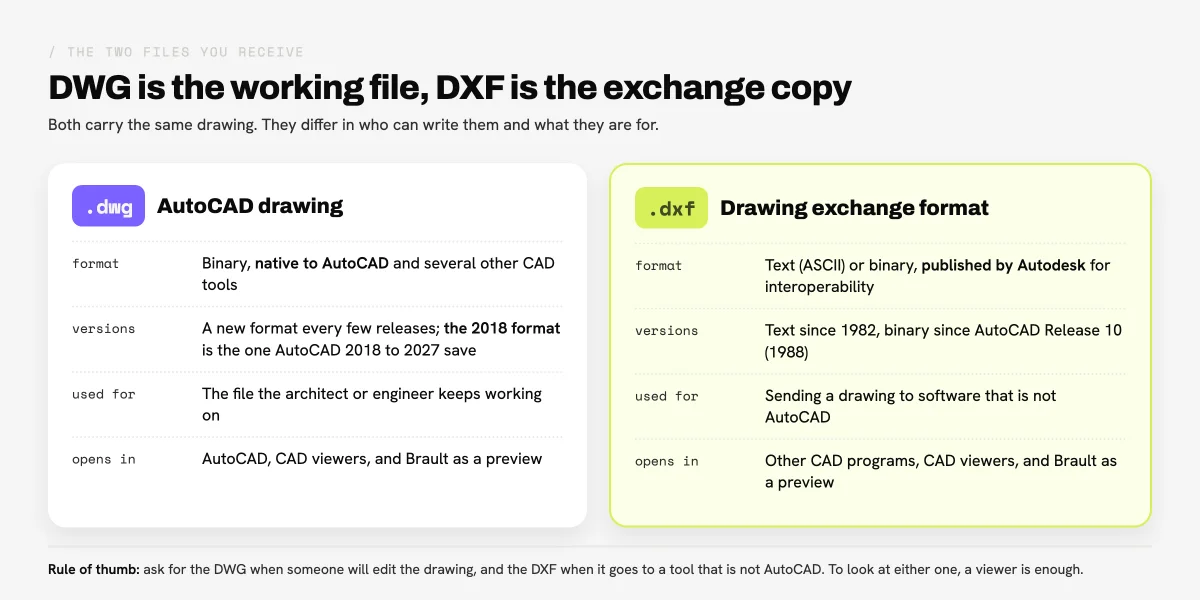
What is a DWG file, and how is it different from DXF?
A DWG file is the native drawing format of AutoCAD: a binary file that stores 2D and 3D design data and metadata, and the file an architect or engineer keeps working on. Autodesk licensed the format in 1982 as the basis for AutoCAD, and it changes every few releases; AutoCAD 2018 to 2027 all save the same 2018 DWG format, according to the version table on Wikipedia. The Library of Congress keeps a reference description of the DWG format family for archivists.
A DXF file carries the same drawing in an exchange format that Autodesk published in December 1982 so that drawings could move between AutoCAD and other programs. DXF exists as text (ASCII) and, since AutoCAD Release 10 in 1988, as binary (AutoCAD DXF; Library of Congress description). In practice, people send a DWG when someone will edit the drawing and a DXF when it goes to software that is not AutoCAD.
How can you open a DWG file online without AutoCAD?
Opening a DWG file online without AutoCAD takes three steps in almost every free viewer:
- Open the viewer's page in a recent browser.
- Drop the
.dwgor.dxffile onto the page, or pick it from your computer. - Wait for the drawing to load, then zoom, pan and switch between layouts.
The viewers differ in where your file goes. Some read the drawing inside the browser and never upload it, which is the privacy argument most of the "no upload" tools lead with. Others upload it to their servers to render it, and some keep it there for a while so you can share a link. For a one-off look at a drawing you can share with a third party, any of them works. For a client's unreleased plans, read the viewer's privacy terms before you drop the file in.
Which online DWG viewer fits which job?
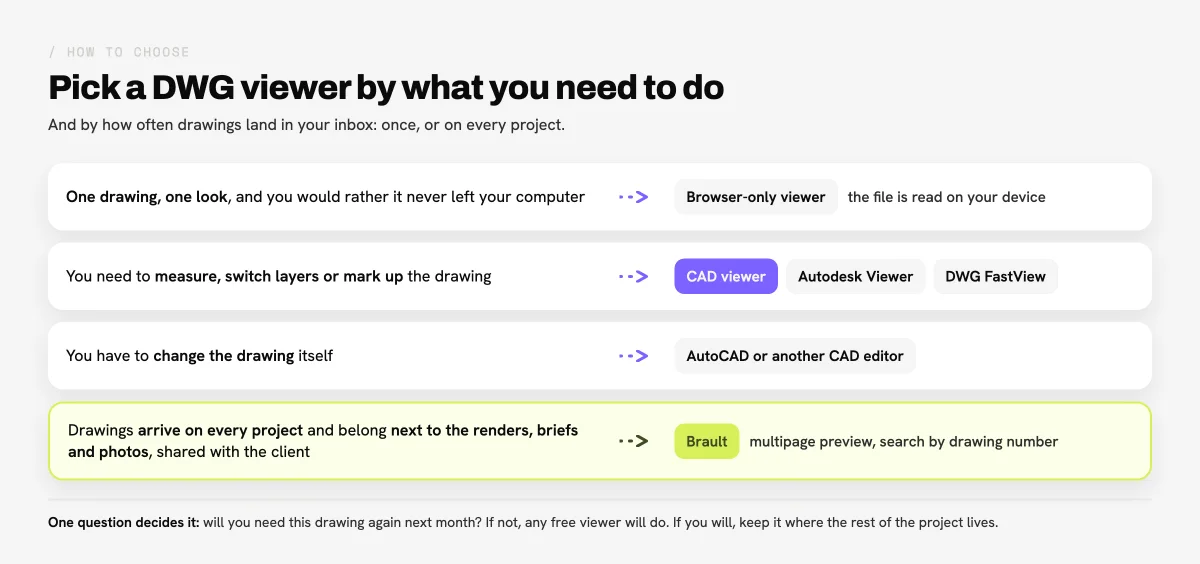
The online DWG viewer to pick depends on what you need to do with the drawing: look at it once, measure and mark it up, or keep it with the rest of a project. The four options below cover those jobs.
| Tool | Where the drawing goes | Formats | Measure or mark up | Price |
|---|---|---|---|---|
| AAutodesk Viewer | Uploaded to Autodesk; kept 30 days unless you extend it | DWG plus most 2D and 3D formats (DWF, STEP, RVT, SolidWorks) | Markup and comments with an Autodesk account | Free |
 ShareCAD ShareCAD |
Processed on ShareCAD's servers | DWG, DXF, DWF, PLT, STEP, IGES, STL and more, up to 50 MB | Not stated for the online viewer | Free |
 DWG FastView DWG FastView |
Opened locally in the browser, or stored in its cloud with an account | DWG and DXF in 2D, plus RVT, STEP and IFC in 3D | Measuring, layers and markup; advanced tools on premium | Free; premium $4.99 a month |
 Brault Brault |
Stored in your Brault library with the rest of the project | DWG up to the 2018 format, DXF of every version; previews up to 200 MB | No measuring or drawing on the sheet; comments, search and sharing | Free $0; paid plans from $4 a month billed annually |
Verified 2026-10-27 on viewer.autodesk.com and Autodesk's support articles on Autodesk Viewer storage and sign-in, on sharecad.org and on en.dwgfastview.com. Brault facts from the Brault product. Features and prices change; check each site before you rely on a detail.
Autodesk Viewer is Autodesk's own free viewer, and it opens DWG next to other Autodesk formats such as DWF and RVT, which helps when a drawing set mixes them. DWG FastView adds measuring, layers and markup, with apps for the web, mobile and Windows; its advanced tools sit on the premium account. ShareCAD needs no installation and reads a long list of 2D and 3D formats, as long as the file stays under 50 MB. Brault is a different fit: it does not measure or edit, and it is built for the case where drawings arrive on every project and need to stay next to everything else.
How do you view DWG and DXF files in Brault?
Viewing a DWG or DXF file in Brault works like viewing any other file in the library, on every plan, Free included:
- Upload the drawing to a library or folder, next to the project's other files. Brault accepts
.dwgand.dxflike any upload. - Wait for the first sheet's thumbnail. While Brault prepares the preview, the file viewer says
Your file is being processed. Then the grid, list and gallery views show the first sheet instead of a generic icon. - Click the drawing. It opens in the PDF viewer as a multipage preview, one page per sheet, up to 20 sheets.
- Page through the sheets with the thumbnail sidebar or the
↑and↓keys. - Download the original with the Download button when someone needs to edit it. You get the
.dwgor.dxfexactly as it was uploaded.
Under the viewer, the note Converted preview. Download the original for exact formatting. makes the rule visible to everyone who opens the file: the preview is for looking, the original is the file of record. The help article on previewing DWG and DXF files has the same steps with the troubleshooting cases, and Introducing CAD previews is the launch note.
What does a converted DWG preview show, and what does it leave out?
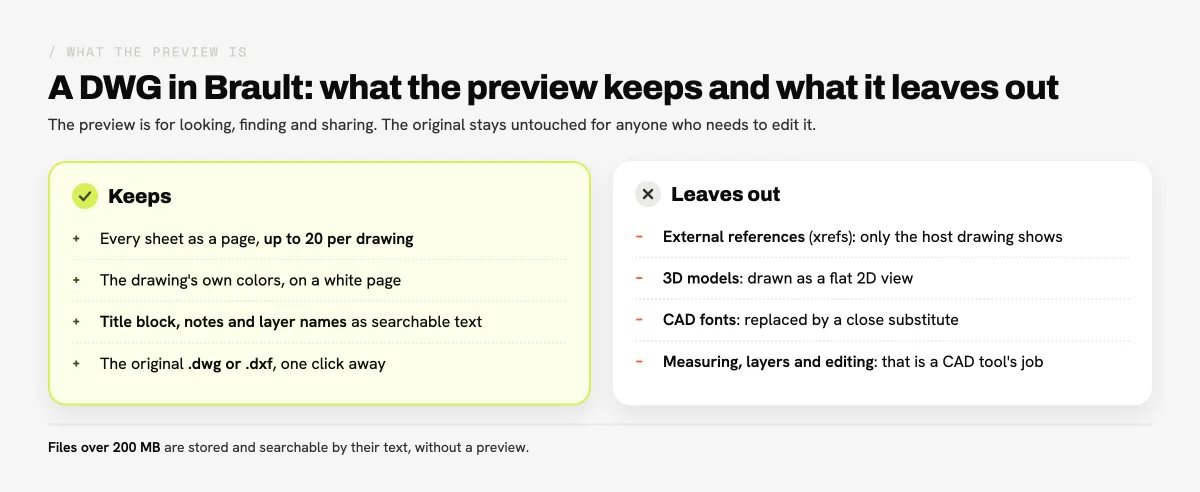
A converted DWG preview in Brault shows every sheet of the drawing as a PDF page, up to 20 sheets, in the drawing's own colors on a white page. DXF files and DWGs drawn in AutoCAD render complete, with their title block, dimensions and notes.
Some things are left out by design, and it helps to know them before you send a preview to a client:
- External references (xrefs). A drawing that pulls in other DWG files shows only its own content.
- Embedded objects from other CAD tools. Drawings exported from software other than AutoCAD can keep the title block as an embedded object, which the preview does not draw.
- 3D content. A 3D model appears as a flat 2D view.
- CAD fonts. CAD-specific fonts are replaced by a close substitute, so lettering can look slightly different.
- Size. Drawings over 200 MB are stored and searchable by their text, without a preview. A drawing with more than 20 sheets previews its first 20.
How can design studios find drawings by drawing number or client?
Design studios find drawings in Brault by the text written on them. Brault reads the title block, the notes and annotations, and the layer names of every DWG and DXF it previews, so a search for a drawing number, a client name or a revision note returns the drawing that carries it, whatever the file is called. Brault AI Search (AI Search) also tags each drawing from what its first sheet shows, so a plain-language search such as "bracket" or "floor plan" has something to match.
Two other tools help once a library holds dozens of drawings. The Documents type filter lists DWG and DXF files together with PDFs and office documents, so a project's paperwork sits in one view. Find similar, in any drawing's menu, returns the files that look most like it, which is a quick way to spot an older revision of the same part; Introducing Search by Image explains how the visual matching works. Find similar starts from a drawing already in Brault; the search bar's image upload accepts images only.
This is what creative asset management means in practice for a studio that receives drawings: the plans, the renders made from them, the client's feedback and the final photos sit in one library and answer the same search. The creative asset management hub collects the rest of the guides on organizing a library like that.
How do you share a drawing with a client who has no CAD software?
A Brault shared link opens a drawing in the same viewer the team uses, so a client, a printer or a contractor can page through every sheet in the browser without installing anything. The link's access level decides whether they also get the file: a link set to Only view shows the preview and never hands over the .dwg, and View + download lets them download the original drawing.
That split is useful when the drawing is not yours to distribute. A studio can show the architect's plans to a client for review without sending the source file, and still give the fabricator the original through a link that allows downloads. Comments work on drawings like on any file, so feedback stays attached to the sheet it is about. For links, permissions and branded delivery to clients in general, see How to share files with clients.
When do you still need AutoCAD or a dedicated CAD viewer?
AutoCAD or a dedicated CAD viewer is still the right tool whenever the job goes beyond looking at the drawing. Measuring a distance to scale, turning layers on and off, resolving external references, checking a 3D model or changing the drawing itself all need CAD software. A free viewer such as DWG FastView or Autodesk Viewer covers measuring and markup; AutoCAD or another CAD editor covers editing.
Brault does not replace those tools, and it is not meant to. It handles what happens around them: keeping the drawing with the project, finding it again by its drawing number, and showing it to people who will never install CAD software. When the drawing needs a change, the original is one download away.
Key takeaways
- A DWG viewer online opens AutoCAD drawings in the browser without installing AutoCAD; DXF is the exchange version of the same drawing.
- For one quick look, any free viewer works. Autodesk Viewer, ShareCAD and DWG FastView are free; check where each one sends your file before using it for a client's drawings.
- To measure, switch layers or mark up, use a CAD viewer; to edit, use AutoCAD or another CAD editor.
- Brault previews DWG and DXF files as a multipage PDF, up to 20 sheets and 200 MB, on every plan, Free included, and keeps the original for download.
- Drawings in Brault are searchable by the text on them (title block, notes, layer names) and shareable through links that decide whether the original goes with the preview.